



What if you and your friends were the ones controlling the map, the rules, and the raid nights – no more random public servers to take your chances with?
Escalating their control over the gaming environment is a common path many dedicated Rust players and small communities of gamers eventually follow. Frequently, this longing leads to actions such as setting one’s own map wipes, choosing certain mods or plugins, and creating custom rules not only to have fun but also to ensure a stable and friendly environment. In fact, there is no other way than to have your own Rust dedicated server to fully accomplish this control.
Hosting your own server means you determine the important aspects like the hardware specification, the uptime that is free of failures, the support quality, and the network side giving the best low-latency connection to your group located in the U.S. However, in order to make the right decisions, you need to know which features and hardware have the biggest impact on gameplay.
Our guide will explain to you what hardware and managed hosting features are the most important, how to find a provider, typical costs, the basic setup steps, and how UltaHost makes it easy and trustworthy for you to manage and grow your community server.
Key Takeaways
- The hardware minimum requirements and achieving the small to medium Rust server (20-50 players) hosting specs will become clear to you.
- You will grasp and be able to explain the most important distinctions between self-hosting and renting a managed game-server host.
- You will have the ability to evaluate competitive pricing and core features from various providers to make a monitoring decision.
- The steps involved in getting your Rust server online in a quick and straightforward manner will be familiar to you.
- UltaHost’s Game Server Hosting service meets these community needs and solves the whole process, as you’ll discover.
“To run your own Rust server is to change from being a passive player to a leader of the community – why not choose a host that takes care of the tech while you concentrate on game nights?” – UltaHost Game Hosting Expert.
Why Host Your Own Rust Server?
To a devoted player of the kind, and among small communities which are intimate and close in the U.S., the advantages of running your own server are almost instant and permanent, and the drawbacks of random public servers are simply not comparable to them.
Motivations and Benefits
- Complete Control Over Your Environment: The privilege of hosting allows you to have total control over the game experience. You can, for instance, wipe your map on your schedule, create a set of rules that would prevent anyone from harassing others, and insert your own mods or plugins which might be seldom, if not never be used by public servers. In a sense, this actually makes it your world for your friends.
- Greater Speed and Less Lag: The decision of a local data center in the U.S could be a very good one, as it would lessen the distance very much between the server and the clients and hence the latency will be lower and the system will be more efficient.
- More Robust and Secure Community: A server of your own is the stepping stone to a small, loyal and intimate player base. The server keeps a correct timetable, hence lessening the probability of sudden server changes, and also you get the administration tools to quickly take care of the anti-social users.
- No Need to Spend Time Searching for a Server, Just Play: If a managed host provides a service that is reliable, then you slowly but surely eliminate the annoyance resulting from resorting to unstable, laggy, and ill-moderated servers, which is basically the time you and your group ought to spend on doing scavenging, building, and raiding.
What Does It Take – Specs and Hosting Requirements
Being a demanding game, Rust made the choice of hardware the most important one. Below are the minimum technical requirements for the game to run smoothly.
Practical Technical Requirements
| Player Count | Recommended RAM | Typical Monthly Cost |
| 20-50 Players (Vanilla) | 6–8 GB | $10–$20 |
| 50–100 Players (Mods/Plugins) | 8–12 GB+ | $20–$50 |
- RAM and Player Slots: In case of a close-knit community of 20-50 people playing a typical Rust server that is mostly vanilla (unmodded), you will not need more than 6-8 GB of RAM and this amount is already a good starting point. However, in case you intend to scale the community to 50-100 users or apply heavy resource-consuming mods and plugins, it is not only recommended but necessary to upgrade your RAM to 8 12 GB+ to avoid a significant drop in the performance level of your server.
- CPU and Storage: Contrary to the total number of cores, the single-thread processing speed of the CPU is the factor that matters the most for game servers. Besides that, very fast storage, like NVMe SSDs, is an absolute must because it can improve the loading of the map greatly and eliminate the stutters in the game.
- Bandwidth and Network: If you are the host of many players or a server with lots of mods, you will have to choose a managed host that is either offering unlimited bandwidth or very high transfer caps in order to be able to handle the data stream that is happening constantly without any hiccups.
- Hosting Location and Latency: For communities located within the U.S., choosing a data center that is U.S.-based is a must. The server that is nearest to most of your players will have the lowest latency and this is exactly what will provide you with faster, highly responsive gameplay.
Self-Hosting Trade-Offs
Although hosting from your own home PC means that the server is entirely under your control, it also entails major responsibilities. Not only do you have to take care of the hardware yourself, but you also have to ensure stable power and internet uptime, and install strong security measures, such as protection against potential DDoS attacks, on your own. Most gamers and hardware enthusiasts would agree that it is better to avoid these issues by hiring a professional hosting provider.
Host Your Rust Server
Launch a managed Rust server with reliable performance and full control for your community.
Hosting Options – Self vs Managed Game-Server Hosting

Running a server by yourself or using a dedicated service to host it depends on the level of your technical skills and how much of the infrastructure you are willing to handle.
Self-Hosting: The DIY Approach
- Pros: Full freedom over the server settings; the running cost may be decreased to some extent if the hardware meets the requirements of the server.
- Cons: Demands a deep technical knowledge for both the initial setup and later maintenance; you have to be the hardware maintainer, time keeper, backup manager, and also provide your own DDoS protection.
Managed Game-Server Host: Simplicity and Peace of Mind
- Pros: Very fast setup is possible; the hosting scenario is made specifically with games like Rust in mind; also present are security measures such as DDoS protection, automatic backups, easy mod support, and 24/7 technical support.
- Cons: There is a requirement for a continuous monthly subscription fee; compared to owning, you have less direct access to the hardware running your server.
What to Look for When Selecting a Managed Host
Most gamers and small communities that only need to focus on gaming and not on server infrastructure will find that managed hosting is the best option for them. Some of the main features to be taken into account are: instant deployment, guaranteed mod/plugin support, easy-to-use control panel, 99.9%+ uptime guarantee, non-optional built-in DDoS protection, and unlimited or high bandwidth.
Create a Rust Community
Set up a secure, high-performance Rust server designed for smooth gameplay and growth.
Pricing Benchmarks for Rust Server Hosting
The knowledge of the usual cost structure not only makes the process transparent but also helps you to figure out the worth of any hosting plan.
Typical Rust Hosting Costs
Entry-level managed Rust hosting, which is good for a small community (20-50 players), normally starts with a monthly fee of $10–$20.
Basic cost range: The price for a very basic shared server may be as low as $3- $5 per month. On the other hand, it can go up to $150 or even more per month for a powerful dedicated hosting.
Higher costs usually come from the following points:
- More memory or a higher number of slots to be provisioned.
- Resource-heavy mods/plugins are being used.
- Paying for more attractive geographic locations.
- Opting for physically dedicated hardware or advanced DDoS protection features.
If you are hunting for a bargain, then you should find a 20-50 player package with a monthly fee of less than $15, which is comprised of mod support, unlimited bandwidth, and DDoS protection. It is always wise to keep an eye on the renewal rates and what is included by default while you are inspecting the fine print.
How to Set Up Your Rust Dedicated Server (Basics)
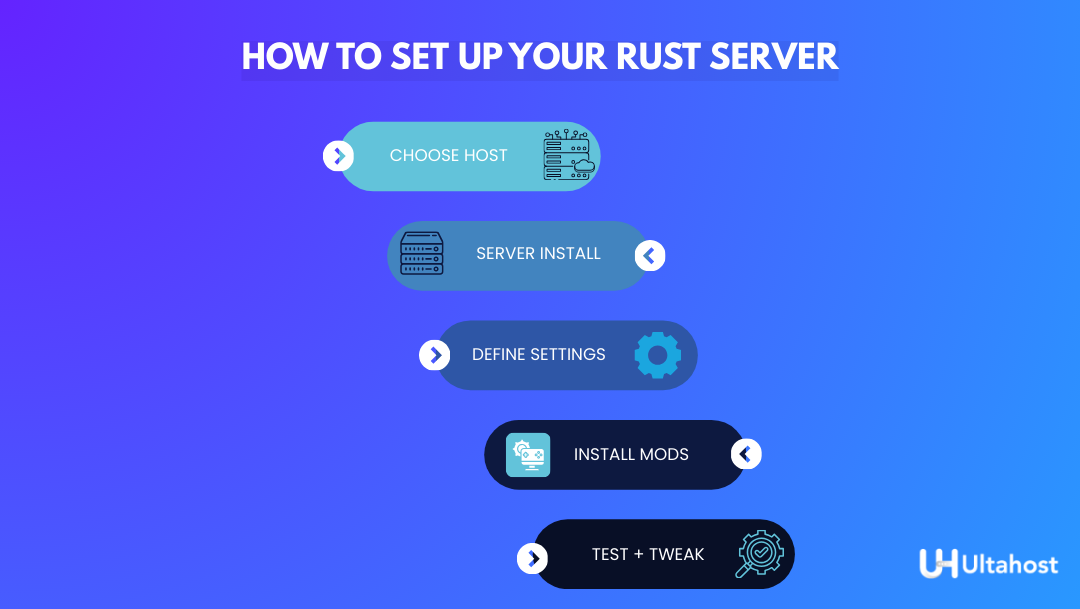
If you want to shorten the process of setting up a vanilla Rust server for your group from many steps to just a few, then a managed host is a must-have.
Simple, Beginner-Friendly Setup
- Choose Your Host and Specs: For starters, you can select a managed game-server host (like UltaHost). After that, by thinking carefully, you can decide the amount of RAM, storage to be used and your preferred location in the U.S.
- Server Installation: The control panel that your host provides you must be used by you for a normal one-click method which you will find, or you can use SteamCMD (app ID 258550) to download the server files directly to your instance.
- Define Server Settings: Via the control panel, it is quite straightforward to set up the right server environment: server naming, map size selection, player number limit setting, and make sure that the default ports (e.g., 28015 UDP) are correct.
- Install Mods (Optional): In the case that you want to execute mods or plugins, just select a framework like Oxide/Carbon and then, either you install it through your host’s control panel and the file manager, or you use a file manager to locate the directory.
- Test and Tweak: After running the server, do a latency and stability check. In case things are not running smoothly, then you can try to lower the map size or player limit a bit and try again.
Managing and Maintaining Your Rust Server
The foci required to run a community server successfully shall involve not only playing but also transforming into the owner and administrator of the community.
Operational Upkeep and Community Management
- Backups and Updates: Make a decision to use a host that offers daily backups automatically without any intervention from you – this is your most valuable rescue. Keep the game and the plugin updated as soon as possible to ensure security and compatibility.
- Wipe Schedule Consistency: Establish a map wipe schedule (e.g., monthly, bi-weekly) that suits your community’s requirements, inform the members at a proper time, and maintain the player practice for their predictability.
- Community Rules and Moderation: The server should have an easily visible and understandable code of conduct, the admin/moderator roles should be trusted and delegated, any incidents should be documented, and the rules should be regularly, though not too frequently, enforced to maintain a good atmosphere.
- Performance Monitoring and Scaling: Monitor your server’s RAM/CPU/network usage closely. If you see that there is a constant lag or that your player slot count is going up, do not wait for a performance drop to act; increase your specs to be ahead of it.
- Player Engagement: The culture of friendliness and being welcoming should be your work; you may also plan regular in-game events, and remain clear in your communication of the changes or the upcoming wipes. It is the number of players kept that makes a server live.
How UltaHost Helps with Rust Game-Server Hosting
UltaHost’s Game Server Hosting solution is designed to provide the performance, reliability, and customer support that are required by the U.S. gamers and small communities to grow and be successful.
| Running your own Rust server gives you full control over rules, wipes, and performance—without the chaos of public servers especially when backed by reliable managed hosting like UltaHost. |
- Quick Setup and Migration: We offer free setup and website migration services, so with minimal technical effort and time, your server can be set up and fully operational.
- Performance and Reliability: The machines that we operate are loaded with high-quality enterprise-grade NVMe SSD storage and come with a 99.9% uptime guarantee – both are absolutely necessary for smooth, lag-free gameplay and player access that is consistent.
- Security and Safety by Default: Every plan includes daily backups that are free of charge and DDoS protection is strong and on by default. These measures are very vital for public Rust servers that have to be protected from disruptive types of attacks.
- Dedicated Human Support: You can always reach out to our 24/7 human support through live chat and tickets, so that even during the late-night or weekend hours you will be able to get help quickly.
- Value and Scalability: We provide straightforward, community-friendly pricing, with unlimited bandwidth, full mod/plugin support, and specs that can be scaled up easily. It is you who has the total control, along with the professional infrastructure, which helps you to concentrate on your community rather than on the details of hardware management.
UltaHost is a great choice because we mix similar or even better features, excellent support, and required backup/protection features into plans that are specifically designed for hardcore gamers who need quality infrastructure.
FAQs
What is the minimum RAM I should get for a Rust server with 30 players?
For a vanilla Rust server with 20-50 players, 6-8 GB of RAM should be enough to keep the server running smoothly.
Can I host a Rust server on my home PC instead of renting one?
Yes. But you will need robust and stable internet bandwidth, a power supply that you can rely on, hardware of the top tier, and, in addition, you will have to take care of DDoS protection, backups, and uptime by yourself.
How much does it cost to host a Rust server for a small community?
The price of a managed hosting plan that is good enough for a small community (20-50 players) is usually around $10 – $20 per month and depends on the resources and features that are included. Check our pricing page as we tend to be much better value than competitors.
Is it necessary to have DDoS protection on my Rust server?
Yes, without a doubt. Any publicly listed game server is a target to be flooded with disruptive traffic. Therefore, a hosting service that offers DDoS protection is basically what you need if you want to have more uptime and fewer interruptions.
Are there any options available on my Rust server, such as mods or plugins?
Yes. Most quality managed hosts support modding frameworks like Oxide or Carbon and provide easy control-panel tools or one-click installers for your convenience.


