Khi các công cụ kinh doanh AI ngày càng phổ biến, một câu hỏi mới xuất hiện: Một máy chủ tiêu chuẩn có đủ hay bạn cần một máy chủ AI chuyên dụng? Cho dù bạn đang phát triển ứng dụng, thực hiện phân tích dữ liệu hoặc khám phá khả năng AI cho doanh nghiệp của bạn, hướng dẫn này giải thích máy chủ AI là gì, tầm quan trọng của nó và cách tiếp cận để xác định liệu nó có phải là một khoản đầu tư đáng giá hay không.
Vài lời chia sẻ
Việc áp dụng trí tuệ nhân tạo trong kinh doanh thể hiện rõ qua việc giới thiệu chatbot, tự động hóa, dự báo, nhận dạng hình ảnh và phân tích luồng dữ liệu. Tuy nhiên, khối lượng công việc từ các ứng dụng này không thể được duy trì bởi các máy chủ chia sẻ cơ bản, truyền thống được sử dụng để lưu trữ web hoặc các ứng dụng cơ bản. Nói một cách đơn giản, máy chủ AI là một hệ thống máy tính chuyên dụng, hiệu suất cao được sử dụng để thực hiện các tác vụ đào tạo hoặc thực thi AI được chọn lọc, sử dụng nhiều tài nguyên.
Các tác vụ này yêu cầu đào tạo hoặc thực thi hiệu suất cao các mô hình AI và do đó, yêu cầu dung lượng bộ nhớ và ngưỡng cao, cùng với phần cứng chuyên dụng. Việc áp dụng các công cụ AI đã tạo ra sân chơi bình đẳng trong nhiều ngành. Cho dù đó là các tập đoàn lớn, chủ doanh nghiệp nhỏ, chuyên gia CNTT, người làm việc tự do hay các công ty sáng tạo, việc sử dụng các công cụ AI để nâng cao năng suất và tự động hóa các tác vụ đã trở thành một thông lệ tiêu chuẩn.
Hãy cùng tìm hiểu sâu hơn và giải thích máy chủ AI là gì, nó khác với máy chủ thông thường như thế nào và nó thường được đặt ở đâu.
AI Server là gì?
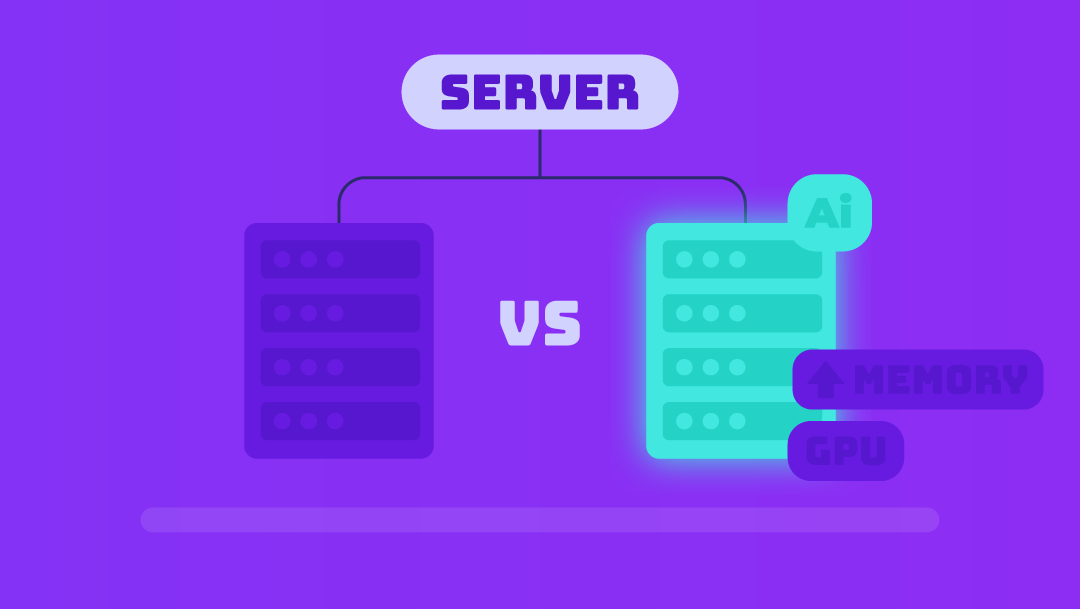
Máy chủ AI là máy tính được thiết kế cho mục đích cụ thể để chạy các khối lượng công việc trí tuệ nhân tạo. Nó không tập trung vào những việc thường ngày như lưu trữ trang web hay xử lý ứng dụng. Máy chủ AI xử lý việc huấn luyện mô hình, suy luận thời gian thực và luồng dữ liệu khổng lồ đòi hỏi nhiều năng lượng và xử lý song song hơn so với máy chủ thông thường.
Không giống như máy chủ truyền thống, vốn mô phỏng máy tính để bàn bằng cách chủ yếu dựa vào CPU, máy chủ AI thường được trang bị các bộ tăng tốc chuyên dụng, chẳng hạn như GPU, TPU hoặc FPGA, để xử lý các tập dữ liệu khổng lồ. Chúng cũng triển khai bộ nhớ băng thông cao, lưu trữ nhanh hơn và mạng được nâng cấp để đảm bảo luồng dữ liệu mượt mà cần thiết cho các mô hình AI hiện đại. Thiết kế này giúp máy chủ AI phù hợp với các tình huống như:
- Đào tạo các mô hình máy học lớn.
- Chatbot và AI đàm thoại thực hiện tương tác thời gian thực.
- Đóng gói hình ảnh hoặc video hàng loạt.
- Sử dụng hệ thống trí tuệ nhân tạo tại biên để có phản hồi độ trễ thấp.
Tóm lại, máy chủ AI không chỉ đơn thuần là một máy tính nhanh hơn. Nó là một môi trường điện toán được thiết kế riêng cho mục đích này và được tinh chỉnh để đáp ứng các yêu cầu của AI hiện đại.
So sánh máy chủ AI và mấy chủ tiêu chuẩn
| Tính năng | Máy chủ tiêu chuẩn | Máy chủ AI |
| Chức năng chính | Websites, apps | Đào tạo AI, suy luận, xử lý dữ liệu nặng |
| Hệ điều hành chính | Chỉ CPUs | GPUs/TPUs/FPGAs + CPUs |
| Bộ nhớ | Trung bình | Rất cao |
| Lưu trữ | Standard SSD | NVMe tốc độ cao + tập dữ liệu lớn |
| Mạng lưới | Băng thông bình thường | Tốc độ cao, độ trễ thấp |
| Độ tải | Lưu trữ, ứng dụng kinh doanh | Chatbot, AI tạo sinh, tầm nhìn, đào tạo mô hình |
Các trường hợp sử dụng phổ biến cho máy chủ AI
Máy chủ AI không còn chỉ dành cho các công ty công nghệ lớn nữa. Khi các giải pháp AI ngày càng được tích hợp vào các sản phẩm và dịch vụ phổ biến, ngày càng có nhiều doanh nghiệp, cơ quan và người tự do phát hiện ra rằng việc chạy tải công việc AI tại địa phương hoặc trên cơ sở hạ tầng chuyên dụng nhanh hơn, rẻ hơn và linh hoạt hơn so với chỉ dựa vào API đám mây.
Real-Time Inference
Nếu bạn đang vận hành chatbot, động cơ đề xuất, công cụ hỗ trợ tự động hoặc hệ thống thị giác máy tính, tốc độ sẽ được tính. Bạn nhận được phản hồi và dự đoán ngay lập tức cho người dùng của bạn với máy chủ AI, vì phản hồi không bị trì hoãn do các tài nguyên đám mây được chia sẻ hoặc nhảy mạng.
Ví dụ, một công ty cung cấp công cụ trò chuyện hoặc tìm kiếm được hỗ trợ bởi AI có thể duy trì độ trễ thấp và chi phí có thể dự đoán được bằng cách chạy suy luận trên máy chủ AI của riêng mình.
Dạy mô hình AI
Nhiều doanh nghiệp không còn chỉ dựa vào API AI của bên thứ ba nữa. Họ đang tự cải tiến mô hình của mình và thực hiện các điều chỉnh để nâng cao độ chính xác. Để đạt được điều này, bạn sẽ cần một máy chủ AI có khả năng tính toán nhanh, bộ nhớ lớn và I/O tốc độ cao.
Ví dụ, một nhóm sản phẩm có thể được hưởng lợi từ việc có một máy tính trực tiếp và được kiểm soát cho các chu kỳ điều chỉnh trợ lý nội bộ bằng cách áp dụng LLM nguồn mở.
On-Site AI Deployments
Một số khối lượng công việc không thể phụ thuộc vào độ trễ của đám mây hoặc để lộ dữ liệu nhạy cảm trên internet. Máy chủ AI biên sẽ hữu ích khi bạn cần.
- Quyết định được đưa ra ngay lập tức (ví dụ: robot, tự động hóa công nghiệp)
- Robot có nghĩa là gì?
- Xử lý IoT hoặc phân tích video tại chỗ.
Ví dụ, một công ty sản xuất vận hành hệ thống thị giác để phát hiện lỗi có thể triển khai máy chủ AI tại chỗ.
Tăng trương thị trường
Với sự gia tăng của AI tạo ra, nhu cầu toàn cầu đang tăng tốc. Thị trường máy chủ AI trị giá khoảng 124,81 tỷ USD vào năm 2024. Hơn nữa, các báo cáo chuyên gia ước tính rằng thị trường máy chủ AI sẽ đạt 854 tỷ USD vào năm 2030, với tỷ lệ CAGR khoảng 38,7% (Grand View Research).
If you’re building AI features, managing large amounts of data, or offering AI-based services, your organisation must be familiar with AI servers to remain competitive.
Core Architecture & Components
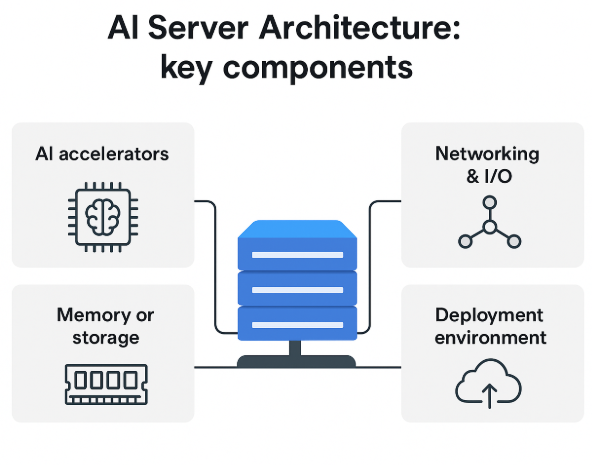
AI servers appear to be normal servers on the outside, but are designed quite differently on the inside. The architecture enables fast transmission of large data volumes, efficient parallel execution, and heavy-lift facilitation for training and inference.
Here is a general explanation of how an AI server works, without delving too deeply into the engineering details.
Hardware Components
Artificial Intelligence workloads work with multiple specialized hardware components. When selecting or evaluating an AI server, it is essential to focus on its key components.
CPUs + AI Accelerators
At the heart of an AI server is the CPU, but it is not carrying the full load. AI tasks rely heavily on AI accelerators such as:
- GPU is great for parallel processing and neural networks.
- TPUs tailored for deep-learning workloads.
- FPGAs can be configured to create custom AI routines.
The accelerators handle training and inference, while the CPU manages task coordination and system operations.
Memory/Storage
AI systems require rapid access to vast amounts of data. That’s why AI servers are used.
- HBM or high-bandwidth memory is required to ease the bottlenecks during training tasks.
- NVMe or SSD storage for rapid read/write cycles.
These elements facilitate smooth data transfer, especially when running larger models.
Networking & I/O
Constantly moving data, AI workloads frequently span distributed systems. AI servers rely on.
- High-speed Ethernet or fibre connections.
- Tailored cables (like NVLink) are reliable for rapid GPU communication.
- High-bandwidth I/O paths to avoid slowdowns.
Efficient networking ensures the model runs fast enough and inference is responsive.
Deployment Environments & Form-Factors
Not every AI server lives in a massive data centre. The Performance, cost, and feasibility are affected by how and where you deploy one.
On-premises vs Cloud vs Hybrid vs Edge deployments
On-premises
- When you have your own environment for hosted AI servers, you have complete control over data, security, and customisation.
- Suitable for organizations that need local processing without much delay.
Cloud-Based AI Servers
- Cloud providers offer flexible, scalable AI compute.
- Teams trying out AI or adjusting workloads on the fly are a good fit.
Hybrid Deployments
- Some organizations blend cloud and on-premises systems, utilizing the cloud for burst compute and local machines for regular inference.
- Hybrid setups balance cost, performance, and control.
Edge AI Servers
- Edge deployments are ideal for real-time applications as they are located near the data source.
- Application of robots, internet protocol applications in industries, and video processing in the domain.
Infrastructure Demands
AI servers require more than just rack space. Before deploying one, consider:
- AI accelerators consume significantly more power.
- Cooling requirements (temperature control is essential).
- Rack and physical space.
- Network upgrades for sustained high data centre.
UltaAI – Smart AI Assistant for UltaHost Clients
UltaAI is UltaHost’s intelligent support assistant, designed to help you manage hosting, domains, billing, and technical issues instantly with smart, AI-powered responses.
Choosing Whether You Need One
An AI server can offer a lot of power, but that doesn’t mean that it is always needed. The costs of hardware and infrastructure changes should always be weighed against workloads, objectives, and the available budget before making a decision.
One of the most practical ways is offered here.
Start With the Right Questions
First, consider your current or planned usage of AI.
What is your current workload?
- Training requires accelerators and high-bandwidth memory. Custom and large models are needed.
- For inference, usage can become more efficient with smaller local servers or cloud instances.
What workload are you expecting?
- For occasional tasks, learning can be done in the cloud.
- If you expect more frequent or heavier tasks, a learning model is usually more cost-effective on dedicated hardware.
What is the importance of latency with the task?
- On-demand or real-time tools may need on-prem servers. Things like vision, support bots, robotics, and the like fall into this category.
- For tasks like these, cloud resources can be more cost-effective. It is worth noting that these are important latency tasks and can tolerate some latency in their processing.
Is full control over the data needed for this task?
- Privacy concerns with data can lead some industries to prefer on-site or private AI servers.
Check Your Cost & Infrastructure Readiness
AI servers are always more demanding on infrastructure. Make sure of these;
- Do you have the power capacity to support GPU-heavy servers?
- How are your cooling and HVAC systems?
- Do you have the physical rack space or a proper hosting environment?
- Is your system prepared for hardware and maintenance costs?
- Ultimately, is your team capable of managing the setup?
Comparing Your Options
| Option | Best For | Pros | Cons |
| Standard Shared Hosting | Websites & Blogs | Affordable and easy to manage | Not suitable for AI workloads |
| VPS Hosting | Small tools | More control and custom setups | Limited for training |
| Dedicated AI Server | AI training/inference | Full control and predictable performance | Power, cooling, maintenance |
| Cloud AI | Flexible or short-term workloads | Elastic, no hardware investment | Higher cost |
If your workload varies a lot, cloud options (GPU instances, managed ML services) are safer bets. However, if you consistently run heavy workloads, having an AI server becomes a more economically wise investment over time.
Decision Checklist
- You may need an AI server if you check several of these:
- You regularly train or fine-tune AI models.
- You maintain real-time AI services in which even a slight delay can change outcomes.
- Cloud inference costs are unpredictable or rising rapidly.
- You handle sensitive data and prefer to keep control over your local systems.
- You have (or can easily construct) an adequate power and cooling system.
- You wish to maintain sustained economic efficiency over time for workloads.
- Your team has the necessary skills needed to manage hardware, or they prefer full autonomy over the system.
Trade-Offs & Risks
While the power of AI servers is impressive, the drawbacks are also noteworthy and should be considered by every business, agency, or freelancer. Keep these important trade-offs in mind:
- AI optimized hardware (GPUs, TPUs, high-bandwidth, etc) is expensive, and at an ongoing operational cost like cooling, electricity, and maintenance, may exceed that of a normal server.
- If your AI tasks are light, infrequent, or seasonal, you may end up overpaying for the hardware to maintain cloud-based services, while idling tasks could be a more efficient use of resources.
- More sophisticated staff and increased server configurations and optimization are needed due to the greater complexity in the infrastructure.
- AI hardware consumes significant space and requires robust cooling, particularly for foundational AI applications. Sustainability, heat output, and operational carbon footprint are becoming increasingly evident for companies seeking to reduce their environmental impact.
AI server, if load, resources, and long-term rollout plan make sense, can greatly improve operational output across the board. If not, perhaps a flexible hybrid commercial solution might be a better initial fit.
Future Trends & What’s Ahead
AI’s impact on core infrastructure is far-reaching, from freelancers to the largest corporations. Over the coming years, accessibility and deployment of AI compute resources and capabilities will be transformed.
Here are a couple of foundational changes on the immediate horizon:
| Trends | Business Implication |
| Growth in edge AI servers | AI compute performance with operational power efficiency unlocks advanced AI capabilities for smaller teams |
| Hybrid cloud and edge | The hybrid will train in the cloud and inference on the edge or at a private location. |
| Emerging innovation | Reducing heat output and advancing engineering in buildings or data centers will allow work to be completed more sustainably. Running AI workloads becomes both less operationally expensive and more sustainable at the same time. |
| Sustainability advancements | Reducing heat output and advancing engineering in buildings or data centers will allow work to be completed more sustainably. Running AI workloads becomes both less operationally expensive and more sustainable. |
| “AI-ready” hosting and managed services | These hosts have Managed AI Compute, which makes it significantly more feasible and more economical to enter the AI market. |
AI servers will continue to adopt faster, cooler, more distributed architectures, enabling organizations to deploy AI without the massive costs.
Quick Evaluation Checklist – Do you need an AI Server?
Hãy trả lời danh sách kiểm tra đơn giản này để đánh giá xem máy chủ AI có phù hợp với công ty của bạn hay không. Hãy trình bày ngắn gọn, súc tích và thực tế, tập trung vào việc ra quyết định thường xuyên.
Use-case fit
- Nội bộ, cần đào tạo hoặc tinh chỉnh các mô hình AI?
- Nó có thực hiện suy luận quy mô lớn (trò chuyện, tầm nhìn, đề xuất) không?
- Bạn có yêu cầu xử lý độ trễ thấp hoặc tại chỗ để tuân thủ hoặc bảo mật không?
Estimated scale
- Khối lượng yêu cầu dự kiến (tốc độ) mỗi giây/phút là bao nhiêu?
- Độ phức tạp/kích thước mô hình (ví dụ: mô hình thị giác, LLM).
- Độ trễ dự kiến là bao nhiêu: thời gian thực, gần thời gian thực hay hàng loạt?
Infrastructure Readiness
- Bạn có bao nhiêu nguồn điện, hệ thống làm mát và không gian rack?
- Có nhân viên nào quản lý việc thiết lập, bảo trì và giám sát không?
- Môi trường của bạn có thể lưu trữ GPU/bộ tăng tốc không?
Cost & Budget Fit
- Chi phí phần cứng liên quan đến OPEX (tức là điện năng, làm mát và sửa chữa) là bao nhiêu?
- Chi phí phần mềm (tức là công cụ giám sát, cấp phép, hỗ trợ) là bao nhiêu?
- So sánh với chi phí của đám mây, với mức sử dụng cao, liệu phần cứng có đáng để sở hữu không?
Future-Proofing
- Môi trường có hỗ trợ khả năng mở rộng dễ dàng (nhiều bộ tăng tốc/GPU hơn, kết nối nhanh hơn) không?
- Có cách nào để chuyển sang mô hình lai hoặc cạnh sau này không
- Bạn muốn mô-đun hóa hay có thể nâng cấp?
Đúng vậy, danh sách này giúp bạn dễ dàng đánh giá máy chủ AI và phù hợp với khối lượng công việc, ngân sách và ý tưởng dài hạn của bạn.
UltaHost giúp bạn thế nào?
UltaHost là một lựa chọn tuyệt vời nếu bạn muốn thử nghiệm hoặc thiết lập hệ thống AI mà không tốn nhiều chi phí. Hướng dẫn này bao gồm tất cả các công cụ thiết yếu dành cho người mới bắt đầu và người thử nghiệm muốn tìm hiểu sâu hơn về cơ sở hạ tầng AI mà không phải tốn quá nhiều tiền cho một máy chủ mới.
Đây là lựa chọn hoàn hảo cho những ai muốn sở hữu phần cứng mà không phải lo lắng về chi phí sở hữu một máy chủ mạnh mẽ. Các dịch vụ VPS, máy chủ chuyên dụng và lưu trữ đám mây của UltaHost cung cấp cho nhóm của bạn mọi thứ cần thiết để xử lý khối lượng công việc AI phức tạp, chẳng hạn như xử lý các đường ống dữ liệu lớn và cổng API, mô hình lưu trữ cho các tác vụ suy luận nhỏ hơn, hoặc thiết lập máy chủ lai kết nối với bộ tăng tốc điện toán đám mây của bạn.
Với UltaHost, bạn sẽ có các tùy chọn linh hoạt, giá cả minh bạch, ổ SSD NVMe, thời gian hoạt động 99,9% và hỗ trợ kỹ thuật 24/7.
FAQ
Can I use a standard server for AI workloads?
Yes for minor or light tasks, but performance may be limited. Standard servers lack many of the optimisations (accelerators, memory, I/O) that AI workloads require.
Which organisations should consider an AI server?
Organisations that conduct sustained model training, handle large-scale inference (many users or low-latency needs), or deploy AI at the edge with specific demands. Smaller web-hosting or simple website workloads typically don’t need a dedicated AI server.
What’s the difference between cloud AI compute and owning an AI server?
Cloud AI compute offers flexibility (pay-as-you-go), no infrastructure burden, and rapid access. Owning an AI server gives more control, potential long-term cost savings for heavy workloads, but requires infrastructure, upfront investment and operational overhead.
How significant is the power or infrastructure cost of an AI server?
Quite significant. AI server deployments can draw much more power and require more cooling/space than standard servers. Given the growth in AI-optimised data-centre infrastructure, energy/cooling are major factors
Will AI servers become obsolete quickly, given rapid hardware advances?
Hardware evolves rapidly (new accelerators, form factors, edge deployments), so upgrade-path planning is important. However, the fundamental role of AI servers remains: supporting training/inference. The risk is more about being locked into outdated hardware.