



WordPress 6.9 “Gene” came out in December with features long requested by WordPress users becoming the major release of 2025. This update not only simplify life for content creators, but also put AI on solid footing.
From editing articles, new block building tool, to producing high-quality code that’s automatically generated with advanced AI features. This release eliminates barriers between you and what customers demand every day.
This guide will walk you through what’s new in WordPress 6.9, why it matters and how you can make the decision to upgrade or not.
Key Takeaways
- Inline and block commenting in-built solved Inline commenting on WordPress blocks, Feedback on one place without distractions, Lesser tools outside.Speed up editorial reviews.
- WordPress 6.9 Enhances Core Web Vitals with On-Demand CSS, Smarter Cron Jobs, More Robust Caching, Faster LCP and Lower TTFB for Improved SEO & User Experience
- New AI infrastructure such as the Abilities API is silently future-proofing WordPress for automation, smart workflows, and AI content handling.
- Improved HTML sanitization, improved input validation, and updates to abstracted libraries result in less vulnerabilities and a more secure site.
- The new Enhanced Command Palette, more powerful Interactivity API, strengthened Block Bindings, PHP 8.5 and guidance with removal of Legacy IE code bring rapid and cleaner development to your fingertips.
- They are easier to maintain and scale than ever, thanks to clean architecture and modern APIs.
- Smarter defaults, auto optimisations and cleaner core code should reduce the need for manual fiddling and historical technical debt.
Upgrade to WordPress 6.9! Not sure where to start?
UltaHost take the guesswork out of it. Our managed WordPress hosting includes automated compatibility checks, staging environment testing, and 24/7 expert support.
Understanding WordPress Automatic Updates and Version Management
Now that WordPress 6.9 has been released, we thought it would be interesting to take a closer look at how WordPress manages automatic updates for WordPress and what your options are with regards to managing version upgrades across your installs. Knowing these mechanisms helps you balance the compromise between security, stability and feature adoption.
WordPress supports several types of automatic updates
1Core minor updates: By default, WordPress automatically applies minor security and maintenance updates (like 6.9.1, 6.9.2) without manual intervention. These updates are designed to be safe and non-breaking, addressing se
2Core major updates are not installing by default: And by that I mean major version updates, like from WordPress 6.8 to 6.9 and the likes – unless you had forced/previewed them yourself in the Settings page. You have control of when you absorb new functionality and to make sure compatibility is tested by capabilities like this.
3Plugin & theme updates: You can turn on automatic updates for specific plugins and themes, or set them to auto-update all through a Web host provider or WordPress settings.
In the case of the 6.9 update, most sites must upgrade manually. However, managed hosts like UltaHost can handle updates safely. – They can safely perform the upgrade for you.
When setting up wordpress automatic updates, take these into account:
- Site criticality: Production sites with customers may wish to manually control updates with testing on a staging environment
- Update frequency: Sites prone to frequent types of security threats (such as e-commerce sites or user-generated content) may prefer quick security updates.
- It can also be a safer option for those that are less technical: managed updates with your host.
- Backup plan: The risk that comes with automatic updates must be paired with automatic backups to ensure a swift roll back when things go wrong
| the Abilities API and Model Context Protocol do not instantly add AI chatbot to your dashboard. What they don’t do is create the standard infrastructure that future AI tools are built on. Think of it as WordPress building the tracks before all the trains can start running. |
Revolutionizing Team Collaboration with Block Notes
One of the biggest features to hit WordPress 6.9 is the Notes - it changes the way teams collaborate on creating content. If you’ve managed feedback across emails or Slack, you know the struggle. WordPress 6.9 solves this with built-in collaboration tools. Problem solved with WordPress 6.9, thanks to a direct collaboration feature in the block editor.
- Capability-based access: Users must have the edit_posts capability to add notes, to give you control over who can add notes where
- Block-level commenting: Note pages take advantage of the semantics in content, rather than at just a post level.
- Collaborate asynchronously: Never miss a new comment thanks to automatic email notifications when new comments are added
- Resolvable comments: Mark comments as resolved when you’ve finished with them to keep your editorial workflow nice and clean
Six New Core Blocks That Replace Plugin Dependencies
WordPress 6.9 takes a practical approach to expanding the block library by adding six highly requested blocks that eliminate the need for additional plugins.
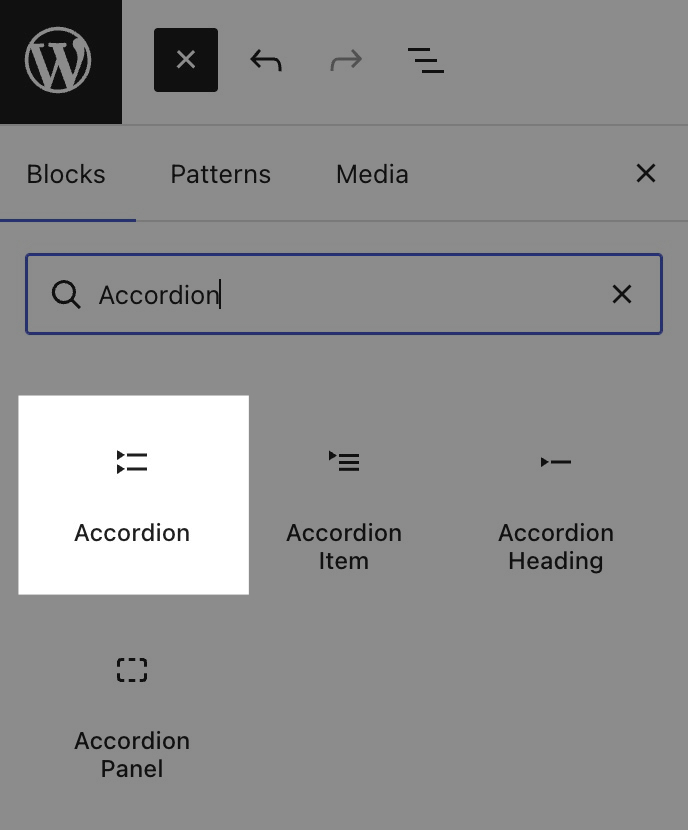
1 Accordion Block
You can finally create collapsible content sections without installing a third-party plugin. The Accordion block works well for FAQs, nested menus, and long-form content that needs to be organized and easy to scan. Anchor support lets you link directly to specific sections. This feature works well for documentation and help centers.
2 Math Block
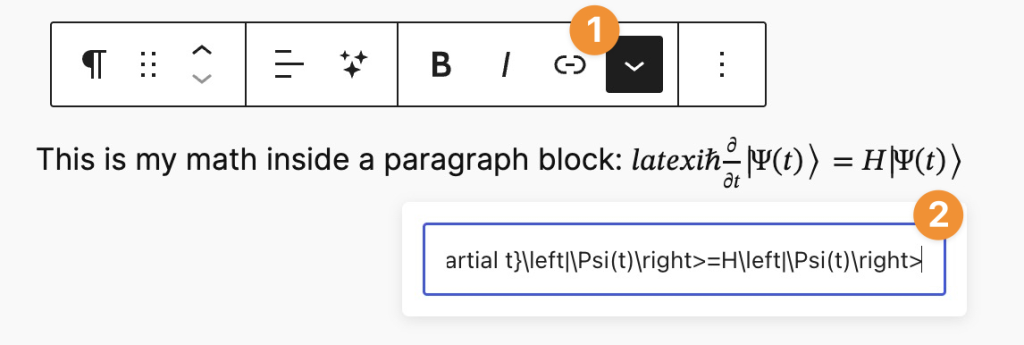
Attention all tech bloggers and school sites! The new Math block uses LaTeX to display math equations and characters. No longer do you have to use external services or JavaScript libraries for those heavy math formulas – write them right there in your content with nice and clean MathML output.
A big win for STEM indie creators who had to do this aways with plugins or build a custom solution.
3 Time to Read Block
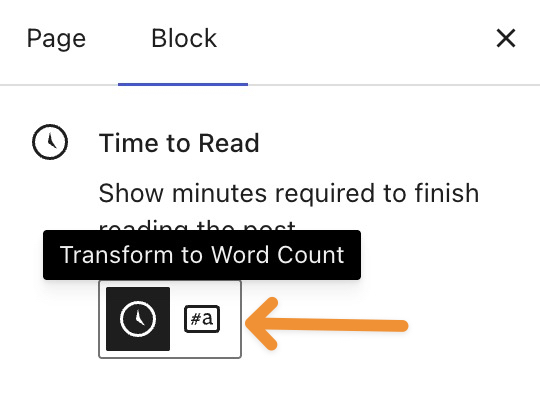
Time to read block generates reading time estimate on fly according to your post/article length. It’s a small, but meaningful enhancement of UX that helps potential readers to make an informed decision on if they want to interact with your content at this point of time.
4 Term Query Block
This is a dynamic and fast way to display your taxonomy terms that enables endless possibilities on category listings, tag clouds, or custom taxonomy displays — never touching any PHP code.
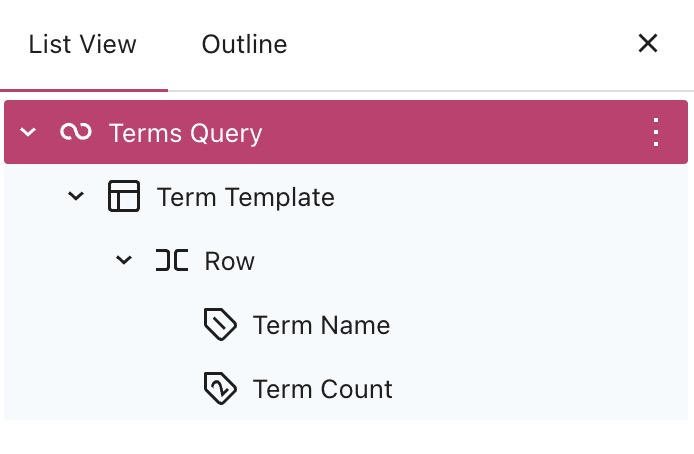
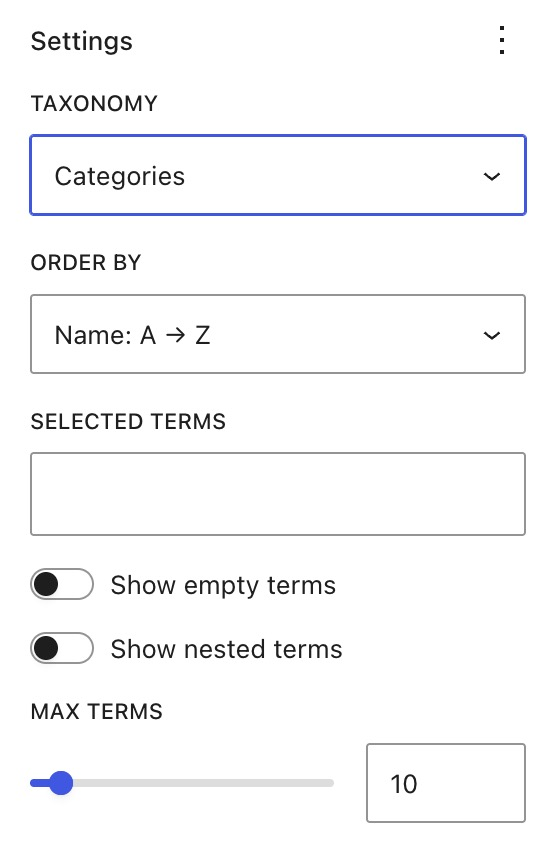
- Use List View to select the parent Terms Query block.
- Open the block settings in the right sidebar.
- In the Taxonomy dropdown, select the taxonomy you want to display (e.g., Categories, Tags, or a custom taxonomy):
5 Comment Count and Comment Link Blocks
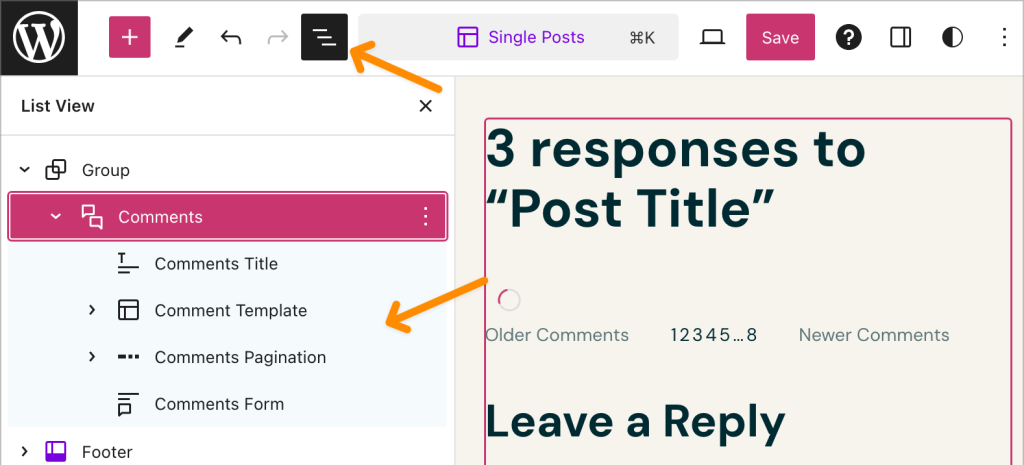
With decoupled comment count & style, you have total control over the placement + function of comments in WordPress 6.9! Now, you can decide which posts comments should be open on, and where to display the comment access within your layout — two features that were previously exclusive to the Site Editor.
The Abilities API: Preparing WordPress for an AI-Driven Future
Although features in WordPress 6.9 come with benefit, the Abilities API is an investment and helps WordPress place in development.
This API provides unified format to read capabilities of WordPress core, plugins and themes for AI agents and automation tools. The capabilities of WordPress core, plugins and themes for AI agents and automation tools.
Think of the Abilities API as interpreter that allows AI to understand what your WordPress site is actually capable of. Rather than having AI models that guess things about how WordPress works,they can now ask API “what is this thing, and how do you use it?”. This paves the way for some truly transformational use cases:
1Dynamic data integration: you can now connect external services with WordPress sites and carry out complex tasks using APIs
2Site management: Users can assign tasks to an AI Assistant, like writing and scheduling posts, and the AI handles process
3Content Automation: AI processes for content generation, image optimization, metadata refreshes and posting could all happen without human intervention
Now, you should know that you’re not going to get AI features in the WordPress admin interface quite yet. (Fundamental to 6.9, but the user-facing AI tools are still in a fledgling state.) What you’re seeing now is the groundwork that’s going to be supporting automated workflows, intelligent content creation, and powerful site management in future releases.
 le=”width: 44px; height: 44px; border-radius: 10px; object-fit: cover;” />=”https://ultahost.com/blog/wp-content/uploads/2025/08/WhatsApp-Image-2025-09-24-at-04.17.09_0a28ff8e-1024×1024.jpg” alt=”Author” />
<div>”font-size: 14px; color: #777;”>WordPress Content Writer
Enhanced Editor Experience with Improved Drag-and-Drop
If you’ve ever grimaced at WordPress’s block editor, trying to wrestle that miniscule drag handle in order to re-arrange blocks. You’ll welcome one of the biggest user-facing changes in fire WordPress 6.9: native drag and drop with a live preview. This improvement turns the block editor to a real visual page builder.
The old drag-and-drop system required very accurate touching on small handle icons, which was annoying on touch devices and prone to unwanted selections. WordPress 6.9 is fixing that with some very smart enhancements:
1Direct block dragging: Drag blocks directly from the add block inserter without having to click any separate buttons. The click target is larger and more forgiving, so it feels closer to dedicated page builders like Elementor or Divi.
2Live drop previews: Drag a block around the editor and see exactly where it will end up before dropping. This visual confirmation removes the guesswork in having to struggle through annoying positioning errors and take countless undos.
3Improved block selection: The editor now clearly shows visual indicators for the selected block and its position within the layout hierarchy. Which makes things like complex, nested layouts a lot easier to deal with.
Why UltaHost Customers Should Upgrade to WordPress 6.9
Given that the new release of WordPress, version 6.9 directly affects hosting capacity/performance and security posture as well as user experience we provide.
1 Performance alignment with managed hosting
The on-demand CSS loading and improved cron execution in wordpress 6.9 gets our infrastructure more in line with UltaHost’s optimizations. Our caching layers and CDN settings become even more effective with the intelligent resource loading in this release, leaving your site’s Core Web Vitals scores to potentially benefit without you having to change anything..

2 Enhanced wordpress security updates
Although WordPress 6.9 does not focus specifically on security, it nevertheless strengthens protection through an improved HTML API and better input validation. As a result, these improvements decrease the attack surface and increase your site’s resistance to common vulnerability patterns. Furthermore, when paired with UltaHost’s server-level security, you gain strong defense-in-depth protection that is more effective than either solution alone.

3 Simplified wordpress automatic updates
WordPress 6.9’s enhanced update engine integrates seamlessly with UltaHost’s managed update services. For customers utilizing our automatic updates, the upgrade to 6.9 is made easy with appropriate stage, test and rollback facilities. Upgraded compatibility checking in the newest version also minimizes risks of conflicts when updating plugins..

4 Resource efficiency improvements
The database query optimizations and caching improvements in wordpress 6.9 you have a more efficient use of resources by our servers. However results in better performance during traffic surges and more optimal use of your server resources (especially for those on shared hosting).
5 AI-ready infrastructure
As WordPress turns to AI-generated features with AP,4 – Abilities API and MCP – Model Context Protocol, UltaHost is getting our infrastructure ready to work with these abilities. However, adopting WordPress 6.9 early, you prepare your site to integrate AI-powered workflows as soon as they are ready.

Get Your Domain and Hosting the Right Way
Ready to build your website with confidence? Start by choosing a reliable, easy-to-manage domain name that perfectly fits your brand.
Conclusion
If there is anything clear about WordPress 6.9, it is that this update stands out. It does something unusual for CMS updates.
This provides clear immediate value, also puts into place the foundations of pretty significant break from traditional website management.
What distinguishes WordPress 6.9 from other updates, however, is its clear sense of intention. Moreover, every feature added to the product, from extension support to on-demand CSS loading, feels designed not around a rigid roadmap but around real user workflows.
FAQs
Is WordPress 6.9 safe to update right now?
Yes, WordPress 6.9 is secure for the majority of websites and provides immediate performance, security and teamwork benefits. Always test in a staging site first, and particularly if you have older plugins, page builders or custom legacy code.
What are the minimum system requirements for WordPress 6.9?
The minimum requirements are PHP 7.2.26 and MySQL 5.7; however, we strongly recommend using the latest version of PHP and MariaDB for better performance and compatibility. WordPress 6.9 is also going to give the middle finger even more to old Internet Explorer and not support it in favor of new browsers!
What if my site breaks after upgrading?
The majority of issues are caused by out-of-date plugins or themes, so just revert from your backup, deactivate the plugins to find what’s causing the issue and update or replace it. To prevent problems, always test updates in staging and ensure you’re running the latest plugins and themes.
Will WordPress 6.9 update automatically?
No, version 6.9 of WordPress would work only on manual updates through Dashboard → Updates and the minor ones are auto update. Managed WordPress hosts will likely do the upgrade for you after compatibility checks.
How does the Block Notes feature work?
Block Notes enables users with edit privileges to leave inline comments on blocks, email notifications, time-stamped feedback and the ability to mark threads as resolved. Notes are saved in the database and never shown on the front-end.
Will WordPress 6.9 improve my site’s performance?
WordPress 6.9 offers enhanced performance using on-the-fly CSS, more efficient cron runs and improved caching, which will result in better load time for your website optimizing core web vitals. You can compare gains with PageSpeed Insights or GTmetrix before and after you upgrade..


