



Even a 100 milliseconds load lag will decrease conversions by up to 7% costing you traffic and revenue. And, although these decelerations might pass unnoticed by the owners of websites, they are instantly noticed by users. As a matter of fact, the majority of them will not wait until your page loads. Consequently, what appears to be invisible on the back end is in fact pushing the visitors away.
First order optimization no longer suffices nowadays. Considering that Google has already established the Core Web Vitals as a direct factor in the ranking, and that the fact that less than half of all of the sites are presently passing the test performance is no longer a choice, it is crucial. It is fortuitous that AI is currently making its mark with regard to making websites fast with smart optimization, anticipatory loading, and real time monitoring. Consequently, in this guide you will learn the way toward utilizing AI powered tools and cutting edge hosting to assist you in creating websites which are quicker, more captivating, and rank an awful lot higher.
Key Takeaways
- Having 100ms faster pages can generate more conversions, visibly taking performance optimization from being purely an SEO task to be part of the business strategy.
- A predictive loading, automatic image compression, and smart RUM insights. AI takes care of most tasks that once had to be done manually by an expert.
- Since replacing FID in March 2024, its stricter standards expose JavaScript inefficiencies, making AI-powered code analysis essential for fast fixes.
- With no fast servers, caching or global infrastructure, and frontend optimization only goes so far, good hosting makes everything else work.
- Ongoing AI monitoring ensures that your page will remain optimized, even with frequent Google algorithm updates.
Ready to boost your Core Web Vitals?
Boost your Core Web Vitals with UltaHost’s high-speed hosting and deliver faster, better-performing websites today.
What Are Core Web Vitals, and Why Do They Matter More Than Ever?
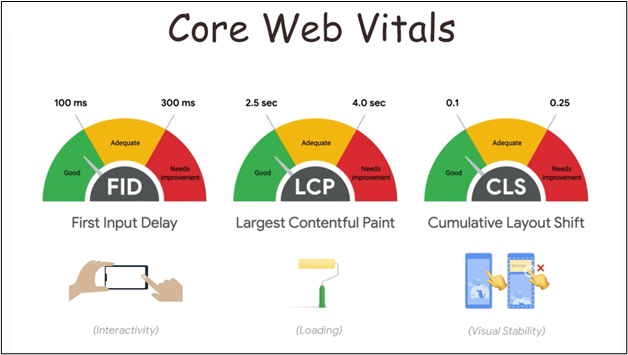
They evaluate how quickly and instantly real users on real devices feel that your website is not just in some testing tool they help Google assess the overall experience of a user.
1 Core Web Vitals focus on three key areas:
- Cumulative Layout Shift (CLS) Ensure Stable Page Layout (Target: < 0.1)
- Largest Contentful Paint (LCP) Focus on loading the main content quickly (Target: ≤ 2.5 s)
- INP (Interaction to Next Paint) target on speed of your website in response to user interactions (Target: < 200ms)
How AI Is Transforming Website Speed Optimization
Previously, to resolve speed related problems one had to conduct long audits, decode complicated reports and test possible resolutions which were available one at a time. Naturally this was an excruciatingly slow, highly resource-intensive process. The workflow has been transformed today entirely by AI that automatically identifies, diagnoses and in most instances resolves performance issues much quicker than any human method of ever doing this.
1 Here’s how AI is transforming optimization:
- AI finds bottlenecks and explains them in natural language rather than raw data.
- Here you can ask questions such as “Why is my mobile LCP slow?” and receive actionable answers.
- As of November 2024 Chrome DevTools began to use AI to analyze sluggish tasks and map out performance issues as well as understand the problems in LLMs.
- AI surfaces the highest-impact fixes saving teams time from drowning in dashboards.
Developers will no longer need to make guesses using flame charts and metrics but can obtain clear, practical guidance in a few seconds. This change of complicated data to smart recommendations renders high level performance optimization reachable even by the teams of any abilities.
AI Powered Image Optimization: Fixing the Biggest LCP Killer
Images, by all means, can be considered as one of the biggest LCP score dragons of any site. They are frequently cumbersome, regularly misformatted, and, more commonly than not, delivered to the device to which they are destined at the completely wrong size. This issue is happily solved by AI itself, as it scales up image optimization, eliminating the necessity to resize, compress, or convert each image or format individually.
1 How AI improves image performance:
- Services such as ShortPixel, Imagify and TinyPNG can convert JPEG/PNG to WebP’s AVIF for more efficient output.
- AI detects the main themes inside your pictures and creates beautiful thumbnails, ideal for e-commerce.
- Hundreds of images can be automatically adjusted, reduced in size, and converted to JPG while you sleep.
- Reducing image load, the most frequent reason for low loading scores is made.
2 Best practices for 2025 image optimization:
- Prefer next generation formats (AVIF, WebP) whenever available.
- Target screen responsive image srcset and sizes.
- Preload critical above the fold images
- AI to decide the best format and level of compression for each device
| AVIF could cut file sizes in half compared to WebP while maintaining high visual quality. With detection, conversion and delivery managed by AI the LCP scores of websites improve without affecting how they look, image optimization becomes easy and super effective. |
AI-Driven Predictive Loading and Navigation Intelligence
Here is where A.I. goes from reactive to revolutionary. The latest performance tools not only solve for speed but predict user behavior, preloading resources before the click takes place. By gathering intelligence on how visitors interact with your site, A.I. pre-renders the next page and load times become virtually imperceptible.
1 How predictive AI improves performance:
- Tools like Uxify study browsing patterns and preload probably next pages.
- Server requests, parsing of JavaScript and layout rendering starts before user interaction.
- AI automatically changes cache TTLs, prefetch rules and edge routing based on the traffic pattern.
- Enhances LCP and INP, diminishes TTFB as well as Total Blocking Time (TBT).
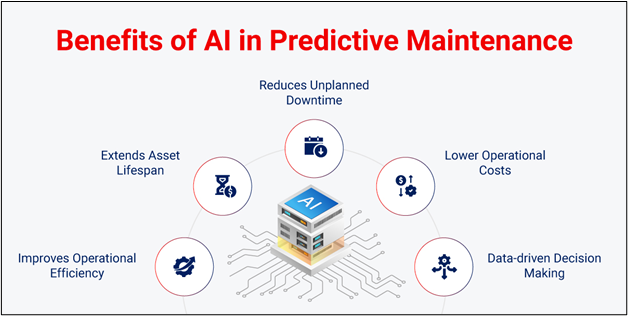
| When the resources are already at the edge and pulled even more intelligently beforehand, the browser is not scrambling, it’s prepared. With INP’s tight 200ms target, that extra prediction can be crucial in whether or not you pass Google’s performance benchmarks. |
Optimizing JavaScript for Better INP with AI Assistance
If images are the primary contributor to LCP, JavaScript appears to be contributing far more INP. Slow render blocking scripts are what make interactions sluggish and websites unresponsive. Fixing this manually requires time and deep technical expertise but AI is transforming that.
1 How AI improves JavaScript performance and INP:
- AI parses Chrome DevTools, Lighthouse and PageSpeed data for long tasks and main thread blockers.
- Scans your bundles for wasted polyfills, synchronous patterns and bloated scripts.
- Suggests offloading heavy logic to Web Workers and code splitting.
- Produces a clear, ordered list for what to fix first and why.
2 Why this matters for INP:
- INP measures all “interactions”, not just the initial click.
- Goal is <200ms (above ~100ms, humans perceive delay)
- AI uses the real user data to discover slow:
- Button clicks
- Form submission
- Dropdowns
- Navigation actions
| By integrating code analysis with what actually happens in the real world, AI helps teams fix the interactions that are truly frustrating to users. With this tool there is no longer “guess and check”, it’s data driven optimization, resulting in a very responsive, high performing website. |
How UltaHost’s Infrastructure Gives Your Core Web Vitals a Head Start
No amount of fronted optimization will make up for a slow server. Time to First Byte (TTFB) in particular is very much dependent on hosting infrastructure. If your server is slow, at LCP pageStart and throughout the entire performance section it’s fighting from behind before the browser has a chance to render anything.
This is where UltaHost comes in.
1 Infrastructure advantages:
- AMD 4.2GHz CPUs + NVMe SSDs (PCIe Gen 5) Faster database queries and file access = straight up reduction in TTFB.
- 1 Gbps speed won’t lose out on performance even with heavy bandwidth.
- LiteSpeed Web Server (LSCache) will speeds up serving dynamic pages.
- Multilayer caching will varnish, Redis and Memcached speed up your content distribution.
- 30+ data centers spread globally helps with less latency with your content close to your visitors.
- HTTP/2 + optimized DNS will quickly initiate connection.
- 99.99% availability keeps monitoring always on, providing you with stable performance stats.
Even with nothing other than the NVMe storage, we get a nice head start on the already fast read/write hardware and sub 2 second load times even under the heaviest traffic spikes that LCP has.
When you combine AI-based frontend optimization (smart image compression, predictive Preload, JavaScript processing) with fast, modern hosting, you are supercharging your Core Web Vitals from the server and browser. Because that “dual” strategy is what actually takes borderline scores and turns them into perform good all the time bearings.
AI Tools for Ongoing Core Web Vitals Monitoring
As important as it is to fix Core Web Vitals, maintaining them is where the real effort will be. Websites wrinkle over time, as updates pile atop plugins on top of third party scripts and a great many small delays quite add up into an expanse that shaves off milliseconds. This is where AI driven monitoring steps in to stop collateral damage from becoming the normal.
1 How AI monitoring protects performance:
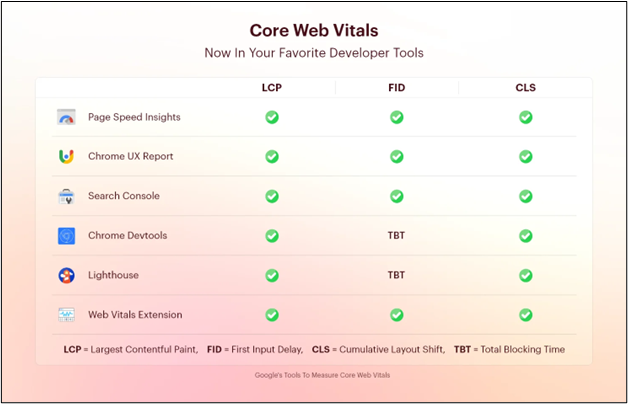
- Tools like Google PageSpeed Insights and more advanced platforms like Valido Web Score track LCP, INP and CLS across your site.
- The AI figures out what changed, isolates the most likely problem and suggests fixes.
- Performance reports transform into concrete advice, not just bare figures.
- Backslides are prevented, and you can identify them before they start to hurt your sales.
2 Why mobile monitoring matters most:
- Barely half (49.7%) of sites pass Core Web Vitals checks on mobile vs (57.1%) on desktop.
- Ranking are done by Google using mobile first indexing
- AI analyzes real user data across:
- Devices
- Network speeds
- Locations
| By segmenting performance data and prioritizing mobile users, AI tools provide a complete, real world view of your site’s health. Instead of quarterly audits, optimization becomes a continuous, proactive process that keeps your Core Web Vitals green over the long term. |
Practical AI Workflow for Core Web Vitals Improvement
It’s not enough to be familiar with the tools you’re using, you must have a systematic workflow in place to see the results. A typical modern air assisted optimize process would have a basic Iogic flow as follows.
1 Step 1: Establish Your Baseline
- Audit with Google PageSpeed Insights & Lighthouse.
- Review LCP, INP and CLS scores (as well as diagnostics).
- Use an AI enabled RUM tool in order to record real-user data (experiments often vary between the lab and the field).
2 Step 2: Automate the Low Hanging Fruit .
- AI Based Tools use a compressor service to compress and convert images to webp/avif with AI tools (examples: ShortPixel, Imagify, TinyPNG).
- Detect render blocking JavaScript and long tasks that are harming INP with AI code analysis.
- Cache server side (Varnish, Redis, Memcached) for lower TTFB.
- Streamline the critical rendering path (inline critical css, preload crucial assets).
3 Step 3: Monitor Continuously
- Establish AI driven alerts for performance degradation.
- Focus on mobile performance and real user signals.
From a proactive web performance management perspective:
Avoid treating website performance as a one off technical exercise; treat it as an ongoing business strategy. Build AI monitoring, mobile first testing, and automated optimization into your workflow so that every update safeguards Core Web Vitals, user experience, and revenue well before issues affect rankings or conversions.

Don’t let slow hosting hold your website back
Upgrade to UltaHost and combine AI optimization with powerful infrastructure for consistently fast website performance
Final Thoughts
Optimizing website performance is no longer just about shaving milliseconds off of load times, it’s also about revenue protection, rankings and long-term growth. Core Web Vitals impacts both user experience and business results. AI fundamentally revolutionizes how we think about optimization: what was traditionally hours of technical know-how and ad nauseam manual audits is now predictable, automated and on the books to continuously monitor.
Front-end optimization, smart real user monitoring, and robust hosting infrastructure powered by AI Performance is no longer reactive, but rather strategic where these processes work together. So to continue down this road of search engines evolving toward AI-driven indexing and mobile-first evaluation, fast, stable, and semantically clean websites will become more valuable than ever. The businesses that view performance as an ongoing investment are the ones who will consistently rank higher, convert better, and scale faster.
FAQs
How long does it take to improve Core Web Vitals?
Some relatively small improvements (image compression, caching, script cleanup) could yield results in days. Bigger structural changes could take weeks. AI tools most certainly save time, like by automatically detecting and prioritizing.
Is AI necessary for optimizing website speed?
Not essential, but absolutely a huge benefit. AI accelerates diagnostics, discovers hidden bottlenecks, and avoids regressions. It eliminates the need for manual work, resulting in a more accurate approach and particularly valuable for expanding or intricate websites.
Which metric should I prioritize first: LCP, INP, or CLS?
LCP is a good starting point, as it has the largest user visible impact and is usually image-related. Then tackle INP, especially if your site is JS heavy. Identifying layout stability issues is relatively painless to remediate, so CLS is typically easier to address.
Why is mobile performance more important than desktop?
Google employs mobile first indexing, which means that your rankings are primarily based on how well you perform on mobile. Several sites can be skipped on desktop but break on mobile because of slower devices and weaker network connections.
Can good hosting alone fix Core Web Vitals?
No, but it lays the groundwork. And fast servers reduce TTFB and enable caching; frontend optimizations have a better starting point. The real performance benefits come from strong hosting paired with AI powered optimizations at the frontend.
Will improving Core Web Vitals increase conversions?
Yes. Research has shown consistently that improvements in speed, even small <100ms can significantly increase user interaction and conversions. Sites that run faster also have lower bounce rates and higher user trust.


