



WordPress 6.7 “Rollins” designed with jazz legend Sonny Rollins in mind, advances the web with creative and accurate coding. Dropped November 12, 2024, it’s the last big WordPress update of the year and a significant jump for the platform!Featuring 1,264+ improvements with various performance improvements, bug fixes, and more to help make building and maintaining sites a smoother experience.
This includes eight of the Gutenberg releases, and has introducing block editor improvements and usability enhancements including zoom out mode, a default theme optimized for blocks, improved media handling, and significant performance improvements.
All in all, it’s a slick, creator-first release ready for 2025. Let’s start before we get another update.
Key Takeaways
- Zoom Out mode and the Twenty Twenty-Five theme make it easy to build professional looking designs, without writing any code.
- Get better performance for WordPress 6.7 on UltaHost modern hosting services with new PHP, SSD storage and caching technology.
- New APIs like the Template Registration and Block Binding lead to less custom code and faster, more complex builds.
- Native HEIC support and auto image sizing streamline workflows while keeping sites speedy.
- The backups, staging and plugin checks options really help implement these new features without a hitch.
Don’t let a simple request error break the user experience.
Let Ultahost’s expert support team help you diagnose and fix the issue fast, so your website stays online and error-free.
The Revolutionary Zoom Out Mode: Editing at Scale
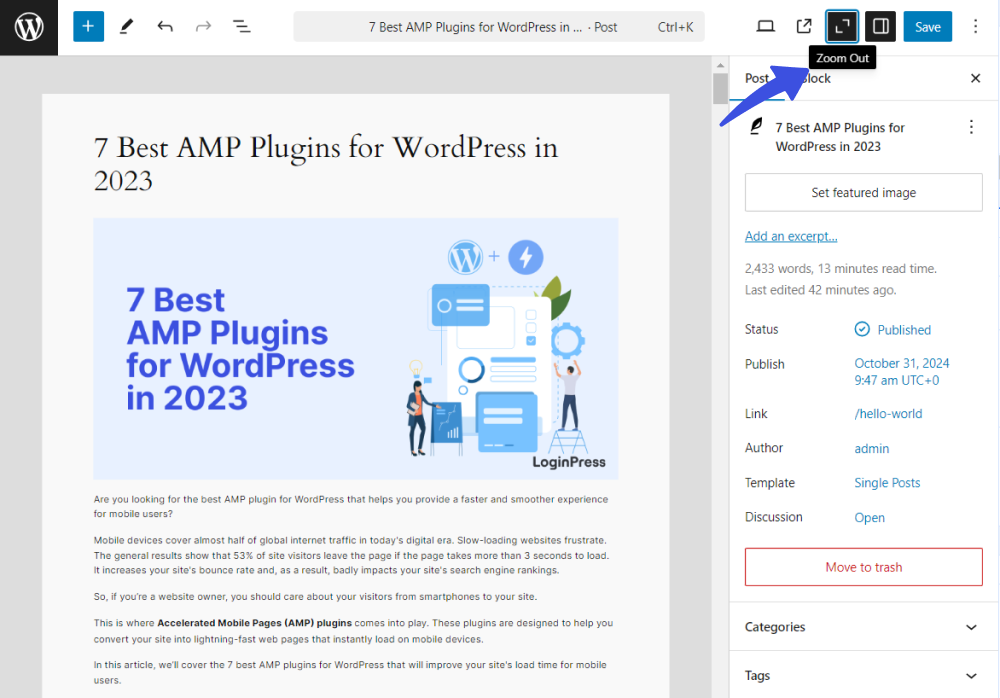
Zoom Out mode is one of the most impactful additions to WordPress 6.7, designed to simplify how users work with complex layouts and large amounts of content. Instead of focusing on individual blocks, this feature introduces a higher level, pattern based editing experience that improves speed, clarity, and collaboration.
- You can work with full sections and patterns (not just blocks), so you have much greater control over more complicated page layouts.
- When activated, the editor canvas will zoom out and show you an overview of your entire page structure in relation to how all sections fit together.
- Whole sections can be inserted, reordered, swapped out or deleted with a few clicks; this comes in really handy on landing pages, longform articles and content rich layouts.
- Switch to the Patterns tab and the editor automatically zooms out, for a seamless and easy page building experience with reusable design patterns.
- While Zoom Out mode is active, the List View shows patterns instead of individual blocks, reducing visual clutter and making navigation through complex layouts far more intuitive.
- Elements outside the main content area, such as headers and footers, are non editable, helping users stay focused on the primary page structure.
- Zoom Out mode detects the main content area using a Group block set with the <main> HTML tag, encouraging better theme structure and compatibility.
- The high level visual layout provides a shared reference point for designers, developers, and content creators, making discussions and layout iterations faster and clearer.
| Before upgrading to WordPress 6.7, make sure your hosting supports PHP 8.2+, SSD storage, and modern caching. Managed WordPress hosting from UltaHost handles these requirements automatically, reducing upgrade risks. |
Twenty Twenty-Five: The New Default Theme That Redefines Simplicity
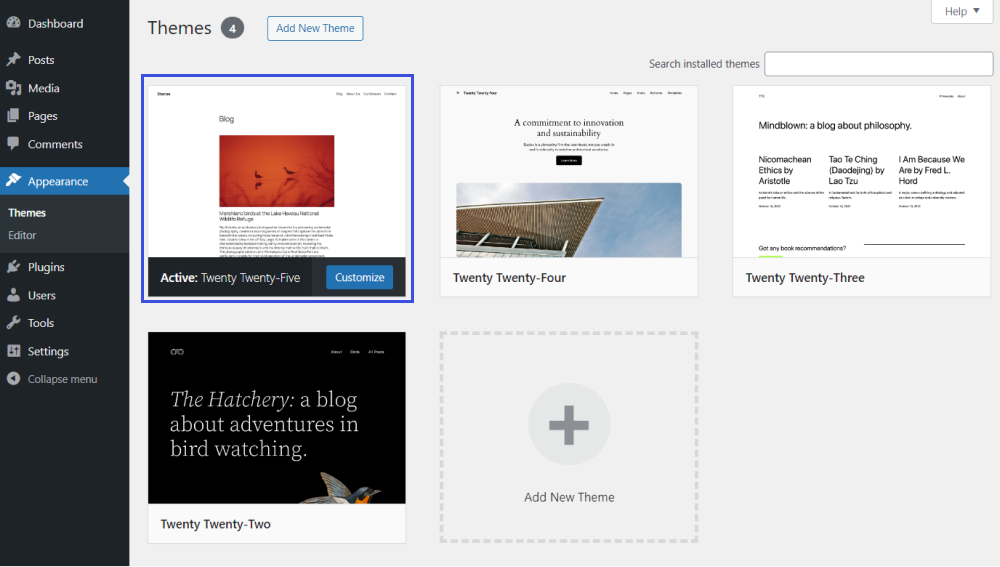
WordPress 6.7 includes Twenty Twenty-Five as a new default theme which showcases the full power of modern, block based site building. The design is minimalistic yet offers huge customization options, and therefore ideal for users of any experience. Here’s a look at its key features, broken down by category.
1 Design & User Experience
- Twenty Twenty-Five aims for a mix of lightweight approach and a design too specific, giving just enough structure to tighten an unfettered visual look.
- The theme is based upon our RBP (Reusable Building Patterns), simply assemble polished layouts up in a matter of minutes without any coding knowledge.
- With various choices of style and carefully selected strap material, it’s hard not to find the perfect combination that is for years to come. Attention to details.
2 Patterns & Layout Building
- It comes with pre-designed templates for service pages, about sections, work showcases and is fully responsive.
- These patterns are built for actual use, not simple dummy design which means you can create pages with speed while keeping a high design quality.
- You can mix and match and re-arrange patterns to build beautiful pages in just a couple of minutes.
3Responsiveness & Typography
- The text is fluid and responsive, ensuring that the content flows naturally at all screen sizes and that your post is easy to read on all devices.
- Native control is eased because of the responsive nature, minimizing design maintenance.
4Visual Enhancements
- It’s a good example of block / global background images usage.
- It also allows for layered, image rich designs that are visually appealing but do not sacrifice clarity and performance.
5 Performance & Optimization
- It is performance tuned, which makes it work even on entry level or budget hosting.
- It provides consistent and seamless user experience without extra overhead.
6 Developer-Focused Features
- It shows how to use the Template Registration API, Block Bindings API, and more new features in WordPress 6.7.
- It offers a real world example of creating future compatible to block themes for developers.
- Simple by design, and easy to extend or adapt for the project at hand.
Enhanced Block Editor: More Power & More Control
WordPress 6.7 brings practical improvements to the block editor, making content creation faster, cleaner, and more flexible. The key updates focus on design control, smarter dynamic content, and smoother workflows.
The block inserter stays open while you work, the toolbar is more accessible, and the pre-publish flow is cleaner.
Borders and colors are now available on Buttons, Headings, Paragraphs, Galleries, and more. Plus, Group blocks finally get shadows so adding depth and style is a breeze, you don’t need code anymore.
The Query Loop block now automatically inherits template settings, saving you time. Filtering and sorting are easier as well, making post lists, product grids, or event displays simpler than ever.
| WordPress 6.7 makes editing less of a chore and more of a creative playground perfect for bloggers, designers, and content creators alike. |
Media Management Revolution: HEIC Support and Performance Boosts
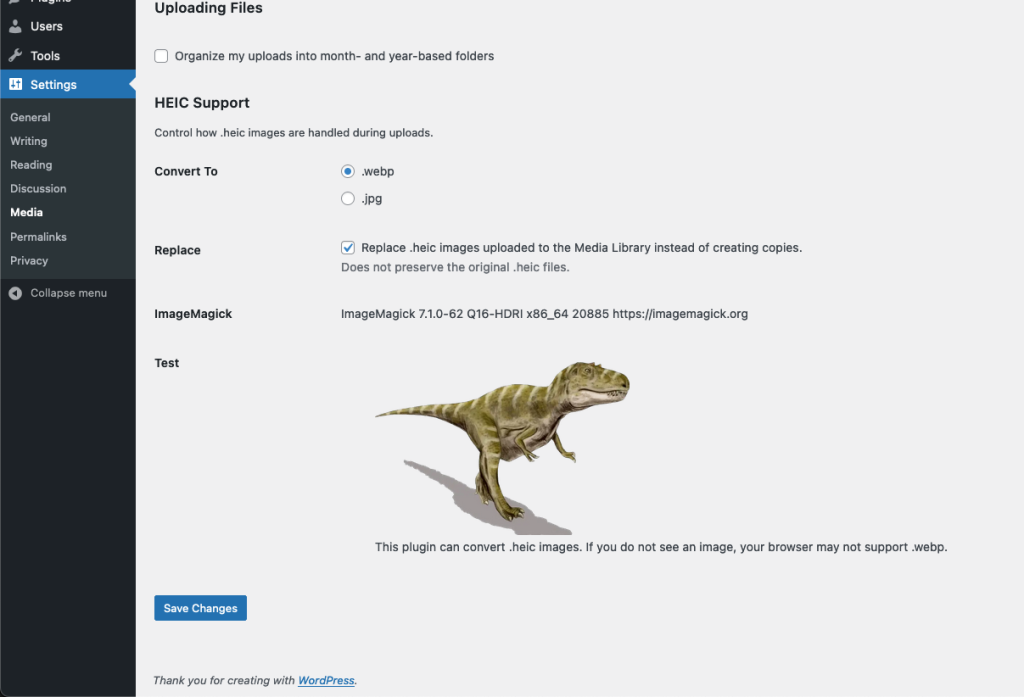
WordPress 6.7 simplifies handling of images; efficient interface for Apple device creatives. Native HEIC support is one of the most crucial. Developers no longer need to convert image files to JPEG or PNG, as WordPress now automatically does the work of converting your HEIC format images in the background, without compromising on their quality and compatibility with all browsers and devices.
You have to ensure though that your hosting provider has ImageMagick installed on their servers (most probably do like UltaHost).
You can check support under:
Tools → Site Health → Media Handling → ImageMagick did not support the following formats.
In addition to the above, WordPress 6.7 also includes other performance enhancements for image delivery
- The sizes=”auto” attribute is compatible with lazy loaded images to allow browsers to choose the best image size for screen resolution, reducing bandwidth and improving load time.
- It allows you to upload your own background images on individual blocks/pages or the entire site, control over image position, sizing and overlay options, it does all of this without needing any custom CSS.
- Coupled with new shadow and border controls, this now allows you to build professional looking, visually complex layouts without ever needing to leave the editor.
- Theme developer friendly and provides a powerful way to manage your background settings with pure programming while keeping clean markup.
Developer-Focused APIs: Building the Future of WordPress
WordPress 6.7 introduces a strong set of new APIs and developer tools that will let you build custom themes, plugins, and even more advanced websites easier and at scale. It’s yet another indicator that WordPress has transcended blogging and become a full blown application platform.
Some of the notable updates are:
- Block based templates now can be registered through code, without having to use a theme file or hijack esoteric hooks. It’s also easier to do simple templates for custom post types, taxonomies or even virtual pages but users and themes can still override them easily.
- WordPress 6.7 introduces a more approachable and user-friendly interface for editors to bind blocks to custom fields without coding. Now you can show post meta, custom field values or dynamically generated data with just a few clicks and still allow developers to have full control through the API that powers it!
- A new block-manifest.php file which allows multiple blocks to be registered from the same provider with a performance improvement, particularly useful for plugins that register lots of custom blocks.
- Bug fixes and better state management also makes it easier to create interactive features like lightboxes, dynamic filters, or other responsive UI components.
- Developers can add custom options to the preview dropdown in the editor, and see content side by side or as it would appear on different devices.
Data Views and Enhanced Content Management
Data Views are improved in WordPress 6.7 to make it simpler to manage pages, patterns and templates alongside large content libraries, a particular boon for agencies and enterprise teams.
Here’s what’s improved:
- The footer and floating toolbar now contain bulk actions so that the features you need are readily available while minimizing visual clutter
- Attractive flight previews Grid preview size is fully customisable to suit your screen and working style, taking the effort out scanning content in with a quick glance.
- Rearrange the columns to bring your most important data to the top be it a last modified date, an author or a status column.
- Choose from the grid view multiple items which you want to delete, duplicate or edit without opening each item!
- Switch between Published, Drafted and Scheduled contents in a jiffy without mess.
| Data Views uses a new API that lets developers display custom or external data in a consistent interface, with sorting, filtering, pagination, and bulk actions handled automatically. |
Typography, Fonts, and Performance: Polished Design Meets Real Speed in WordPress 6.7
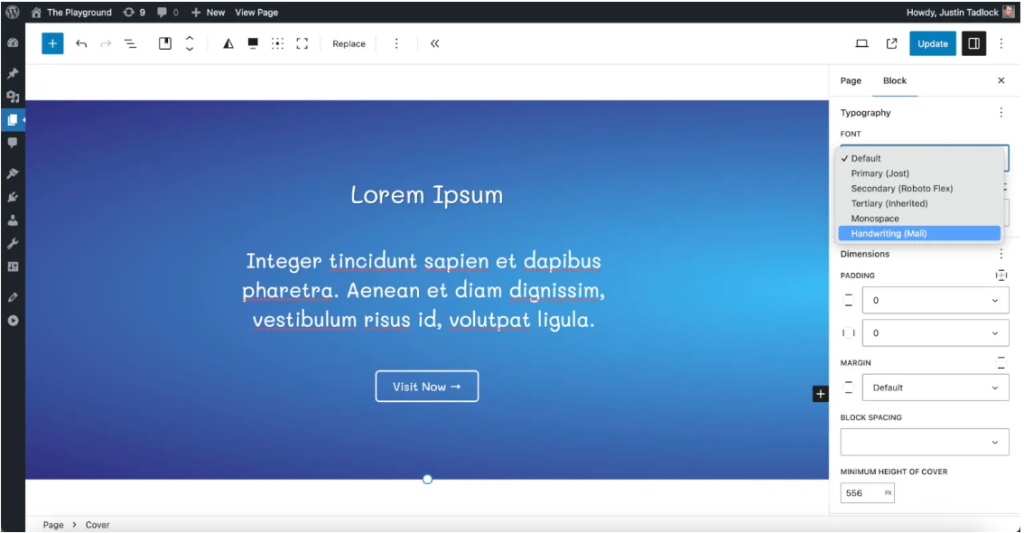
WordPress 6.7 is designed to help you both look good and perform properly by providing improved font control (for better font management) and more efficient use of typography, speeding up page load times in the background.
1Font Management & Typography Improvements
- Keep Font and Font-Sizes under control, All fonts (and font-sizes) are manageable in 1 place now In Global Styles, add/edit/delete those sizes without being tied to theme defaults.
- Create semantic size variations, such as small, medium, and large for the text styles used that appear consistently across the site.
- Text naturally scales across screen sizes through CSS typography as it should be, no need for breaking points.
- Twenty Twenty-Five adds even more support for these, and new typography APIs make it easy to create all sorts of textual hi-jinx with little or no custom CSS.
2Performance & Speed Enhancements
- Package libraries and previews load faster, including on content heavy or pattern rich sites.
- Optimized for PHP 8.1, 8.3, with performance improvements you can feel on the latest hosting environments.
- Outdated JavaScript polyfills are removed to decrease page weight and increase loading times on modern browsers.
- Faster image processing, better AVIF encoding, and support for sizes=”auto”on lazy loaded images reduce the amount of bandwidth used while improved Core Web Vitals can help your site stand out in search.
How UltaHost Maximizes Your WordPress 6.7 Experience
While WordPress 6.7 provides significant performance enhancements and impactful new features, the effect you experience will depend on the magic happening under the hood of your site. UltaHost fills this void with plans offering WordPress specific hosting that powers and elevates all you can do with WordPress 6.7.
Offering support for PHP 8.2 and 8.3, as well as SSD storage across all plans to speed up database queries, file retrieval and site uptime, UltaHost simply makes WordPress’s baked-in performance optimizations better!
1Performance
Performance is also boosted with enhanced server level caching, including Redis object caching which lowers database load on the server by fetching frequently-requested data from memory. This is particularly powerful on the dynamic features for WordPress 6.7 such as the Query Loop blocks, and custom field bindings we see up to 40-60% faster page load times.
2Speed and Server Configurations
When it comes to more than just speed, UltaHost also ensures full WordPress 6.7 compliance with pre-installed ImageMagick for HEIC image support; all PHP extensions recommended and server settings configured for memory, execution time, and uploads at their maximum so advanced features will work without any hitches.
3WordPress Focused
Rounding out the experience, UltaHost’s WordPress focused support team stays informed on all the latest WordPress trends and assists with performance tuning, compatibility problems, and advanced features such as the Interactivity API. Combined with on-the-ball security and server upkeep, UltaHost makes for a solid, high-performing base to begin extracting all you can out of WordPress 6.7.
| Real enterprise hosting doesn’t just respond when you ask, it actively monitors performance, detects anomalies, and preempts failures. That level of monitoring keeps sites stable during sudden traffic or plugin updates. |
Security and Maintenance Improvements
1Security Enhancements
This release strengthens security with improved authentication, refined user capability checks, and patches for known vulnerabilities, highlighting the importance of keeping sites updated.
2HTML API Improvements
The HTML API now supports nearly all HTML tags and introduces the new set_modifiable_text() method, enabling safe text updates inside script, style, and title tags. The HTML Processor also gains a full parser mode, allowing more accurate and secure HTML parsing while reducing XSS risk.
3Maintenance & Internationalization Updates
A new has_translation() function lets developers check translation availability without loading language files. Core functions like load_plugin_textdomain() and load_theme_textdomain() now load translations only when needed, reducing overhead.
Administrative emails are also sent in the user’s preferred language when the admin email matches their profile address.
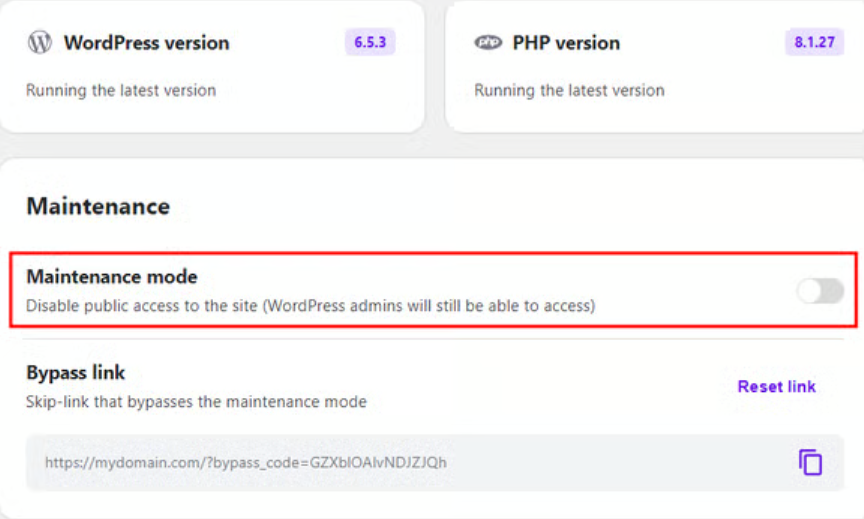
Migration and Upgrade Considerations
Upgrading to WordPress 6.7 is a straightforward process, but following a structured checklist helps minimize risks and ensures a smooth transition. Use the steps below to prepare your site, complete the upgrade, and verify everything is working as expected.
1Before the Upgrade
- Verify that your hosting environment meets WordPress 6.7 requirements, including PHP 7.4 or higher (PHP 8.1 or newer recommended) and MySQL 5.7 or MariaDB 10.3 or later.
- Ensure required PHP extensions are enabled, such as imagick, curl, dom, json, and hash.
- Create a complete backup of your WordPress files and database and store it securely outside your web server.
- Test the upgrade in a staging environment, especially for business critical or highly customized websites.
2During the Upgrade
- Navigate to Dashboard → Updates in the WordPress admin area.
- Click Update Now to install WordPress 6.7.
- Allow for a brief maintenance window while the update is applied.
3After the Upgrade
- Monitor site performance and responsiveness across multiple devices and browsers.
- Verify that your theme and all plugins are functioning correctly.
- Test content editing, forms, and media uploads to confirm full functionality.
- Review server and WordPress error logs for PHP warnings or compatibility issues.
| Following this checklist ensures a secure and reliable upgrade process, allowing you to take full advantage of WordPress 6.7’s features and performance improvements with confidence. |
Turn errors into opportunities for optimization
Understand how 400 Bad Request errors affect performance and SEO, and see how UltaHost can help you diagnose and fix them with ease.
WordPress 6.7 “Rollins” is no mere regular update, it marks an ongoing transition of the WordPress platform towards faster, more well-designed, and more user-friendly websites for approximating all types of users out there on the web, literally from individual bloggers to huge organizations.

Final Thoughts
WordPress 6.7 strikes the perfect balance between innovation and stability, providing what is still some of the best improvements we’ve seen from any point release yet without sacrificing performance and reliability.
Key features, such as Zoom Out mode (and adding the Twenty Twenty-Five theme) as well new block editor tools and media handling improvements, developer APIs, and performance optimizations are all production ready in this release and will make both your workflow and reader experiences work better now.
Strong, WordPress-specific hosting is crucial for realizing the potential of these upgrades as your site’s performance and security are highly reliant on your server. And with WordPress 6.8 already around the bend, updating to 6.7 now allows you to enhance existing sites for today while providing a steady foundation to build on into tomorrow’s next great thing.
FAQs
Is WordPress 6.7 suitable for non-developers and beginners?
Yes. Features like Zoom Out mode, block patterns, and the Twenty Twenty-Five theme allow users to design professional layouts without writing code, making WordPress 6.7 highly accessible to beginners, creators, and small businesses.
Do I need special hosting to benefit from WordPress 6.7 performance upgrades?
Yes. To fully experience WordPress 6.7’s speed improvements, your hosting should support PHP 8.2+, SSD storage, Redis object caching, and modern server configurations without these, many performance gains won’t be noticeable.
Choosing a WordPress optimized provider like UltaHost ensures these requirements are already in place, so you can benefit from WordPress 6.7’s performance upgrades right away without extra setup.
Should I upgrade to WordPress 6.7 now or wait?
If your plugins and hosting environment are compatible, upgrading now is recommended. It not only improves current performance and workflows but also prepares your site for upcoming features in WordPress 6.8.
Can WordPress 6.7 handle enterprise level websites?
Yes. With improved APIs, Data Views, performance optimizations, and proper hosting infrastructure, WordPress 6.7 is well suited for enterprise websites, high traffic platforms, and large content operations.
Are the new WordPress 6.7 APIs useful for real-world projects?
Absolutely. APIs like Template Registration, Block Bindings, and Interactivity reduce the need for custom code while enabling dynamic content, custom templates, and interactive UI elements making WordPress viable for complex applications


