
Password Protecting Files and Directories wit...
From the web security perspective, information is valua...






Let’s be honest for a minute: hackers target easy companies. That easy company could be small or big. Any website with a loose guard is an open invitation to attack. That is where website security audits come in. Think of these audits as a health measure for your digital property.
The audits are not bound to visible problems. They uncover silent vulnerabilities before attackers do. Trust us when we say that hackers run their own version of such audits. They just do not send you the report.
There are things you must know before you run a business online. Never skipping website security audits is one of them. Ditching these audits brings you temporary comfort and lasting discomfort. Structured website audits put you ahead of breaches with minimal reaction.
Define what you want to inspect first. A proper audit does not limit itself to malware scans. It reviews every layer of your website’s ecosystem. Your checklist should include core website files, extensions, software, themes, plugins, third-party integrations, server and site configurations, user roles and practices, hosting and SSL renewals, and overall website traffic behaviour.
Website protection is both essential and easy!
Protect your website before someone else tests it for you. Explore Ultahost’s secure hosting and proactive protection solutions today. Join us now and enjoy carefree journey as your website remains 24/7 safeguarded.
Each of these components risks your site’s health if neglected. Below are seven structured steps to help you examine your site’s defences.
Initiate a full scan of your website security. This process informs you level of protection your site has. Malware, configuration errors, and outdated software are checked well this way.
Tools like Sucuri SiteCheck allow you to generate a security report. The scan provides a risk score as well as highlights detected vulnerabilities. Improvement recommendations are also offered.
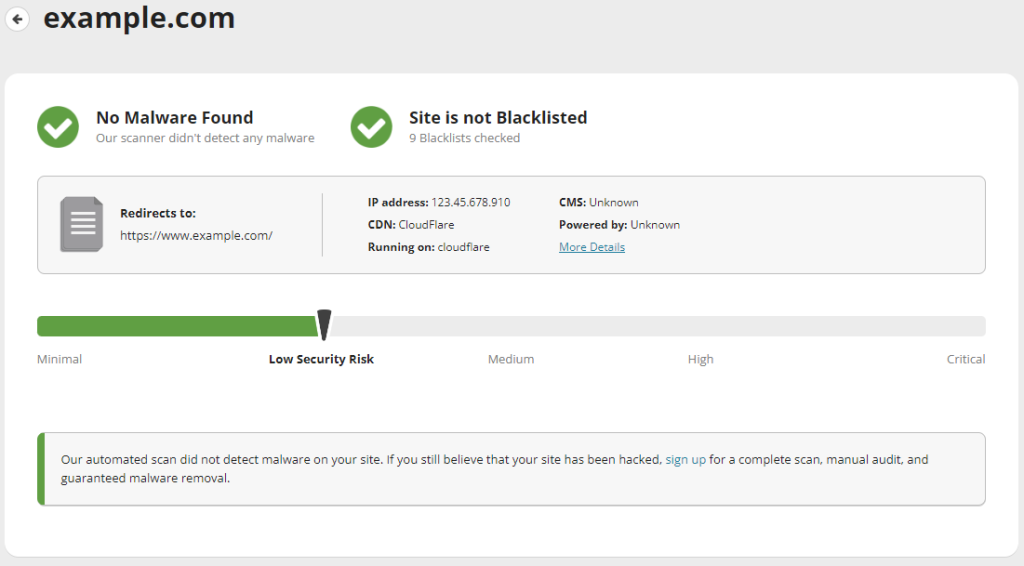
Sucuri is a popular option, yet many reliable scanning tools are available. On you to choose your solution. Either way, this first step functions as the baseline for the rest of your audit.
Analyze the configuration settings on your website. Using a CMS such as WordPress? Access the dashboard and inspect all system preferences for potential weaknesses.
Spam prevention is achievable with close attention to comment moderation settings. Backend details, such as software versions or server information, must not be public knowledge. Review input fields across your site and implement proper validation to block malicious characters or scripts.
Keeping your CMS themes and plugins updated. A critical enough move to reduce security risks.
Access management plays a major role in website security. Your server verifies user privileges whenever changes are made. Essential to control who has what level of access.
WordPress comes with roles. Super Admin. Administrator. Editor. Author. Contributor. Subscriber. All of them come with specific permissions. Assign roles to the best of your judgment. Never grant more privileges than necessary.
Remove abandoned or inactive accounts from the Users section of your dashboard. All remaining users must have strong and unique passwords.
Outdated software is a common cause of website breaches. Very common. Setbacks in older versions of CMS platforms, plugins, themes, or extensions can be exploited with ease.
Make it part of your routine to update all elements as soon as stable versions are released. Regular maintenance lessens exposure to known threats. Your entire security posture is empowered.
Your domain or IP address can be blocklisted if associated with spam and malware distribution or phishing activity and botnets. Your reputation is damaged and email delivery is affected.
Want to check if your domain or IP appears on any blocklists? May tools like Spamhaus or SpamCop help you. Amen.
Follow the removal procedures. Or you may contact your hosting provider or ISP if the issue persists. Domain privacy protection is the key to keeping WHOIS protected from the public eye.
Security demands essential services to remain active. Be conscious of the expiration dates of your domain registration, hosting plan, and SSL certificates. Updation saves a lot of hassle. The role of hosting in website security is undeniable.
Domains can be registered for multiple years. Modern SSL certificates are valid for up to 397 days. That is approx 13 months. Hosting plans vary in duration based on the provider.
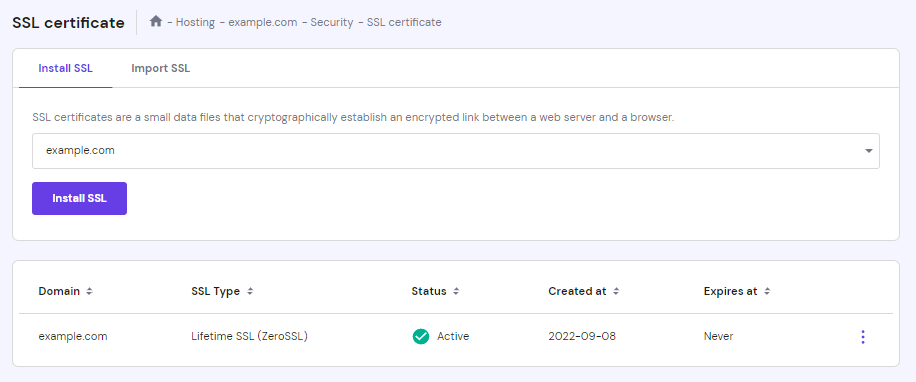
Most hosting dashboards allow you to view renewal dates under the service and billing sections. They also generate invoices for upcoming payments. Stay ahead of renewals to maintain user trust.
The final step in a site security audit is to review traffic activity. Website traffic comes from direct visits and referrals from other websites or social platforms as well as from organic search engine results.
Google Analytics or Ahrefs or MonsterInsights are popular analytics tools used to monitor visitor behaviour. Look for irregularities like sudden traffic spikes from unfamiliar locations. Unexplained increases that could signal botnet activity or sharp declines that might indicate search engine penalties should also alert you. Security warnings must never be ignored.
Filter suspicious traffic and apply protective measures like Cloudflare page rules. These actions can help mitigate malicious requests and maintain uptime.
We hope this step-by-step guide on website security audit helped you out in some way. You may join us for further information on the matter.
Website security audits must be a regular task. Malware scanning and configuration reviews are one thing. You should be aware of how to manage user permissions. Stay updated in addition. Be also informed on renewals and traffic patterns. Every tiny bit of your website plays a role in its overall security. Ignore one weak point and you create an entryway for attackers. Ultahost is around with all its might and experience to rescue you out of this mess. All you have to do is contact our support team.
UltaAI – Smart AI Assistant for Ultahost Clients
UltaAI is your advisor for anything related to domain or hosting. Experience personalized suggestions with our Smart AI!