



When you access the internet, you deal with URLs dozens if not hundreds of times a day. You type them into your browser’s address bar, click them in search results and share them with friends. But do you really understand what a URL is and how it functions?
Despite being a component of daily internet use, URLs are widely misunderstood. What seems to be a haphazard series of characters is instead an ordered system in which every component has a function. Knowing how this structure works can help you browse smarter, wrangle websites better and increase your SEO.
Knowledge of URLs is essential to getting around the web with ease, and whether you are a casual internet user, an up-and-coming web developer or aspiring digital marketer, having a working knowledge of what makes up a URL can make your time on the internet more effective and secure
Key Takeaways
- A complete URL (Uniform Resource Locator) is an address used to access a particular place in the internet.
- From HTTP to HTTPS can mean the difference between being secure and exposed.
- Simple mistakes such as bad domain typos can result in phishing sites, case sensitivity issues will lead to broken 404 pages and sharing URLs with personal parameters will expose private user data.
- URLs significantly impact search engine optimization. Descriptive, concise URLs with relevant keywords.
- Your hosting has an effect on URL performance – fast DNS resolution, reliable uptime should be up to you and not something left to chance.
Get Your Domain and Hosting the Right Way
Start with UltaHost reliable, easy-to-manage domain management that fits your brand. With affordable hosting.
What is a URL?
A URL, or Uniform Resource Locator, is simply a resource address on the Internet. Like the address of your house, for example, that way people can find you, a URL means anybody’s web browser knows exactly where to look to get, say a particular webpage, or image, or video — really anything at all anywhere on the internet.
The word “uniform” signifying that URLs have a standard format and can be universally understood by computer systems and browsers. “What that means is a ‘resource’—any thing you can access on the internet, be it an HTML page, or PDF file, an image, a video.” “Locator” just signifies that it’s the mechanism we use to locate or find that resource.’
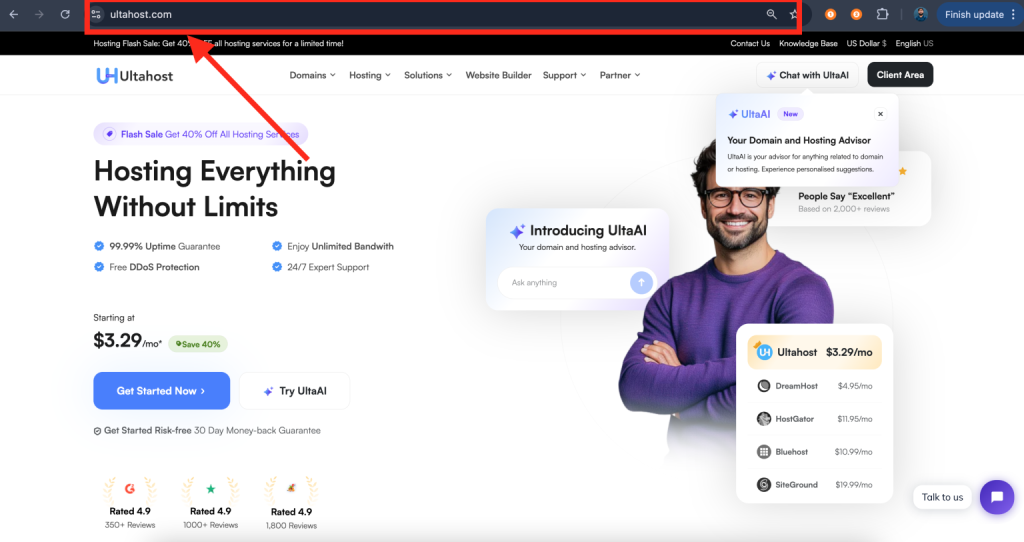
The Anatomy of a URL
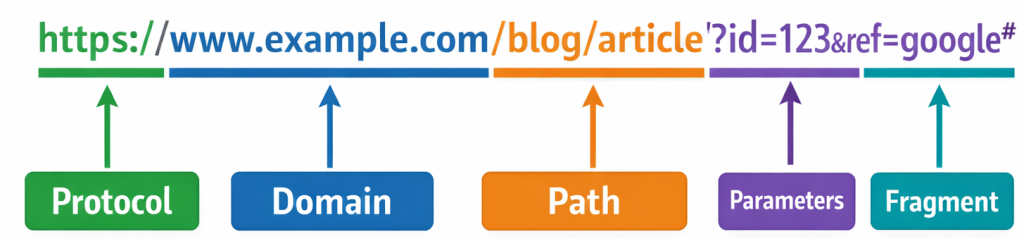
Geeking out on a URL To really understand URLs you must first deconstruct them. So what are the components of a URL?
https://www.example.com:443/blog/article?id=123&source=newsletter#section2
This might look complex at first, but each element of the URL has its place.
1 The Scheme (Protocol)
The portion of our URL have: https://. This is known as the scheme or protocol, and it informs your browser what protocol it should use to download the resource. The most popular are HTTP (Hypertext Transfer Protocol) and HTTPS (HTTP Secure), but there are others such as FTP (File Transfer Protocol).
This is why modern website uses HTTPS when a Web page doesn’t use the secure HTTPS protocol, that’s because everything between your browser and the server you’re connecting to is sent in plain text. When you notice that little padlock icon in your browser’s address bar, it means the site is using HTTPS.
2 The Domain Name
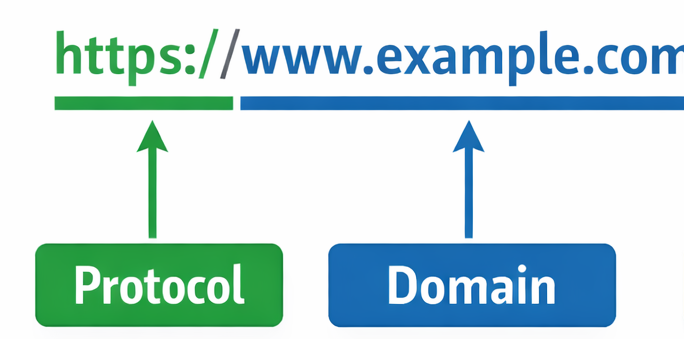
Using the protocol, we obtain www. example. com. “this is the domain” that identify where, in human language, the source residing server is. Domain names were because, let’s face it: Humans are great at remembering words — way better than we ever will be about those numerical IP addresses that computers use to talk.
A domain name can usually have one or several parts separated by periods. In this URL, com is the top-level domain (TLD), example is a second-level domain (example being the actual name of your website), and www would be a subdomain. Many URLs no longer contain the www subdomain, a feature that has grown rather antiquated; however, as many sites still use it for traditional purposes or in order to separate their primary site from other services..
3 The Path
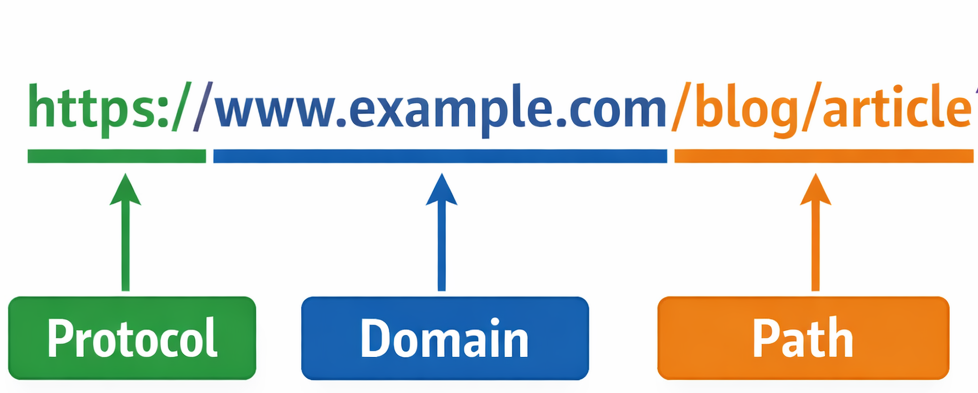
The /blog/article is referred to as the path. It’s what tells the server exactly where the resource on a server is located, much like a file path points to where a file is found in folders on your computer. This tree structure lends itself to logical structuring of content. In this instance, it means there’s a blog section on the site and, within that, an article page.
4 Query Parameters
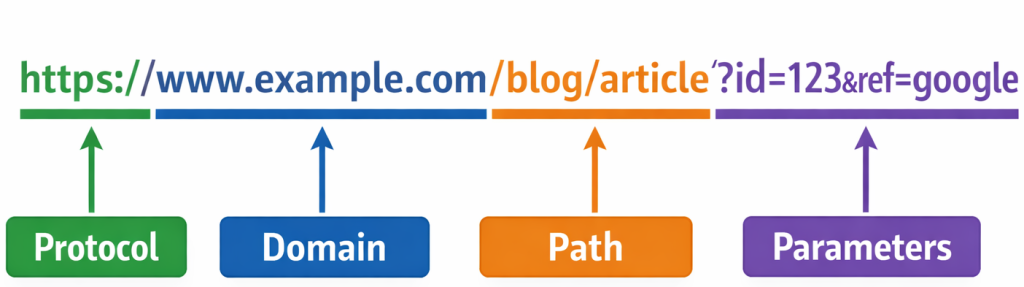
The section beginning with? id=123&source=newsletter are parameters (also known as queries). These are implemented in order to send further information to the server, usually a way of modifying the content that is being shown or maintaining who referred you. Query parameters are beginning with a? followed by key-values separated by &. For example, id=123 could specify which article the server should show, and source=newsletter could flag that the user came from an email newsletter.
5 The Fragment
Finally, #section2 is what’s known as a fragment identifier or anchor. This is not sent to the server at all, and instead instructs your browser to scroll down to an element when you open a page. You see these a lot in really long articles with table of contents, where clicking one of the links will scroll you down to that section.
| Before sharing any URL, perform the “phone test”, if you can’t read it aloud to someone over the phone and have them type it correctly on the first try, it needs simplification. Great URLs are as easy to speak as they are to click. |
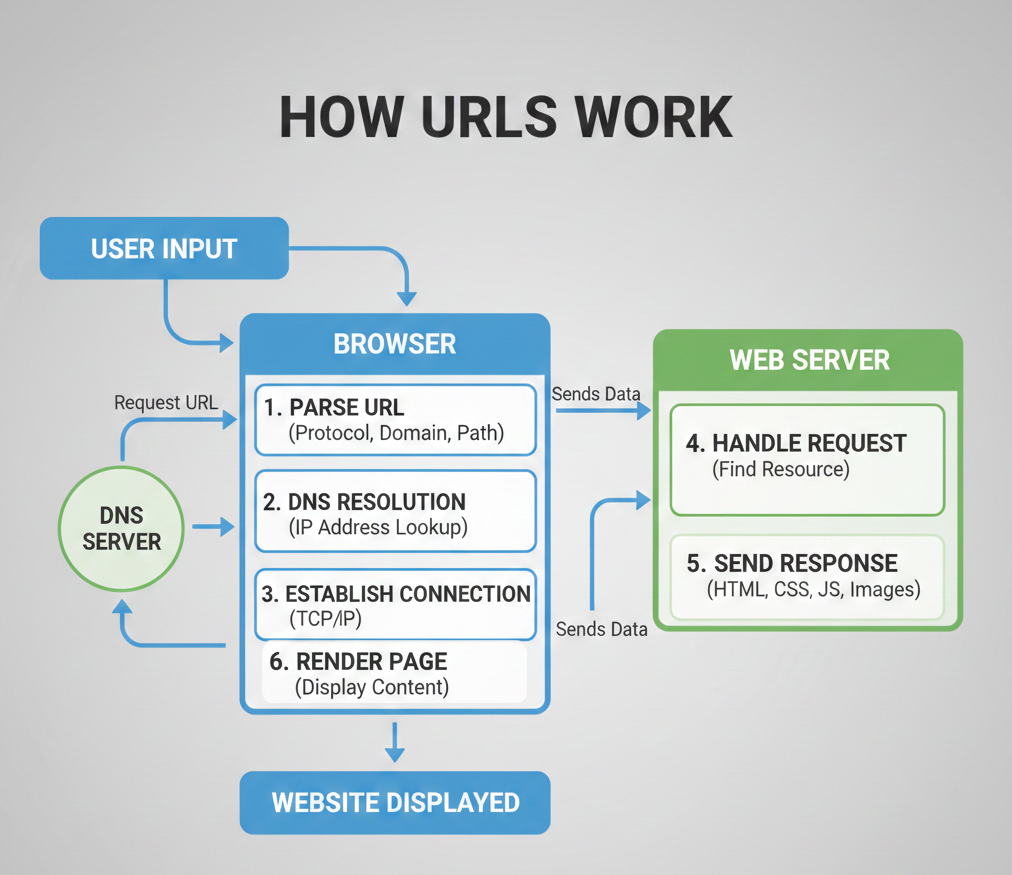
How URLs Work Behind the Scenes
First, your browser decodes the URL to see what it’s composed of. Then it performs a DNS (Domain Name System) lookup to translate the domain name into an IP address, which is the actual machine-readable address of the server. Then your browser requests this file from the server at that IP address on port 80 using something called HTTP.
On HTTPS It’s an encrypted secure connection that is established. So your browser makes a request for the particular resource that is mentioned in the path and/or query part. The server answers to this request by sending you back an answer that includes the resource you asked for or creating a new one.
That data comes across to your browser and then packs it up ( if its html or an image or something ) and displays that on your screen. If an URL has a fragment identifier (such as #test), the browser will take care of scrolling to its position on the page.
All of that usually takes place so fast you’ll hardly notice the wait, although complex pages with lots of assets can take a little longer to fully load..
Absolute vs. Relative URLs
For beginners knowing the difference between absolute and relative URL s is a fundamental skill in web development. The table below gives you an at-a-glance comparison of how each type of URL’s are put together and what to use them for.
| Feature | Absolute URL | Relative URL |
| Definition | A full URL that includes the protocol, domain, and path | A partial URL that points to a resource relative to the current page |
| Example | https://example.com/images/logo.png | /images/logo.png |
| Includes Domain Name | ✅ Yes | ❌ No |
| Includes Protocol (http/https) | ✅ Yes | ❌ No |
| Dependency on Current Page | ❌ Independent of current page location | ✅ Depends on the current page’s location |
| Best Use Case | Linking to external websites or canonical URLs | Linking to internal resources within the same website |
| SEO Impact | Preferred for canonical links and avoiding ambiguity | Fine for internal linking but can cause issues if base URL changes |
| Portability | Less portable (domain-specific) | More portable across environments (dev, staging, production) |
| Commonly Used In | Sitemaps, canonical tags, external links | Navigation menus, internal assets (CSS, JS, images) |
The Role of URLs in Web Hosting: What UltaHost Users Need to Know
Understanding the relationship between URLs and web hosting is crucial for anyone managing a website. When you choose a hosting provider like UltaHost, you’re not just renting server space; you’re establishing the foundation that makes your URLs accessible to the world.
1 Domain Registration and URL Structure
That’s where The Domain Comes In Your journey starts with domain registration. When you register a domain at UltaHost or when you connect an existing domain to your website (by using one of the other methods), you’re creating part of that URL structure. This becomes the base on which everything else is mounted. UltaHost’s domain management tools helps you to easily get your primary domain set up, look into the particulars of activating subdomains, and manage DNS records to ensure that your URLs are resolving correctly.
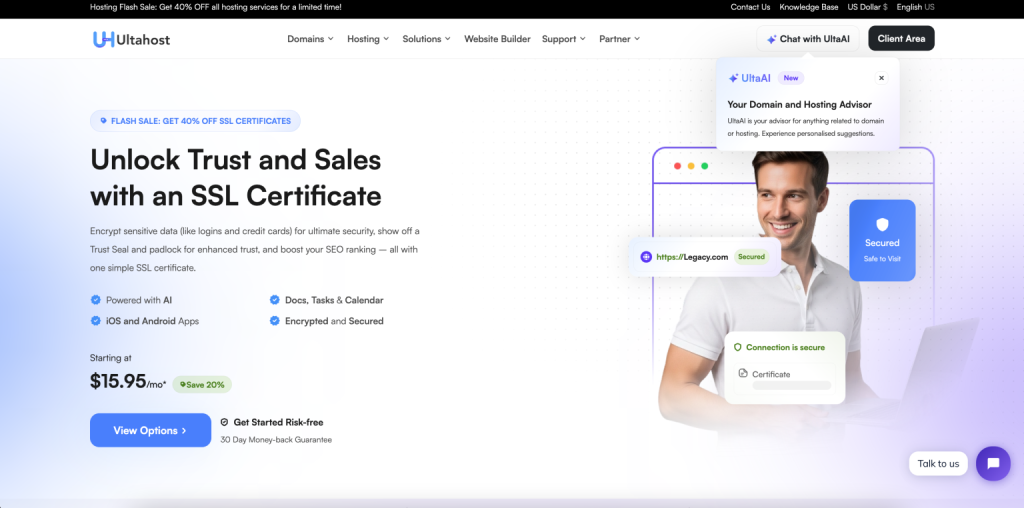
2 SSL Certificates and HTTPS Implementation
Nowadays websites can’t work without Https, UltaHost offers SSL certs to make your URLs secure. When you apply SSL to your hosting account, all URLs on your website change from http:// to https:// — securing data traveling through the server and into the browsers of your visitors.
This is not only good for protecting sensitive information, but you probably rank better in search engines because Google and other search engines give more priority to secure websites. UltaHost’s automated SSL setup takes care of your URLs so that they are secure even if you’re not tech-savvy.
3 Server Performance and URL Resolution Speed
The speed with which your URLs load will also depend on the quality of your hosting. When somebody types in your URL, meanwhile, DNS servers have to look up—resolve—your domain name with the IP address of your server. UltaHost’s efficient server cluster architecture and multiple data centers guarantee this resolution is carried out quickly. With faster DNS lookups your visitors will receive content quicker, which leads to a better user experience and less of them leaving your website.
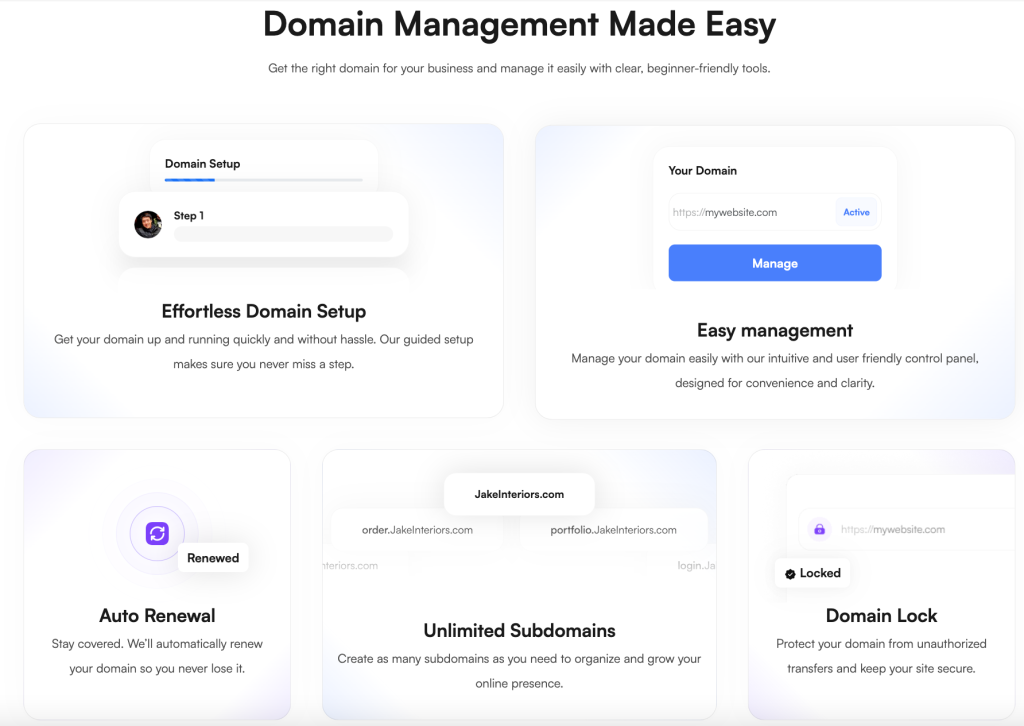
4 Managing Multiple Domains and Subdomains
If your web presence expands, you might have many domains or subdomains, all with their own URLs. UltaHost hosting packages also support addon domains and unlimited subodmains meaning you can host multiple website addresses on one shared account.
5 URL Redirects and .htaccess Management
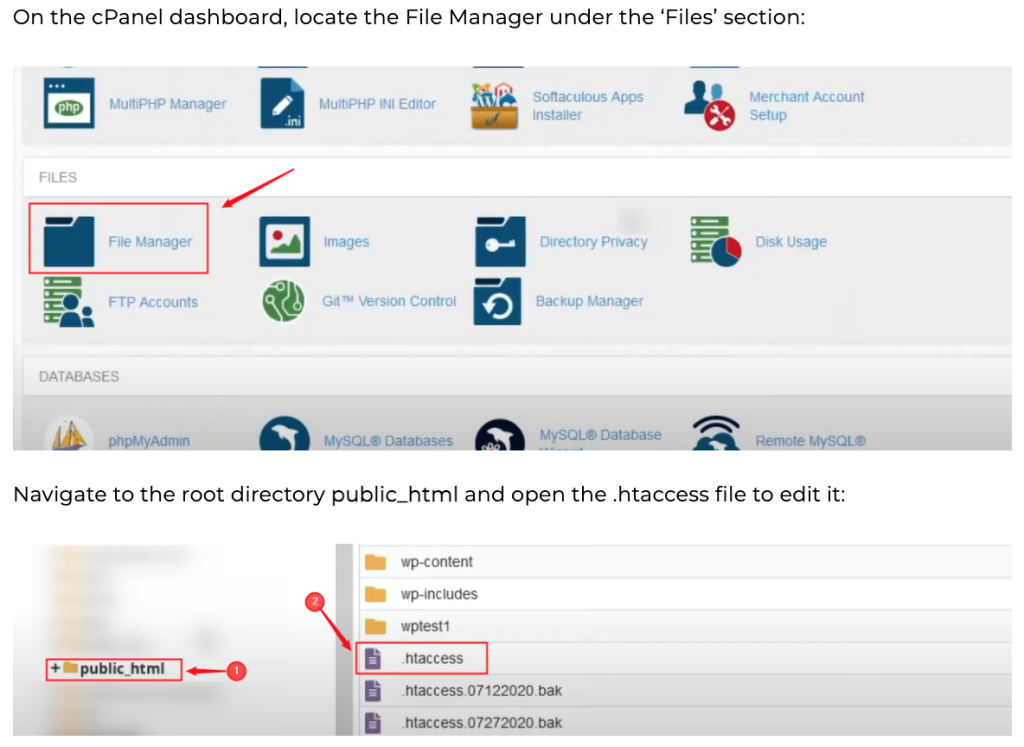
When restructuring your URLs or moving from old URLs to new ones, you need to do what we call URL management. UltaHost provides access to. files, redirect features allowing you to redirect your traffic on an as needed basis and create 301 redirects to keep search engines happy when changing URL’s.
6 Uptime and URL Accessibility
Uptime is the most important factor with a host. Your URLs aren’t worth anything if no one can go to them 24/7. UltaHost promises of reliability also ensure that your URLs will be up and running at all times, only requiring occasional maintenance periods. 24/7 availability is crucial to remain competitive and for building trust with your customers and search engine rankings.
7 Custom URL Configurations
Advanced users can use UltaHost’s hosting capabilities to work with custom URL structures through mod_rewrite rules, handle broken URLs using trafic retention and error pages, or customize folder structure on the website. The settings menu can be used to customise how your URLs should look and behave for your visitors.
URLs vs URIs vs URNs: Understanding the Differences
If you’ve ever been a bit baffled by the terms URL, URI, and URN (and many of us have), there is some comfort in knowing that you are in good company. All three are variants of each other but serve distinct functionalities.
This comparison should give you an idea of what each is, and when (if at all) it will be used or if want to use it.
| Feature | URI (Uniform Resource Identifier) | URL (Uniform Resource Locator) | URN (Uniform Resource Name) |
| Definition | A generic identifier for a resource | A type of URI that specifies where a resource is located | A type of URI that specifies what a resource is by name |
| Purpose | Identify a resource | Locate and access a resource | Uniquely name a resource without implying location |
| Includes Location | ❌ Not necessarily | ✅ Yes | ❌ No |
| Includes Access Method (Protocol) | ❌ Optional | ✅ Required (e.g., http, https, ftp) | ❌ No |
| Resolvable on the Web | Sometimes | ✅ Yes | Usually not directly |
| Scope | Broadest category | Subset of URI | Subset of URI |
| Dependency on Network | Optional | ✅ Required | ❌ Not required |
| Common Use Case | Identifying resources in general | Accessing web pages, APIs, files | Identifying books, standards, or namespaces |
| Example | https://example.com/page | https://example.com/page | urn:isbn:978-0134685991 |
URL Best Practices and SEO Considerations
Creating effective URLs is part art and part science for website owners and developers. URLs are a factor in how search engines decide what to rank the page for SEO.
A good URL is descriptive, and legible. For instance, example.com/blog/url-guide is much more better input friendly than example.com/page? id=4892.
1 Typos in Domain Names
One of the most common types of errors is misspelling domain names, and especially when normal variations like understanding. com with. co or. net, or a misspelling of the domain itself. Hackers frequently take advantage of this with a technique called “typosquatting,” registering frequent misspellings of popular websites in order to capture misdirected traffic or lead phishing campaigns.
Be sure to double-check the domain name in your address bar before you hit Enter, and even more so when entering sensitive information. If you own a website, consider registering common misspellings of your domain to protect your brand and redirect traffic to the correct URL.
2 Trailing Slashes Confusion
Sometimes it can matter if there’s a trailing slash on the end of a URL or not. While example. com/blog and example. com/blog/ that your visitors expect to get them to the same location, some servers interpret them as different URLs which can mean duplicate content for SEO or broken links. As website owners you can set a common-string pattern and the preferred one to search engines.
3 Case Sensitivity Oversights
What many people do not know is, depending on server configuration, the path part of URLs are case sensitive. While example. com/Blog and example. com/blog might have the same behavior on windows servers, but linux server treat it as a separate URL. This can create those annoying 404 errors.
4 Sharing URLs with Personal Parameters
One of the most widespread privacy pitfalls occurs when you share URLs with session IDs, tracking parameters, or personal tokens in their query string. For instance, give a URL such as and. com/article? user=johndoe&session=abc123 could be your account details or tracking information. Analyse the query parameters and delete anything that looks like personal/specific session information before passing URLs around.
5 Ignoring URL Length Limitations
Overly long URLs can create problems with things like sharing (on the likes of social media), bookmarks, and some ancient systems. Keep your URLs short and sweet rather than including unnecessary variables.
6 Not Encoding Special Characters
Using spaces, ampersands (&), or other special characters in URLs without encoding is link dead. A URL like example. com/my article doesn’t work, it should be example so tale. com/my%20article or better yet, example. com/my-article. And then when designing URLs for your own site, only use alphanumeric and dashes – It will eliminate encoding problems completely.
7 Overlooking URL Redirects
A common SEO mistake when creating the redirects of past or changed URLs is to use 302 temporary redirect instead of 301 permanent redirect. These are also handled differently by search engines: 301 redirects pass ranking authority to the new URL, whereas 302 redirects may indicate that the original URL will return.
Each part of a URL has its role. Clean paths, meaningful parameters and well placed fragments aren’t technical details, they’re the foundation of user-friendly, future-proof web architecture. A well-designed URL can tell users and search engines alike exactly what’s waiting to be found, all before a page has even loaded.

Ready to Build Your WordPress Site on Lightning-Fast Infrastructure
UltaHost’s optimized hosting includes free SSL, CDN integration, and 99.9% uptime, everything covered in this checklist, pre-configured for you.
Conclusion
Whenever you understand what URLs mean Whether you’re simply cruising the web, launching a website or sharing links with friends, understanding how URLs function will enable you to use the internet that much more safely and effectively.
Every time you come across a URL in the future, it won’t just be a random string of characters — it’ll be an intentionally organized address that will tell you something about where you are on the internet and how you got to where you are. This unassuming line of text is one of the cornerstone technologies that underpins the modern internet, linking billions of users to an unimaginable number resources across the planet, every day.
FAQs
What’s the difference between HTTP and HTTPS, and does it really matter?
Yes, it matters! HTTP (Hypertext Transfer Protocol) sends data in the clear, but HTTPS sends all requests to a server encrypted using SSL/TLS certificates, ensuring that sensitive information such as passwords, credit card numbers or personal information cannot be seen by hackers.
How does my web hosting provider affect my URLs?
Your host’s role in URL functionality There are several ways that your hosting provider affects the functioning of a URL: DNS management ensures when visitors type in your domain name, it points to your server’s IP address SSL certificate
Can a URL contain spaces?
URLs can’t have raw spaces. If you want a space in the URL: use %20 or – or _. For instance, “my article,” in a URL, would become my%20article or better yet my-article. A Spaced URL Is Not Good For SEO or Readability Hyphens are the best practice for both reading and Search engines.
What is a domain name in a URL?
- A domain name is the human-readable address of the site that you visit, e.g., example. com. It consists of:
- Top Level Domain (TLD) - the portion of an extension such as. com,. org,. net
- Second-Level Domain – The name of the website itself (example)
- Subdomain – an optional prefix such as www or blog
Are URLs case-sensitive?
Yes, actually it depends on the server settings. The domain name is NOT case-sensitive but the path part can be case-sensitive on most servers. For Linux servers “/Blog” and “/blog” as different URLs, while for Windows servers they are the same.
How does UltaHost help with URL managment?
UltaHost has something in URL which is significance:
Subdomains are supported – Multiple URL formats can be hosted with Ultahost on a single hosting account
DNS control – Ultahost keeps your desired domain name pointed to the right IP address
SSL certificates - Free SSL from ultahost allows https for secure URL’s.
Server speed– the speed that URLs load on onchange choice Server Location Speed test changes Some Description
Uptime – Ultahost Uptime Guarantee 99.99% uptime
Tools for configuration – Ultahost also gives you the option to create redirects and customize your URL structure


