



Is your WordPress website struggling to attract organic traffic? Are you finding it difficult to break through to the first page of Google search results? You’re not alone. Many website owners face the challenge of optimizing their sites for search engines while maintaining a great user experience.
Search engine optimization (SEO) is one of the most important factors behind a successful WordPress website. Even if your site looks great and offers valuable content, it won’t perform well unless search engines can properly crawl, understand, and rank it.
This comprehensive WordPress SEO checklist covers 40 essential tasks that will help you optimize your website for better search engine rankings, improved performance, and increased organic traffic.
Key Takeaways
- Great rankings aren’t the result of just doing good content or technical setup, along with some user experience; they are when all three can work in harmony.
- Load Speed, Uptime, and Security in addition to scalability all play a direct role in rankings and crawl ability as well as Core Web Vitals.
- Keywords only matter partly. On-page optimization and structure of content is a factor too. Google friendly URLs, headings with keywords, internal link, and readable article format all contributes that Google and visitor will both understand your content.
- SEO should be constantly monitored and updated. Ongoing audits, content refreshes and performance checks are necessary to grow and sustain organic traffic over time.
- The correct infrastructure is one that makes scaling SEO easier. Performance-tuned WordPress hosting eliminates technical roadblocks, enabling your SEO tactics to shine through in the long-term.
Every second counts in SEO.
UltaHost’s NVMe SSD storage and built-in LiteSpeed Cache deliver 300% faster performance with zero configuration needed..
40 Tasks to Boost Speed and Rankings
We’ve come to conclusion that you can achieve SEO success and improve your site ranking only by using these 40 SEO tasks. But that’s not all. I’m sure you can discover more ways to use our platform to improve your SEO results.
Now, let’s look at the key SEO tasks you can do with SE Ranking.
1 Reliable Hosting
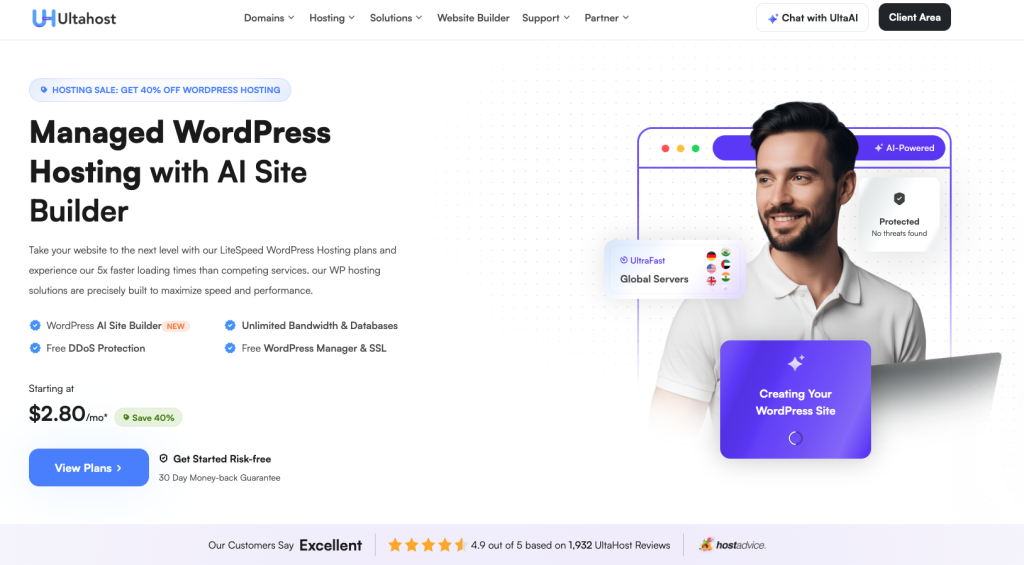
Your website’s hosting provider is the backbone of how your site performs. A good host is fast, with low downtime and high security. This is super-important for SEO! When choosing a hosting package be sure that the company supports SSDs, CDN providers, automatic backups and 24/7 support.
Bad hosting leads to low page speeds, and a lot of down time and this all affects your SERP. Decent hosting providers will include free SSL certificates, staging environments to test changes, and one-click WordPress installation to make it as easy as possible for you.
| Pro tip: If you need great SEO from day one, UltaHost’s managed WordPress hosting serves up the speed, uptime and scalability that search engines show to in return. |
2 Install and Configure an SSL Certificate
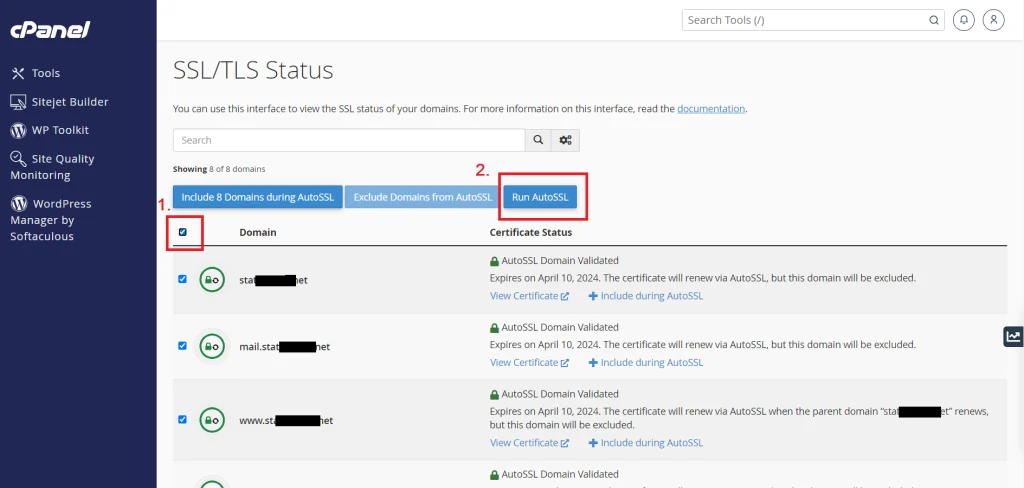
SSL certificates, short for Secure Sockets Layer, which makes data transmitted between your website and a visitor’s browser unreadable to prying eyes. And Here’s Why Aside from security, SSL is a known Google ranking factor that impacts search standings directly..
If a site is SSL-enabled, then the URL will start with HTTPs instead of HTTP and browsers will show a padlock icon confirming that a user’s connection to the site is secure. Browsers now display sites that don’t have SSL as “Not Secure” – A shocker to users with a boatload of negative effects. The majority (at least reputable ones) hosting companies today offer free SSL certificates through projects such as Let’s Encrypt, which makes the addition process easy.
| Pro tip: With UltaHost, SSL certificates are included at no extra cost, helping you secure your site and improve SEO without additional configuration |
3 Optimize Your Permalink Structure
Permalinks are the permanent URLs to your individual pages and blog posts, as well as your category and tag archives. A well-crafted permalink helps both search engines and users to see what your content is before clicking.
The default WordPress permalink category, with dates and post IDs, are not that SEO friendly and URL for some people can become too long. Instead, choose a post name structure that allows for your keywords to occur organically. A clean permalink like “yoursite.com/wordpress-seo-tips” works WAY better than “yoursite.com/?p=123” or “yoursite.com/2026/01/23/sample-post.”
4 Submit Your XML Sitemap to Search Engines
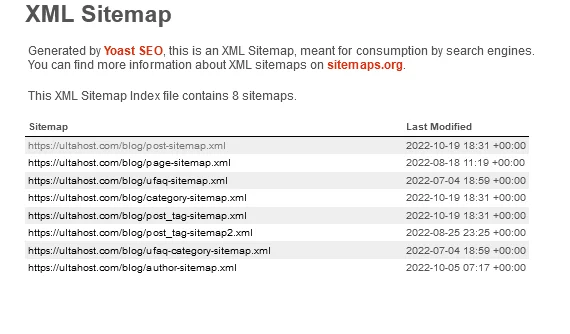
An XML sitemap acts as a roadmap of your website which leads Google to all content on your site, this allows it to crawl and index your pages better. Search engines can discover content even through crawling, but an active sitemap makes it so much easier and faster.
All SEO plugins create an XML sitemap for your WordPress site automatically. When you have created it, submit your sitemap to Google Search Console and Bing Webmaster Tools. Not only does this accelerate the indexing process, but also gives you some insight into how search engines interpret and crawl your site. You can check a list of indexed pages and find crawl errors, while also getting alerted about things that might have gone wrong.
5 Optimize Your Robots.txt File
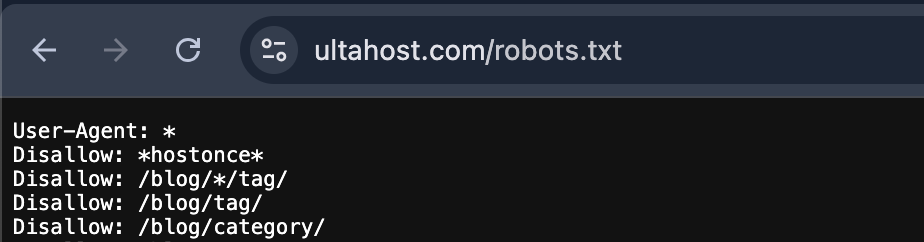
The robots.txt file tells search engine crawlers which parts of your site to crawl and not crawl. WordPress creates a simple robots.txt by default; customizing it can help search engines avoid wasting crawl budget on pages of little value.
Blocking admin pages, login screens, search listings and your own duplicate content allows search engines to focus on your more important pages first. But watch out — incorrectly configured robots.txt files can accidentally block your entire site. Get in the habit of testing changes in Google Search Console’s robots.txt tester before running them live.
6 Enable Search Engine Visibility
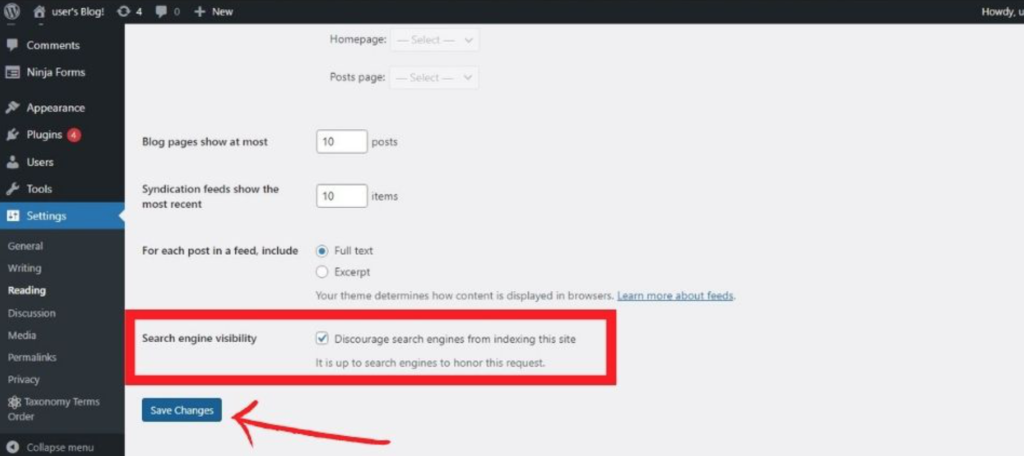
It’s a no-brainer but the first thing you need to do is make sure your website can be found by search engines like Google. WordPress has a feature that “discourages” search engines from accessing your site — primarily useful when you are setting up your WordPress site, but potentially catastrophic if accidentally left enabled once the site is live.
Go to your WP dashboard > Settings > Reading. Make sure the option for “Discourage search engines from indexing this site” is unchecked. This single little checkbox can make or break whether you show up in search results. Many website owners spent months scratching their heads trying to figure out why their SEO wasn’t working, only to discover this feature was in place.
7 Implement Schema Markup
Schema markup is a form of structured data that allows search engines to understand the context and meaning of your content. This code doesn’t change what your site visitors see on the page, but it does give search engines more information about the type of content you have — whether that be a product, event, review or article.
By implementing schema markup, it’s possible to have rich snippets in search results with star ratings, pricing and availability (or cooking time) etc directly visible. Because these enhanced listings are usually more informative and they visually stand out, they generate a higher level of click-through than regular search results.
8 Configure Breadcrumb Navigation
Breadcrumbs are links that allow a user to track their path from the page they are currently viewing on your website up to the home page. They will show up as a chain of links such as: Home > Blog > Category > Post Title. More than user-friendliness, breadcrumbs can help search engines crawl your site and may be displayed in search results.
Some breadcrumb paths appear in Google’s search engine results, substituting or adding to the URL. This makes your listings more informative and might improve click-through rates by helping users get a better idea of where they’ll go when they click your result. Breadcrumbs also mitigate bounce rates with visitors being able to easily navigate back to broader category pages.
| Technical SEO can be intimidating, even for seasoned in-house or agency veterans looking to join a new organization. Server response times, caching, security and scalability all impact SEO; which means that choosing a WordPress host that takes care of these at the infrastructure level can make life simpler for you. |
9 Conduct Comprehensive Keyword Research
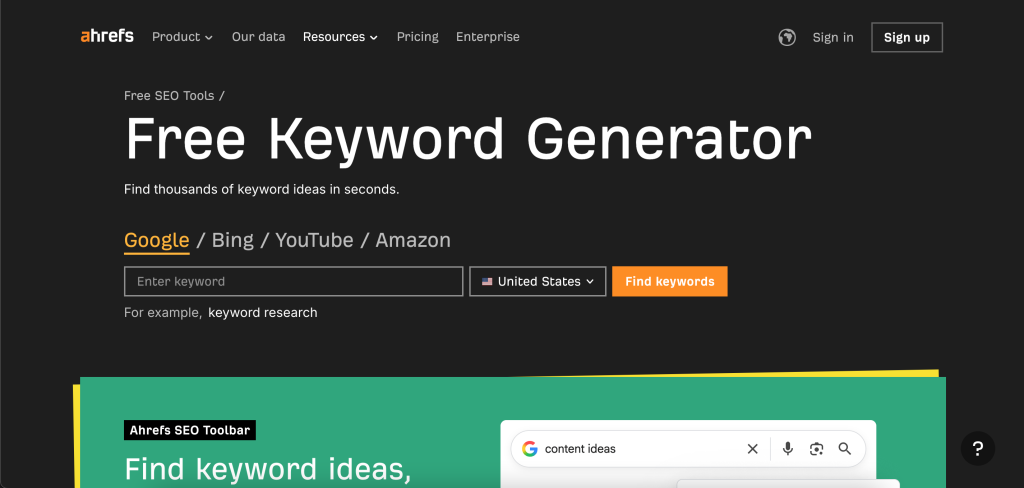
Keyword research is the heart and soul of any effective SEO strategy. It’s about finding the search queries that your target customers are searching for in relation to what you offer or sell on your website. Without good keyword research, you’re slightly lost in the dark, wandering around and hoping your content finds a match with people searching for it.
Good keyword research is not about identifying high-volume phrases; it’s just the start. You must factor in search intent, keyword difficulty, competition and how these keywords relate to your content objectives. Tools such as SEMrush, Ahrefs, and Google Keyword Planner offer insight into search volume range, competition level and similar terms. Instead, focus on trying to find a balance of high volume competitive keywords and lower competition long-tail keywords that you realistically have an opportunity to rank for.
10 Optimize Title Tags and Meta Descriptions
Title tags and meta descriptions are your first shot if you want to grab attention in search results. The title tag is the clickable headline in search results, and the meta description is the short summary underneath it. Together, they have a huge impact on whether users click through to your site.
Include your primary keyword as close to the beginning of the title tag as possible, and make sure it is less than 60 characters so as to keep from being truncated in search results. Your meta descriptions should be persuasive, contain natural-sounding keywords and be 155–160 characters.
However, since meta descriptions are not a direct ranking factor, they can still have a significant impact on click-through rates and therefore indirectly on your SEO performance. Write them like little ads for your content, explaining the distinctive value of each page.
Choose Hosting That Grows with Your SEO Success
Your website needs resources that scale seamlessly. UltaHost’s flexible WordPress hosting plans are designed to grow alongside your SEO strategy.
11 Use Header Tags Hierarchically
Header tags (H1, H2, H3 and so on) help to give structure to your content for users and also can help search engines understand the organisation of a page. The H2s are used for your main sections, and H3s for subsections.
Proper header hierarchy increases the ability to scan through content as readers can easily locate the content they’re expecting. It also helps you show search engines the most important framework of your content and how different sections interconnect. Use your headers to include keywords naturally while maintaining a focus on clarity and user experience over keyword stuffing.
12 Optimize Images with Alt Text and Compression
Using images will improve user experience, but they can also drastically slow down your site if you aren’t optimizing them. All images on your WordPress website should have explanatory alt text for accessibility and SEO, and should be effectively compressed to keep file size as small as possible without compromising on visual quality.
Alt text has many benefits: it can assist vision impaired users to understand what you want them to see when screen readers interpret images, add context when images don’t load and provide search engines with information about an image. Compose descriptive alt text that describes the image well and naturally includes related keywords, if applicable. For compressing images, tools such as TinyPNG or WordPress plugins like Smush are great examples that can cut file sizes by 40–70% with no perceptible loss in image quality.
13 Create SEO-Friendly URLs
URLs do matter more than most people know. Clean, descriptive URLs assist users and search engines to know what a page is about before clicking. And they are more likely to be shared and linked to, because they look professional and authoritative.
Keep your URLs short and include target keywords, but avoid extraneous terms, numbers or dates. A URL like “yoursite.com/wordpress-hosting-guide” is much better than “yoursite.com/2026/01/p?=1234” from an SEO and user-experience standpoint. After you have set your permalink structure within WordPress, try to refrain from changing the URLs unless it is absolutely necessary, as altered URLs can break old links and thus lose precious SEO weight.
14 Implement Internal Linking Strategy
Internal links are those that connect pages on your website together, which helps users find more information and tells search engines which of your pages are most important. A good internal linking strategy will help to spread link equity around your site and increase crawlability.
By using clear anchor text internal links, you should better describe for the reader what page they will land on. Stay away from generic terms like “click here” or “read more.” Instead, opt for keyword-specific anchor text that makes sense. Naturally link to relevant, related content in your body text, and think about including “related posts” sections at the end of articles. Your goal should be to have three to five internal links for every 1,000 words of content.
15 Optimize for Featured Snippets
A featured snippet is the results box that appears at the top of organic listings, often referred to as “position zero.” These are results that answer a user’s question and can drive a lot of organic traffic as well as brand awareness, even if you’re not in the #1 ranking position.
If you want to make it easy for a search engine to quickly read your content and pull out snippets, format it in such a way that you are able to immediately answer common questions within your niche. Use clear, concise definitions, numbered lists, tables or bullet points. Headers (H2, H3) based on questions that are often searched for raise your chances of being featured. For instance, adding a section with a heading “What is WordPress SEO?” followed by a concise 2–3 sentence definition gives Google exactly what it wants for a featured snippet.
16 Create High-Quality, Valuable Content
Quality content is king in today’s SEO world. Google’s algorithms have become so smart at recognising the content that actually assists users, rather than simply chases rankings. Terrific content really cranks the user need/intent angle, delivering one-of-a-kind insights and actionable information that readers can’t get anywhere else.
Detailed content usually ranks better on searches. Although there is no magic word count, a quick analysis of top-ranking pages on Google shows that they generally have 1,500–2,500 words or more. But length in itself is no guarantee of quality.
Concentrate on depth, accuracy, novelty and readability. Leverage examples, information, expert comment and multimedia to add depth to your content. If nothing else, focus on solving user problems over arbitrary word counts.
17 Build Topic Clusters and Pillar Pages
In case you’re unfamiliar with the term, a topic cluster is an approach to content organization in which you create one in-depth pillar page on a broad topic and multiple different cluster pages that cover various aspects of the specific subtopic. And each of those cluster pages points back to the pillar page and one another, weaving a web of interrelated content.
This approach communicates topical authority to search engines, telling them that you’re an expert on your topic rather than someone producing random disconnected articles. For instance, a pillar page about “WordPress SEO” might link out to cluster pages for “WordPress Speed Optimization,” “WordPress Schema Markup,” “WordPress Sitemap Configuration”, etc. This format will boost rankings for both the pillar page and cluster content.
18 Conduct Content Gap Analysis
Content gap analysis unveils topics and keywords that your competition ranks for, but you do not cover yet. This approach opens up all kinds of content ideas that may help you receive new traffic and plug holes in your content strategy.
Use SEO tools to audit your content and identify what keywords you aren’t ranking for that your competitors are. Look for patterns in the topics not yet covered, unanswered questions and content formats neglected. This checklist nearly always unearths low hanging fruit — keywords with decent search volume and reasonable competition that you can target by launching new content or updating existing pages.
19 Develop a Content Calendar
You should create and maintain a content calendar to plan, organize and schedule the creation and publishing of content. Regularly publishing lets search engines know that your site is current and maintained, and it keeps your audience engaged with fresh content.
Your editorial calendar needs to list topics, target keywords, publication dates, content formats and distribution channels. Schedule content to include seasonal trends, industry events, product launches and keyword opportunities. The usual content calendar should consist of blog articles, videos, infographics and podcasts as well as social media content that supports your SEO goals.
20 Optimize Content Readability
Readability keeps people on your page longer, decreases bounce rates and increases engagement metrics — all good stuff for SEO. Content readability isn’t about lowering your writing standards; it’s about ensuring complex information is digestible for your audience.
Use short paragraphs (2–3 sentences), simple sentence structures, and keep your language very clear. Chunk information with subheads, bullets, images and white space. Write in active voice and stay away from jargon unless your readers expect it. You can use tools such as Hemingway Editor or Grammarly to flag long sentences and help improve them. Try to write at an appropriate reading level for your audience, usually around 8th-grade level for the general reader.
21 Add Video Content
Video significantly increases engagement and time on page — two important user experience signals for SEO. Videos can communicate difficult concepts better than text alone and are useful for users who learn best visually.
Instead of hosting videos directly on your WordPress server (which slows down your site because they are big files), include the video from YouTube or Vimeo. Include relevant keywords in the video title, description and tags. You might also want to use video transcripts in your page, as it offers more textual content for the search engines to index and it improves accessibility. Videos come with their own search engine (YouTube is the second most-used search engine), creating additional discovery opportunities.
22 Update and Refresh Old Content
Updating old blog posts is one of the best ways to improve your SEO. Google loves time-sensitive and fresh content, and updating your top performers could lend them a lift in rankings without the need to create entirely new material.
Find content that’s lost rankings, is out-of-date, or could use some attention. Update statistics, add new segments, enhance formatting, include multimedia and update meta descriptions. Perhaps add a “Last Updated” date to prove that your content is fresh for both users as well as search engines. This works well for evergreen content that provides long-term value.
23 Build Quality Backlinks
Backlinks are still one of the most powerful ranking factors in Google’s algorithm. Strong backlinks from reputable, relevant sites tell search engines that your content can be trusted and is a high-value source of information. But not all backlinks are created equal — a single backlink from an authoritative site is worth more than dozens from low quality sites.
Focus on building backlinks naturally from quality content that people want to share and reference. This could be original research, in-depth guides, cool tools, or a new perspective on industry news. Guest Posts, Digital PR, broken link building and resource page link building are all valid tactics. Avoid black-hat tactics such as buying links or participating in link schemes, which you may get a manual penalty for.
Build an SEO-Ready WordPress Site with UltaHost
Don’t let your hosting hold you back. UltaHost’s performance-optimized WordPress hosting is built for speed, stability, and scalability.
24 Implement a Guest Posting Strategy
Guest posting involves writing articles for other websites in your industry, typically in exchange for a backlink to your site. This tactic helps you earn some backlinks, make people aware about your brand and position yourself as an industry expert.
Choose guest posting opportunities carefully. Target websites that are relevant to your niche with high domain authority and engaged audiences. Write genuinely value-added content for your host site, not an ad thinly disguised as one. Include 1–2 natural backlinks to your site within the content itself or in the author bio. Develop good relationships with site owners and editors for future collaborations.
25 Monitor and Reclaim Lost Backlinks
Over time, backlinks might get removed or lost because the content was refreshed, the site redesigned or a page got deleted. Monitoring your backlink profile helps you detect and attempt to reclaim valuable lost links.
Use backlink checker tools to monitor and track when links to your site are removed. Contact webmasters for an explanation of why the link was removed, and then ask them to reinstate it if appropriate. Occasionally a link is dropped from a page inadvertently after an update, and a gentle nudge can help to make sure it stays. Concentrate on earning back those links from powerful sites that delivered a lot of SEO value.
26 Leverage Social Media for Content Distribution
Although social signals are not direct ranking factors, social media remains important because of content distribution and its effect on SEO. Social shares increase content exposure, which can in turn result in additional backlinks and traffic — both of which are critical ranking factors.
Create a social media strategy that mirrors your content calendar. Get your latest work uploaded and shared across targeted platforms, and contribute to discussions in your niche. Optimize for each platform — beautiful images on Instagram, hashtags on Twitter and longer form posts on LinkedIn. Social media also provides chances for networking and relationship building which can result in guest posts, collaborations and naturally earned backlinks.
27 Create and Submit PR Content
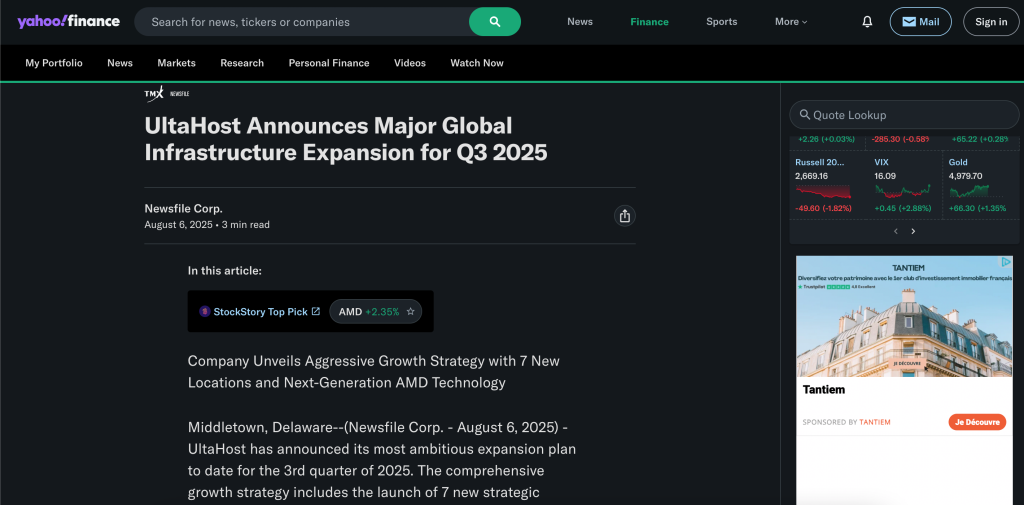
PR and news content can create natural, highly valuable backlinks from news sites and industry publications. If you have legitimately newsworthy content, product announcements, research results or other major developments, distributing it through press release channels can amplify your reach.
Send press releases to distribution services such as PR Newswire, Business Wire or industry-specific PR sites. Pitch stories directly to members of the press and bloggers that focus on your industry. Make sure your press releases are professionally formatted, include usable quotes, and hold enough real news value without being thinly veiled advertisements. Link back to related pages on your site.
28 Conduct Competitor Backlink Analysis
Studying the backlink profile of your competitors presents opportunities for your own link building. If multiple competitors have links from the same source, that source is likely willing to link to content in your niche — maybe even yours!
Use backlink analysis tools to look at where your top competition is receiving links from. Find patterns in where they link from, the kind of content that gets links, and weaknesses in your own backlink profile. Reach out to websites linking to your competitors with the same or better content you’ve created. This competitive intelligence can help you work through your link building at a much faster rate.
29 Optimize Site Speed and Core Web Vitals
Optimizing site speed is a confirmed Google ranking factor and critically important for user experience. Google’s Core Web Vitals, Largest Contentful Paint (LCP), Interaction to Next Paint (INP), and Cumulative Layout Shift (CLS), measure loading performance, interactivity, and visual stability.
Target an LCP under 2.5 seconds, INP under 200 milliseconds, and CLS under 0.1. Achieve these metrics through image optimization, code minification, browser caching, CDN implementation, and reducing unnecessary plugins. Use Google PageSpeed Insights and Google Search Console to monitor your Core Web Vitals scores and identify specific improvement opportunities.
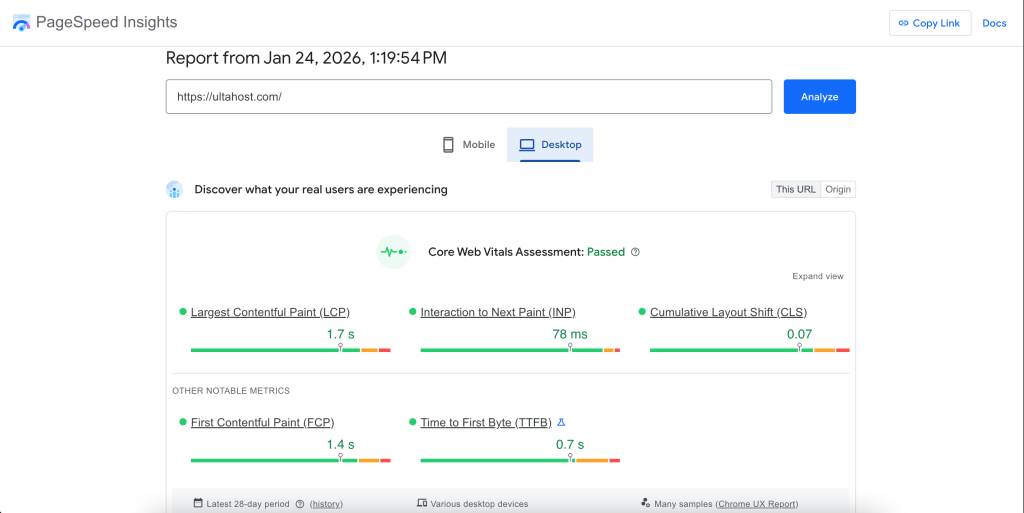
Most WordPress sites publish more before they are able to resolve performance issues. And while content does matter, slow load times, bad Core Web Vitals or unstable uptime can all be limiting factors in how much organic traffic your site can handle.
👉 Before you go full-bore and ramp up your content production, take the time to optimize hosting performance, caching, and site speed.

30 Implement Mobile Responsiveness
With mobile-first indexing, Google predominantly uses the mobile version of your site for indexing and ranking. Mobile responsiveness is no longer a choice, but a necessity for success in SEO.
Implement responsive design that adapts layout, images and functionality for mobile devices based on screen size. Test your site on real mobile devices, not just phone simulators. Make buttons and links easy to tap, ensure text is legible without zooming in, and that navigation works well on a touch screen. Fix mobile usability problems with Google’s Mobile-Friendly Test.
31 Enable Browser Caching
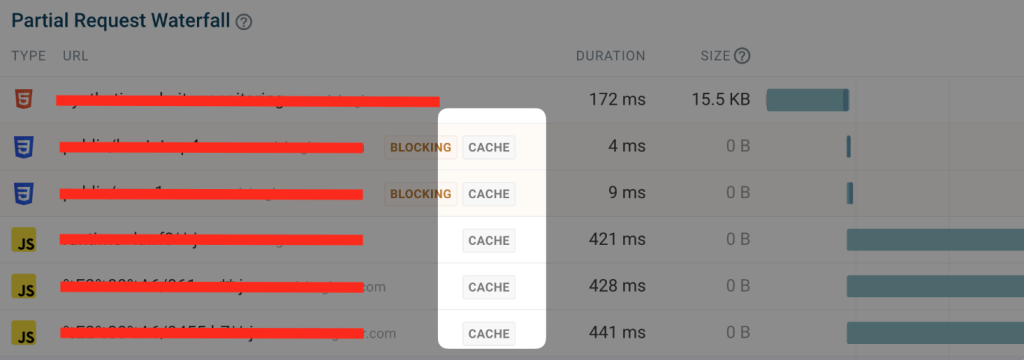
Browser caching allows websites to store static website files (images, CSS and JavaScript) on visitors’ browsers, which means the next time a visitor comes to your site, they won’t need to download them again. This massively improves load speed for repeat visitors and decreases load on your server.
Configure cache expiration times for file types — longer for things that change infrequently like images and fonts, shorter for frequently changing files such as CSS. WordPress caching plugins such as WP Rocket, W3 Total Cache, or LiteSpeed Cache can help you set up browser caching automatically. Good caching can even cut your load times by 50% or more on return visits.
32 Use a Content Delivery Network (CDN)
A CDN distributes your website’s static content across servers worldwide, serving files from locations geographically closer to each visitor. This reduces latency and improves loading speeds for users regardless of their location.
Popular CDN providers include Cloudflare, Bunny CDN, and StackPath. Many hosting providers now include CDN services with their plans. CDN setup typically involves updating your DNS settings or installing a WordPress plugin. Beyond speed improvements, CDNs often include security features like DDoS protection and SSL certificates.
33 Minify CSS, JavaScript, and HTML
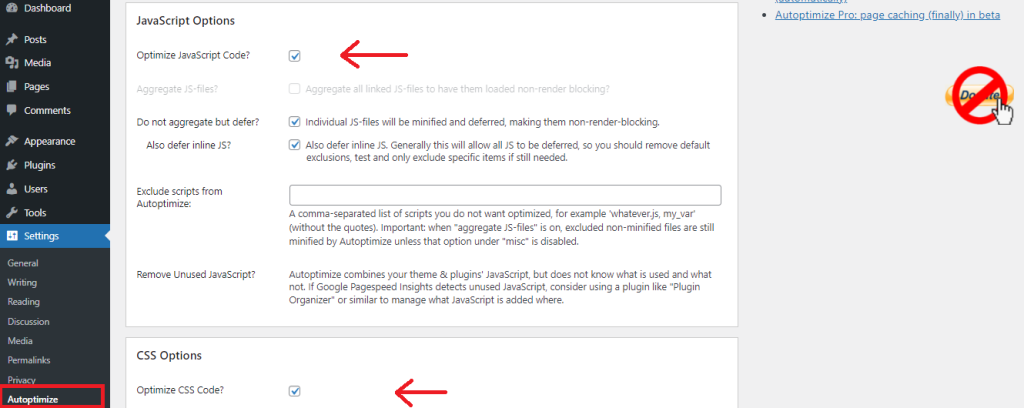
Minification reduces the size of CSS and JavaScript files by removing unnecessary code (whitespace, comments, newlines) while ensuring that the code remains functionally equivalent. This shortens the file size and load time. Though individual file size savings may seem minor, they add up across your site’s overall resources.
Your code files can be minified automatically by WordPress plugins. Use the Autoptimize plugin to minify, combine and optimize your CSS, JavaScript and HTML files. Don’t forget to test your site after enabling minification — sometimes aggressive optimization can conflict with a theme or plugin.
34 Optimize WordPress Database
Over time your WordPress database gathers clutter — old post revisions, spam comments, transient options and orphaned data. Regular cleaning of the database will delete data that is not required, reduce database size and make queries faster.
There are plugins available for cleaning your database on a regular schedule automatically. They eliminate post revisions, auto-drafts, trashed posts and comments, spam comments and expired transients. Make sure to create a backup before optimization. Some plugins include extra features such as database table optimization and repair.
| Learn more: How to Optimize WordPress Database Queries |
35 Reduce Plugin Bloat
Every WordPress plugin brings code, database queries and possible conflicts on your site. Although plugins can extend the functionality of your website, overusing them — including poorly-coded ones — will slow it down and leave security holes that hackers can exploit.
Regularly audit your installed plugins. Also, deactivate and delete any plugins that you’re not using right now. Combine functionality where you can, and look into all-in-one type plugins that will save you from needing two or more single-use ones. Before installing, check the performance impact and pick one that is well-coded and frequently updated. Aim for quality over quantity.
36 Implement Lazy Loading
Lazy loading allows images and videos to not be loaded until they are about to enter the visitor’s viewport. Rather than loading all media on page load, it loads just what is initially visible and continues to load more as users scroll. This significantly speeds up the initial load of the page.
As of version 5.5, WordPress natively supports lazy loading for images. There are also plugins which offer more advanced lazy loading, like Lazy Load by WP Rocket or a3 Lazy Load. It works particularly well for long-form content with a lot of photos, or for gallery and portfolio sites.
37 Monitor Keyword Rankings
One of the best ways to keep track of how your SEO is performing is with keyword rankings tracking. Ongoing tracking reflects trends in ranking, effects of algorithms, and competitor activity.
Monitor your target keywords daily or weekly using rank tracking tools. Track branded and non-branded keywords, along with long-tail variations too. If you spot trends in ranking changes — for example, sudden drops might be due to technical issues or an algorithm update, while gradual improvements show your SEO is working — set up alerts for major ranking changes.
38 Perform Regular Site Audits
Scheduled SEO audits help to find and eliminate technical problems, analyze gaps in content and uncover optimization opportunities. Comprehensive audits cover technical and on-page elements, content quality, backlinks and user experience factors.
Carry out full-site audits on a quarterly basis and focused audits on a monthly basis. Leverage SEO audit tools to crawl your site and find issues such as broken links, duplicate content, missing meta descriptions, slow pages and indexing problems. Rank issues by impact and ease of implementation. A lot of problems could be affecting your rankings without you even knowing.
39 Fix Broken Links
Broken links create poor user experience and waste crawl budget. They occur when linked pages are deleted, moved or have URL changes. Regular monitoring and fixing of broken links maintains site health and user satisfaction.
There are several broken link checking tools or plugins that can help you search for internal as well as external broken links. For internal broken links, fix the link or remove it. For external broken links, try to find a working alternative or remove them. Create 301 redirects for removed pages that have inbound links.
40 Set Up Google Analytics and Search Console
Google Analytics and Google Search Console are invaluable for understanding how successful your SEO efforts have been, and where there are potential opportunities to do better. Analytics monitors user behaviour, the source of traffic and conversion metrics, while Search Console tells you how your site shows up in search performance, indexing status and technical issues.
Set up Google Analytics to measure pageviews, bounce rates, time on site and goal completions. Use Search Console to monitor search queries, click-through rates and indexing coverage as well as Core Web Vitals. Used in tandem, these free tools present a full view of your site’s search performance and user activity.
Ready to Build Your WordPress Site on Lightning-Fast Infrastructure
UltaHost’s optimized hosting includes free SSL, CDN integration, and 99.9% uptime, everything covered in this checklist, pre-configured for you.
Conclusion
Enhancing WordPress SEO isn’t about going after shortcuts and quick wins, but building a solid foundation for long-term growth.
By running through these 40 SEO tips, you’ll have a website that loads faster, ranks more consistently, and is easier to use on phones and tablets. Most importantly, you minimize the chances of common SEO problems that plague a lot of WordPress sites in secret — like slow loading times, poor crawlability, or outdated content.
Opting for a performance-oriented WordPress hosting company such as UltaHost will help your website stay responsive as traffic grows and search algorithms evolve.
SEO is an investment that takes time, but when you combine it with the right tools, hosting, and consistent effort over time, it can become one of the most powerful growth channels for any WordPress website.
FAQs
What is a WordPress SEO checklist?
A WordPress SEO checklist is an organized rundown of optimization to-dos that can help enhance a site’s visibility, performance and rankings on search engines. It includes on-page optimization, technical setup, performance improvement, and continued development tasks that allow the website to grow organically with WordPress over time.
How often should I follow a WordPress SEO checklist?
Some SEO activities only need to be done once, like setting up SSL or permalinks, while others should be revisited regularly. Content updates, performance checks and SEO audits should be done monthly or quarterly to maintain and improve rankings as search algorithms evolve.
How important is hosting for WordPress SEO?
Web hosting is extremely important for WordPress SEO. Page speed, uptime, security and server performance all affect rankings and user experience. With a performance-optimized host such as UltaHost, many technical SEO problems are removed before they start affecting your site.
Can changing hosting providers improve my SEO rankings?
Migrating to a faster, managed hosting provider can have a tremendous impact on your SEO metrics like page load time, Core Web Vitals and crawl efficiency. Your host alone will not ensure higher rankings, but it sets the technical groundwork required for SEO success.
How long does it take to see SEO results on a WordPress site?
SEO is a long-term process. For most websites, you’ll start to notice significant changes after 3–6 months, depending on competition, content quality and your technical setup. Results will be seen more or less quickly depending on consistency and performance optimization.
What are the most common WordPress SEO mistakes to avoid?
Common mistakes to watch out for: slow hosting, neglecting mobile optimization, duplicate content, bad internal linking and publishing without keyword research. These are things that can silently restrict rankings, even if the content itself is top notch.


