How to Fix White Screen of Death in WordPress
If you’ve ever opened your WordPress site and seen no...






WordPress offers a useful feature called XML-RPC, which allows flexibility and remote access. It enables remote publishing and external integrations, but it is a common target for DDoS (Distributed Denial of Service) and brute-force attacks. As a result, many websites disable this feature for security purposes. As a WordPress website owner, you need to know how necessary XML-RPC is for your site to decide if you need to disable it.
In this article, we’ll cover what XML-RPC does, the security concerns it raises, how to disable it, and the cases in which you should leave it enabled.
XML-RPC is an acronym for Extensible Markup Language – Remote Procedure Call. It is the underlying structure of a method that allows your WordPress site to remotely connect to and communicate with external systems. This includes publishing to the site without logging into the WordPress dashboard. You can check this feature at yourdomain.com/xmlrpc.php.
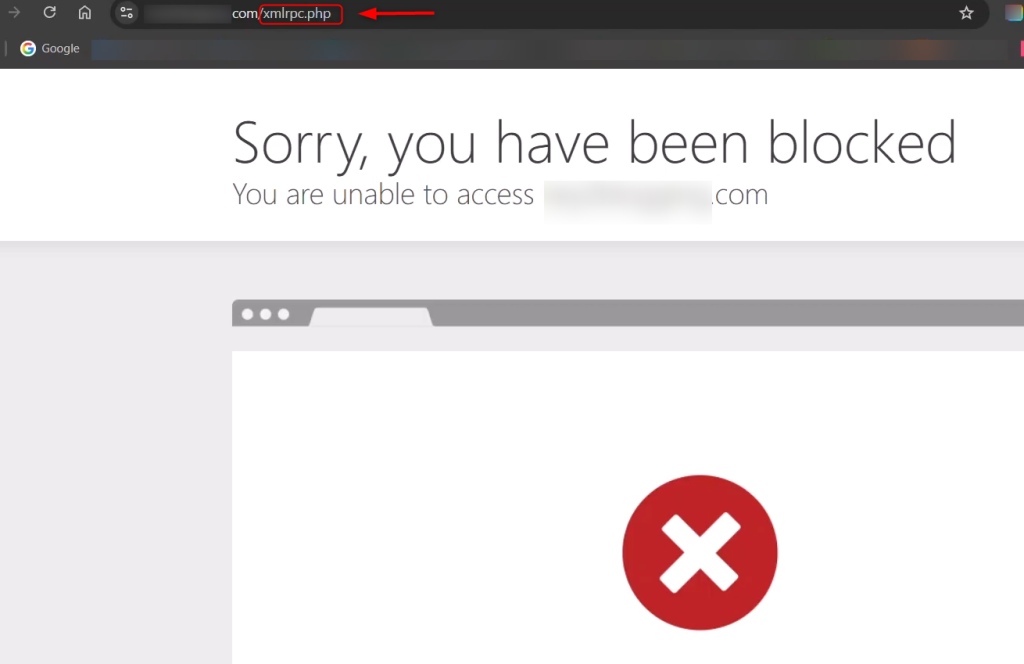
Some tools and services still use this feature even though the WordPress REST API has taken over and offered better options.
XML-RPC isn’t a bad feature and isn’t inherently flawed, but if left exposed, it can become a significant security issue. It enables multiple calls within a single request. Brute-force attackers can submit unlimited username and password combinations. This ability makes their attacks extremely efficient because traditional login rate limits do not block them.
Experience UltaHost’s WordPress Hosting!
Consider Ultahost’s WordPress hosting for 5x faster loading speeds and optimized performance with LiteSpeed technology.
XML-RPC also allows pingbacks and most DDoS amplification attacks. This means that if attackers want to point a large volume of traffic at a specific target website, they can use your WordPress site to do it. Your website may not even be the target, but it may become a part of a DDoS attack without your permission.
Lastly, “xmlrpc.php” can create a security risk because attackers can use it as another login option. People can remove the login protection from their site and set up lots of login protections; attackers, however, may target XML-RPC for the login protections. Because of this, many security experts highly recommend removing it if you don’t need it.
One reason people disable XML-RPC is that website owners do not use remote publishing or other external integrations. For example, if they manage content directly from the WordPress dashboard, they usually do not need XML-RPC.
If there’s evidence of multiple brute-force attempts against your site’s xmlrpc.php file, it is prudent to turn XML-RPC off. With fewer entry points, the attack surface also decreases, making your site less susceptible to automated attacks. Most modern WordPress integrations use the REST API, which makes XML-RPC outdated for most blogs and business sites.
For simple, static, and internally managed sites, turning XML-RPC off is a simple and secure way to improve your site’s safety.
If your workflows rely on XML-RPC integration, then you should leave the XML-RPC functionality enabled. For instance, if you plan to use the WordPress mobile app for publishing and editing content on the site, then you will need to leave XML-RPC enabled, as the mobile app will communicate with the site through XML-RPC.
Some remote publishing tools, automation, and legacy integrations use XML-RPC to communicate. If you disable it without checking compatibility, some services may stop working.
If you need XML-RPC, but are concerned about security, it may be best to only disable pingbacks or use more aggressive authentication. Assess the needs of your site before altering the functionality of core communications.
If you run a WordPress site, you probably know that XML-RPC can be a security issue. In simple terms, WordPress includes it as a built-in feature that allows remote communication, and attackers often use it to carry out brute-force and DDoS attacks.
Most modern websites no longer need XML-RPC because they use the more modern REST API instead. Therefore, it still has some legitimate use cases. You may be able to significantly reduce your attack surface by disabling XML-RPC, but again, make sure you are not contradicting your workflow.
Many popular security plugins, including Wordfence, All In One WP Security & Firewall, and Disable XML-RPC, offer the option of turning XML-RPC off with a single switch. To do so, navigate to the WordPress Admin Page. After that, click the Plugins button, followed by Add New.
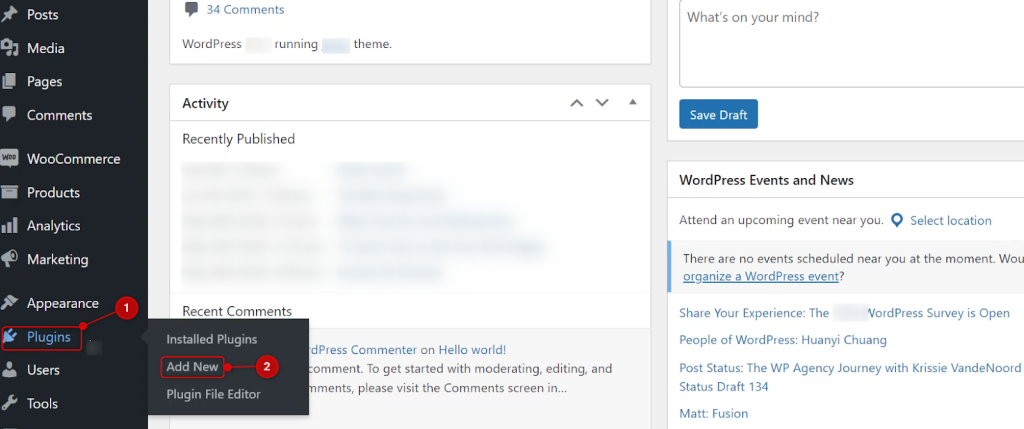
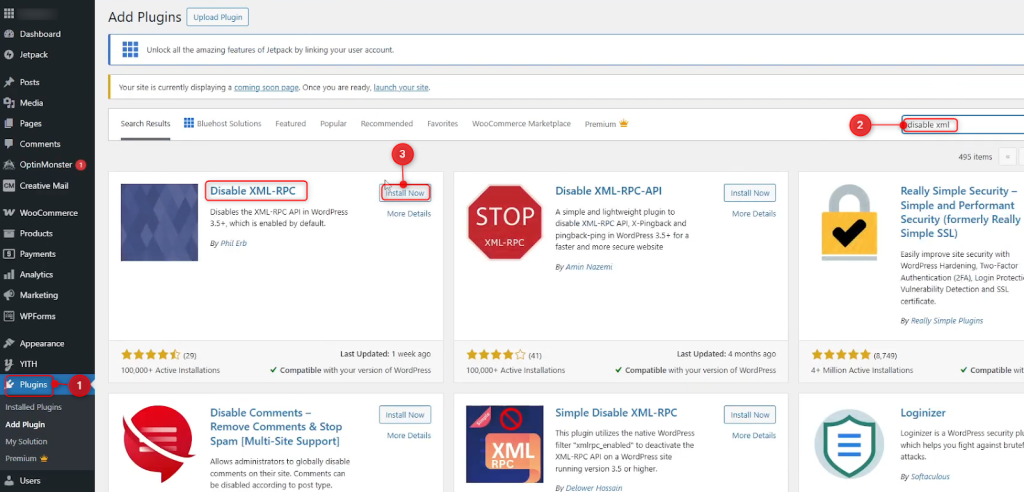
After that, find a plugin named “Disable XML-RPC” and hit Install Now and then Activate.
It will take you to the Plugins page, and you should see the plugin that is disabling XML-RPC.
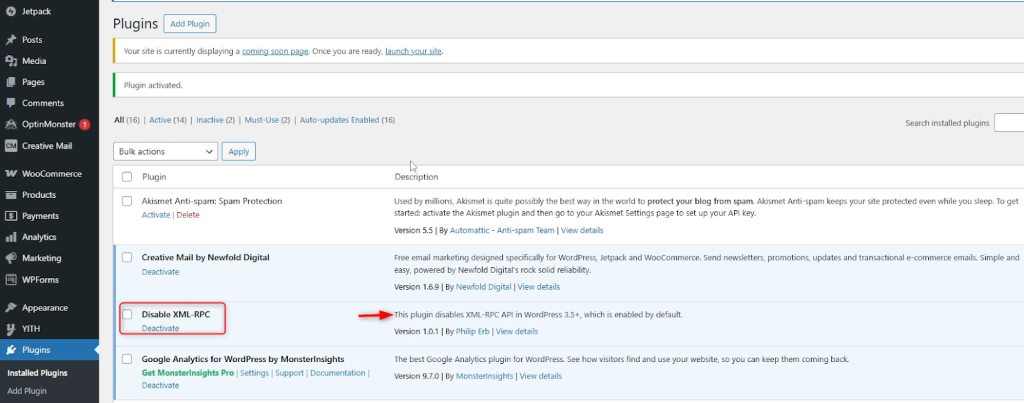
Finally, verify that your site still works. This is a great option for beginners because the plugin applies additional security, such as firewall rules and login access protection, without modifying the core WordPress files and breaking the site.
Another way to disable XML-RPC is by adding a filter from the Theme File Editor. You can do this by going to Theme File Editor under Appearance or by visiting the URL wp-content/themes/your-child-theme-name/ directly. (If you are not utilizing a child theme, it is not advisable to use the parent theme’s “functions.php” file.
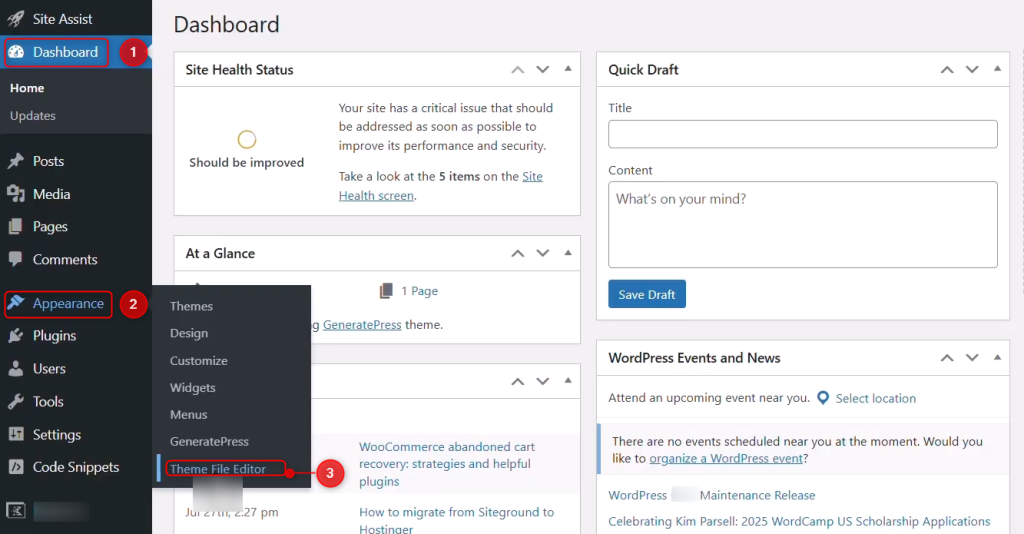
In the code editor, you can modify the “functions.php” file by adding the following line and clicking the Update File button:
add_filter('xmlrpc_enabled', '__return_false');
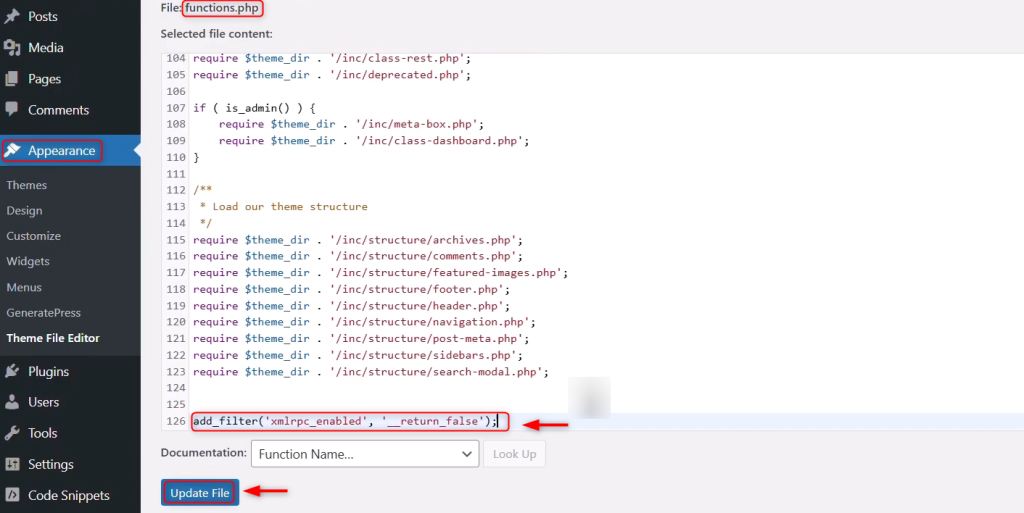
This approach turns off XML-RPC functionality inside WordPress itself, as opposed to fully blocking the file. WordPress will not handle XML-RPC calls, but the file is still there.
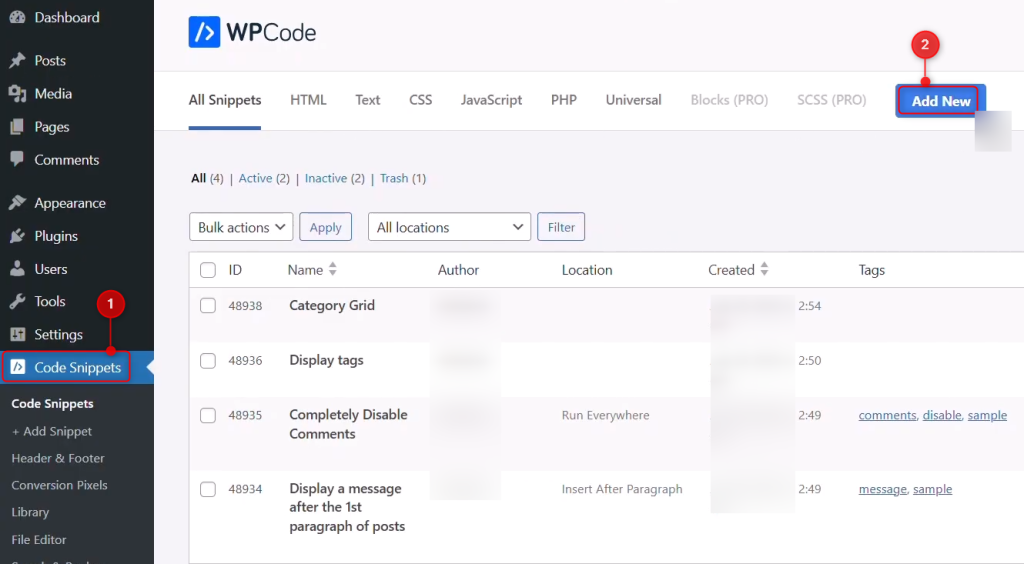
Modifying theme files can be effective, but there are risks as updates may remove the changes. You can also modify a child theme or use a code snippets plugin, like WPCode. For this, we go to Code Snippets, then we click Add New:
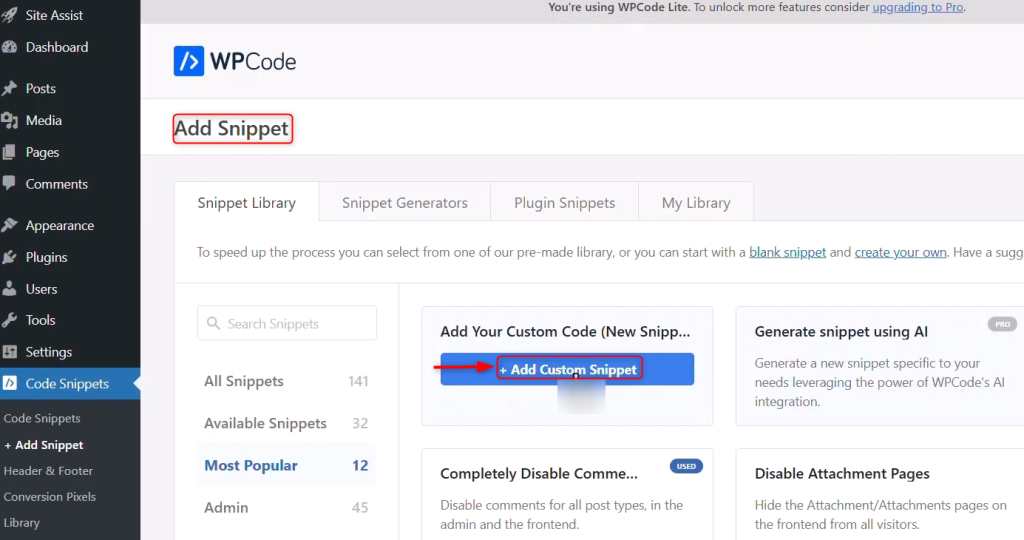
Next, click the +Add Custom Snippet button to add a snippet in the code editor:
Furthermore, add the below code line, toggle the Active switch, and click the Update button:
add_filter('xmlrpc_enabled', '__return_false');
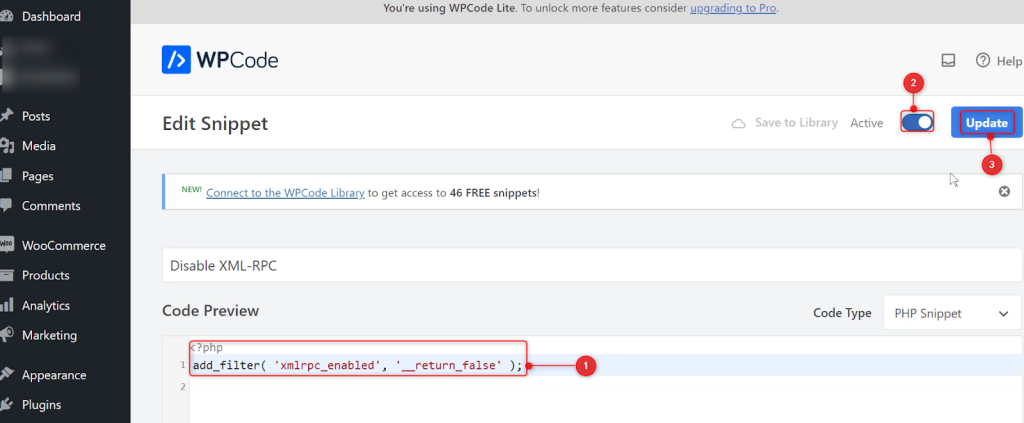
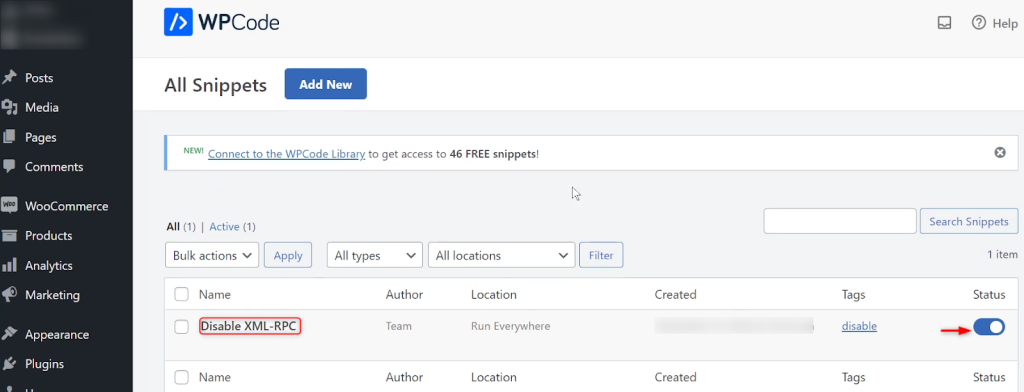
Finally, verify the Disable XML-RPC in WordPress:
Security means balancing functionality and risk. For your WordPress site, this means you should stay informed and decide when to keep XML-RPC enabled and when to disable it.
You can block xmlrpc.php on a server basis if your server is Apache. Changes made in the .htaccess file will prevent external access to xmlrpc.php files before WordPress loads, even saving some server resources.
This method is also effective in preventing any malicious calls to the web app. Among the above methods, it will prevent the request at the web server level, but it does require some technical understanding.
Your website does not need remote publishing, mobile apps, or third-party integrations that require XML-RPC, so the security risk of keeping XML-RPC is greater than the risk of remote publishing. If the site doesn’t need xml-rpc, then it makes sense to shut it off, as the risks associated with DDoS and brute-force attacks are primarily related to the fact that it creates an additional entry point.
But whenever you disable XML-RPC, you will likely shut off a lot of valuable services that rely on it. Therefore, you will need to assess the specific needs of your site and determine which particular risk to take. Sometimes, keeping xml-rpc or the other features you are trying to disable will represent the best overall site safety approach without removing features.
It’s a WordPress file that helps remote apps communicate with your site. This includes publishing posts, managing posts, and interacting with WordPress. It is useful, but it is an entry point that attackers can use.
Although XML-RPC works safely by design, attackers often use it to launch brute-force and DDoS attacks, which creates security risks. XML-RPC allows attackers to attempt multiple logins with a single request.
Disabling XML-RPC should not break the functionality of the website itself. That said, it will break functionality on mobile applications, remote publishing tools, and any other integrations that rely on XML-RPC.
In most cases, yes. The REST API allows applications to communicate with WordPress in a more modern and secure way. Most new plugins and services utilize the REST API rather than XML-RPC.
Yes, XML-RPC will give a slight performance boost, as it will reduce the number of requests and lessen the load on the server. This step especially benefits you if bots are attacking your site. It improves your security significantly, even though it only provides a small performance boost.
If you want to keep remote publishing options, then disabling pingbacks is the best option. Since attackers widely use pingbacks in DDoS attacks, disabling them reduces the risk of a DDoS attack while still allowing you to keep the main functionality.
Try Ultahost Free VPS Trial Today!
Get access to Ultahost’s free VPS servers with a trial. Enjoy ultra-fast speeds, instant deployment, Linux or Windows options, and host your websites or apps from 20+ global data centers.
If you’ve ever opened your WordPress site and seen no...
Engaging your readers and keeping them on your WordPres...
Have you ever received the avoided HTTP image upload er...
Managing files and organizing them appropriately is a c...