




Ultahost offers several types of free and paid SSL certificates. This video explains SSL certificates and why they’re used on most websites.
98% of the U.S. web audience expects secure web pages. If you still see a “Not Secure” message when visiting your website, you are likely losing traffic due to a lack of credibility on your web pages.
A small padlock icon in the address bar remains the most recognized indicator of website credibility. If a page lacks this symbol, the default assumption is that the site is insecure. Even visitors who are not likely to convert increasingly expect this credibility indicator. There is no longer optional security on the web. Transactions that involve sharing any basic information are no longer possible on insecure websites. Loss of trust and credibility is expected for web pages that lack SSL security.
SSL (and its successor TLS) is a security protocol that protects all information passed between a website and a user’s browser. TLS guarantees that website content is genuine and that all information is unaltered and secure. For these reasons, TLS is synonymous with security and trust.
Key Takeaways
- SSL protects all information passed between your website and your visitors.
- HTTPS is the only way to remove the browser `Not Secure` warning.
- Websites equipped with HTTPS security are viewed favorably by search engines.
- It has become industry standard for web hosting and site security to offer TLS security as a default offering with all their services.
- SSL is already used by 85-90% of all websites worldwide, making HTTPS a standard.
Web Today – HTTPS Adoption Is the Norm
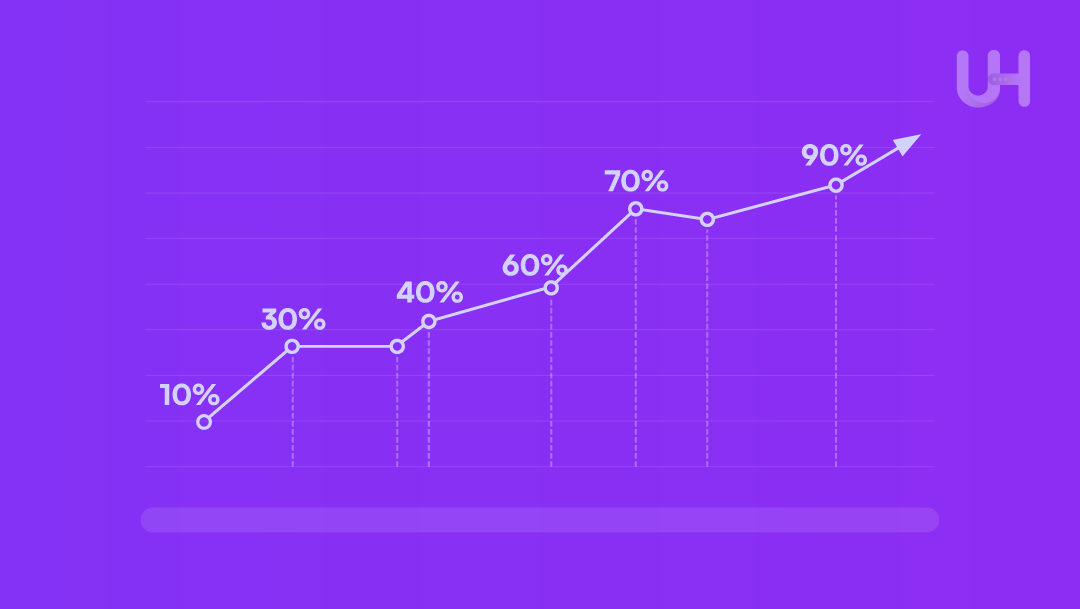
The web has changed drastically, and browsing is now more secure than ever. SSL/TLS is not only for banks and big companies anymore; it has become the default layer of trust across almost the whole internet. Statistics reveal that the transformation has been staggering.
According to statistics from 2024, 87.6% of web pages are now using a valid SSL certificate (SSL Dragon). In the USA, it is more indicative, as about 98% of all internet traffic is HTTPS (2025 SecurityScorecard).
This change didn’t happen on its own. All major browsers and the global security ecosystem have pushed HTTPS as the default connection standard. Chrome, Firefox, Safari, and other platforms warn users if a site does not use HTTPS. As a result, there is an expectation of encryption everywhere. According to the HTTP Archive Almanac, web infrastructure is now architected to be secure, rather than security being an add-on.
It’s obvious now:
SSL/TLS usage is not optional anymore. It has become a fundamental requirement to earn user trust, comply with regulations, and be seen in search results. A website that is not HTTPS-enabled can lead to failure.
HTTPS Adoption (2010 → 2025)
| Year | Global HTTPS Adoption |
| 2010 | 10% |
| 2015 | 30% |
| 2020 | 70% |
| 2024 | 87.6% |
| 2025 | 90–95% (projected) |
What Is SSL – Encryption, Identity, Integrity
For years, people have used the words SSL to describe the safety of a website. The truth is that SSL is now considered old tech. The most secure protocol on the web is TLS, the more modern and upgraded version of SSL. It protects almost every connection in 2025, and we still call it an SSL certificate, but what websites really use is TLS, a protocol trusted by every country that supports browsers. (Wikipedia, blog.gitguardian.com)
SSL has three main ways to keep you safe:
Encryption: It encrypts what you say, no matter what you do. Anyone who wants to listen can’t. Whatever you send is safe from hackers who won’t see what you do or copy you by reading your private data.
Authentication: It keeps your website secure by reassuring users that it is safe and trustworthy, which is why it provides a seal of trust. It does this by checking you are real, and not someone who tries to trick people, or websites that try to cheat you or spy on you. (blog.gitguardian.com)
Integrity: It will not let anyone alter while checking between the user and server; it makes sure that it doesn’t change in any way. If you try to change it, TLS detects it instantly.
That is why the lock is in the address bar: it all goes into a secure box to keep you safe, secure, and intact, verify you are real, and make sure no one can change you. That’s the safest way to secure.
When you use old SSL, it is like sending a letter and some one can see, and read what you say, and some one can copy you, or even change your letter, they can change your letter by calling it a post card that anyone can open and read, and change, but with tls it’s like going to a shop and buying something, and you can keep it safe and say is mine, no one has it but you.
For all these reasons, using TLS gives business owners the safest way to do things, and still keep everything they need to not be seen or read by anyone. You do not need to know how TLS works, you only need to use it.
SSL/TLS, HTTPS, and Browser Standards in 2025
In 2025, one of the most things that make people confused is all the words, and what they mean, here is a simple list to help you understand it, first ssl is older it is really old, it is dead and it is only that is left, and it does not safe you, next is tls that is your driver, and it drives trust, then their is https or hyper text transfer protocol secure, which is only the safest way to say HTTP going on tls so it is safer. (light year)
Older versions of SSL are very weak; they no longer work and can’t protect you from today’s threats. TLS 1.2 and 1.3 are the latest versions available on the web. (Wikipedia)
Using the latest TLS is essential to staying secure and communicating with others. Older TLS configurations can trigger warnings in your web browser and prevent people from reaching you. Experts say it can expose you to new attacks that modern encryption can prevent.
| Protocol | Status | What does the user see? |
| SSL (2.0 / 3.0) | Insecure | Security warnings |
| TLS 1.0 / 1.1 | Weak | Restrict browsers |
| TLS 1.2 / 1.3 | Recommend/secure | HTTPS padlock, trusted connection |
Why SSL/TLS Matters for Your Business Website in 2025
In 2025, SSL/TLS is not only about safety, but it is also about how people feel about your business. The new browsers that you may use now give you warnings if you do not use HTTPS and most people just don’t need a website that says not secure, and they won’t buy anything from you or give you an email.
Trust & conversions: Studies show that people who see the warning will leave, and that this behavior persists until you provide a safe site. Imagine your customer gets to your website, they see a warning that it’s not safe, they just close the web browser and never come back, that is money and leads you lose; that one second of hesitation can cost you a lot of money.
SEO & visibility: Your website can be more visible on search engines. You can look that up and see that it is true that the safe sites get a better place in search, also called organic rankings. This makes SSL less of a feature and more of a tool to help your business grow.
Broader coverage: Even information sites, blogs, and small business websites get better with HTTPS; it keeps their stuff safe, and it makes people trust them more. (digicert.com)
Regulatory / compliance readiness: On top of that, the rules about privacy all over the world are getting tougher, and most expect even the simplest sites to keep the info of their users private. With SSL/TLS, you can meet all those bare minimum standards and be better than most sites out there.
By 2025, SSL/TLS will be just part of the normal way of doing things for most sites that are run by professionals. If your site is safe, then your customers will trust you from the start. If it is not, then they just will go away.
SSL/TLS Certificate Types & What They Mean Today
There are different kinds of SSL/TLS certificates, and they come with different levels of trust. They are made for different sites and most of the time can be summed up into three main groups:
Domain Validated (DV): fast auto-validated certs that prove you own the domain are all you need if you run a blog or a small site, like a school site (digicert.com)
Organization Validated (OV): they prove the business that runs the site is linked to it if you are a small company or a service that needs to look more real
Extended Validation (EV): These are the best certs, and they prove the company that runs the site is real, with the highest amounts of info checked. If you run a shop, bank, or work at a place that might have money and private info, then you might want to get this.
Certificates also differ in how many domains they cover:
Single-domain: Protects one domain only (example.com).
Multi-domain: Protects many domains under one certificate.
Wildcard: Protects a site and all subdomains ( *.example.com).
Each type of certificate has all the strong language encrypting you need but some are way more checked and tested then others if you run a small site or a blog then a own domain one with TLS 1.3 will do more than enough if you run one of those big sites that need to be trusted then you will pay for the extra validation and extra info checked.
Summary Table
| Certificate Type | Validation Level | Cost | Best For |
| Domain Validated | Basic domain check | Free | Small sites, blogs, portfolios |
| Organization Validated | Business identity verified | Moderate | Companies, agencies, service providers |
| Extended Validation | Highest identity verification | Higher | E-commerce, finance, high-trust brands |
| Single-Domain | One domain | Varies | Standard websites |
| Multi-Domain | Multiple domains | Moderate-high | Businesses with several properties |
| Wildcard | Domain + subdomains | Higher | Platforms, apps, dynamic site structures |
Free vs Paid SSL/TLS Certificates in 2025 – What’s the Real Difference
In 2025, webmasters have many choices for SSL, and one of the most asked questions is whether they can get a free certificate. Here are the Free vs paid SSL certificates explained:
You most definitely can, but it has really changed the game, making all sites just use it now, so you do not have to pay, and it’s just the norm now (letsencrypt.org, almanac.httparchive.org)
Most paid certificates, though, are still a good idea as they give more features like:
Company or high trust certs, proof of the company behind it, extra security protection, and better tech support. All this can make more people trust you if they are giving you their credit card info, private info, or even business details that are really sensitive (digicert.com)
Most small sites and blogs, and the most normal websites, do not need the best; they are just fine with a free domain verification certificate that has the same strong encryption as one from a paid site, and best of all, it will save you money. If you do need to pay for one, then consider that if you run a store or a small business, you might want to pay for one so your visitors will trust you more.
So in the end, when you think about it, you have to ask yourself:
- What kind of site do I run: blog, online store, or large site?
- What kind of people will visit my site? Will they see the trust signs?
- How risky is my site? Do I handle money, private information, or regulated information?
Not just because a site is free, it does not mean it is weak, and just because an SSL certificate costs money does not mean it is always needed it just means you will get more trust and tech support if your site needs it. They might be worth it.
How to Get SSL Live on Your Website (2025 Checklist)
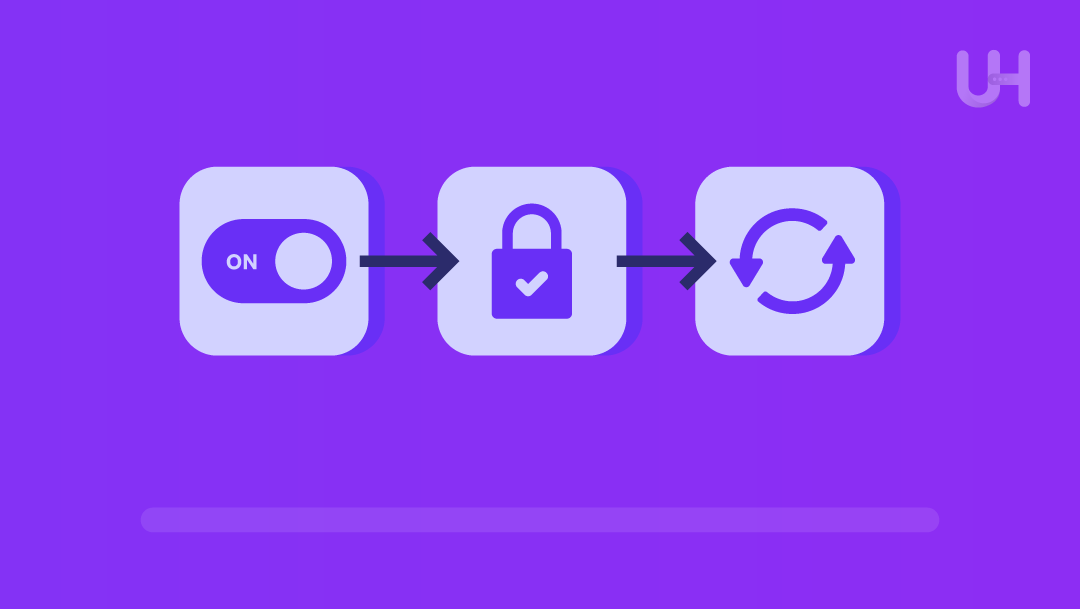
Getting SSL/TLS going in 2025 is much simpler than it used to be. Many hosts will do all the hard work for you and make it really easy, but it helps if you just run down a list and keep a list of all the stuff you will need to do to get it just right in the right order.
- Check if your hosting offers a free TLS certificate
Most hosts now give free DV certificates by default, and if they do, it is just a one-click from the control panel.
- Choose the certificate type (DV, OV, or EV)
Pick which is right for how much you trust. I would say DV is right for most sites, but if you run a high-trust site or a site that needs to follow laws and rules, you might want to go with OV/EV just to be safe.
- Activate the certificate
These are the new safe ways you can get and use them; the old ways aren’t used and accepted anymore.
- HTTPS redirection
You want the whole site to load securely, including the www and no www. You also want to change any links on your site so that no links are unsafe.
- SSL checker
Tools like public SSL status checkers can check the whole chain of your certs and see if your server is set up right or if any links are not safe or not.
- Enable auto-renewal
Certificates have only a time limit; most free ones, like Let’s Encrypt, can have a 90-day limit, and the paid ones are more than one year. Most have auto-renew, so you do not lose your cert in the future.
The checklist will help you make it simple and easy if you are a beginner, as most hosts now do most of the work, and you just press a button, and you have a second, and you will be live with HTTPS in just minutes in 2025.
Common SSL Problems in 2025 & How to Fix Them
Most SSL/TLS issues can be missed if you or your host checks your site from time to time and sets things up right, and has auto-renewal, you won’t have to pay anything to fix them. Most sites can be up and SSL-ready with a quick fix if you see any problems.
| Problem | Likely Cause | Quick Fix |
| Expired | Certificate not renewed | Renew immediately |
| Mixed content | Some resources (images, scripts, CSS) are still loaded over HTTP | Update all links to HTTPS |
| Wrong domain | Certificate issued for a different domain/subdomain | Reissue the certificate for the correct domain |
| Redirect loops | Conflicting rules in .htaccess, CMS, or server settings | Review and fix redirect rules |
| Outdated protocol | Old server configuration | Update server to TLS 1.2 or 1.3; contact host if needed |
Myths & Misconceptions
There are a few old school beliefs about SSL/TLS to know about, also in 2025, here they are from age to age, not just now:
Myth A: SSL is bulletproof
Truth: SSL/TLS can stop data though the site from being hacked but it does not stop the site from being hacked there are many ways to get your site hacked even with ssl or not ssl look at it as this it is like locking your letter in a safe but the house it is in can have a broken lock so SSLl is like the safe but not the house
Myth B: Free certificates are not safe
Truth: The data security is just as good if you pay for a cert as if you get a free one. The only thing different is how the website checks to trust that cert; it doesn’t check to see how safe the site is
Myth C: My site is small, who cares if I use HTTPS
Truth: Everyone uses HTTPS today in 2025, it does not matter if you run a blog, a portfolio, or just have an info site. Getting free SSL or certs can help you with your site being private and your users trusting your website. If it was not safe or did not use SSL, you could be dropping your rank in all the search results.
Myth D: SSL makes my website slow
Truth: With things like HTTPS/3 and TLS 1.2 and 1.3 on your host, many sites or hosts will make your site faster to load when it has SSL and be just as fast, if not faster, with SSL than without.
We have come far in SSL/TLS, and you should be using it today in 2025 for all websites, no matter how big or small.
How UltaHost Helps With SSL and Security

SSL/TLS certificates
For website owners seeking ease and reliability, UltaHost makes SSL/TLS stronger and more effective. All hosts get free SSL certificates for your site, so that HTTPS works with no fuss to ensure the security is just there. It is not hard to do, and it is a good deal.
Modern Version
UltaHost lets you use new TLSs with no fuss and makes sure your certificates get renewed so they do not go out of date. If you have lots of or big sites with sub-sites, you can get and use wildcard or other multi-site certs that safeguard all your sites. That makes sure you can be sure that all your sites are safe and coded up well. You can activate SSL on UltaHost Shared Hosting.
NVMe SSD storage
The site also runs the NVMe SSD storage and fast web hosting parts to make sure all your sites stay up and running fast while they stay safe. That is the key to the new web standards 2025.
24/7 human support
At last, UltaHost gives 24/7 human support with real people, so you can often get mixed code, wrong forwarding, or other SSL/TLS issues fixed quickly and well.
So if you do not know much about servers, or you work as a worker, or own a small shop, you can make the auto use up to date, secure, and run fast. That is the best way to make an SSL TLS, which is just set up and forget it, keep it cloudy with no fuss about safeguarding your site and your data.
FAQs
Do I need SSL even if I don’t run a store?
Yes, in 2025, pretty much all people will look for HTTPS on blogs and all types of websites really. It makes your data safe, helps you gain trust, and can help with your SEO.
Is “SSL certificate” outdated – should I say TLS?
TLS is the new standard, but when people say “SSL,” they often mean TLS certificates.
Are free certificates safe?
Yes, it’s just the same as a paid cert. The only significant change is the extent to which it is checked and the level of trust you place in the site. You need to pick for your site based on your site’s needs.
What happens if my certificate expires?
You get warnings on your site, or your browsers will block it, so you get no trust anymore, and your site will lose SEO on places like Google. It is best to just set it to auto-renewal.
Can SSL/TLS prevent all security threats?
No, it only protects the data when it transits. It does not fix malware, insecure code, or bugs in the sites or on the servers.
What version of TLS should I use?
Use at least TLS 1.2, but TLS 1.3 would be best for security, speed, and how your sites work.
How often do certificates need renewal?
Free certs will last about 90 days; the paid ones last a year in general, but automating auto-renewals keeps your site safe without you lifting a finger.
Get your SSL certificate today – protect your customers – protect yourself.
Check our SSL Prices here: https://ultahost.com/ssl


