
How to Install PIP on Windows and Linux [A Co...
Python, like any other programming language, allows thi...






Email is one of the most important communication tools for small businesses, entrepreneurs, and website owners. Whether you are a startup, an e-commerce store, or a corporate site, getting a professional email address that matches your domain name helps build trust and credibility. Once you understand its importance, the next step is to know which email features are included in your Ultahost plan and how you can verify them.
Ultahost provides official email hosting services for users who want to upgrade or move to a dedicated email solution. However, before making any purchase, you should first review your current hosting package to see which email features are already included.
In this guide, you’ll learn how to check your email service, identify the features included in your plan, and decide whether an upgrade is necessary.
Understanding your email features helps you plan for future growth. As your business expands, you can evaluate whether your current plan is sufficient or if you need additional email accounts, larger mailbox storage, or stronger security features.
However, email features vary by plan. Some hosting packages include only limited email accounts and basic storage, while others provide advanced tools such as spam filtering, webmail access, and full IMAP/SMTP configuration. You may unknowingly exceed your limits, have delivery problems, or pay extra for services you already have.
By checking your email service, you can make sure that your hosting resources are fully utilized and unnecessary costs are avoided.
Upgrade to Advanced Email Hosting with UltaMail!
UltaMail offers safe and private email hosting with addresses that match your domain, helping your brand look professional and making communication easier.
You can follow the following steps to check the email service included in your hosting plan when managing your website through Ultahost.
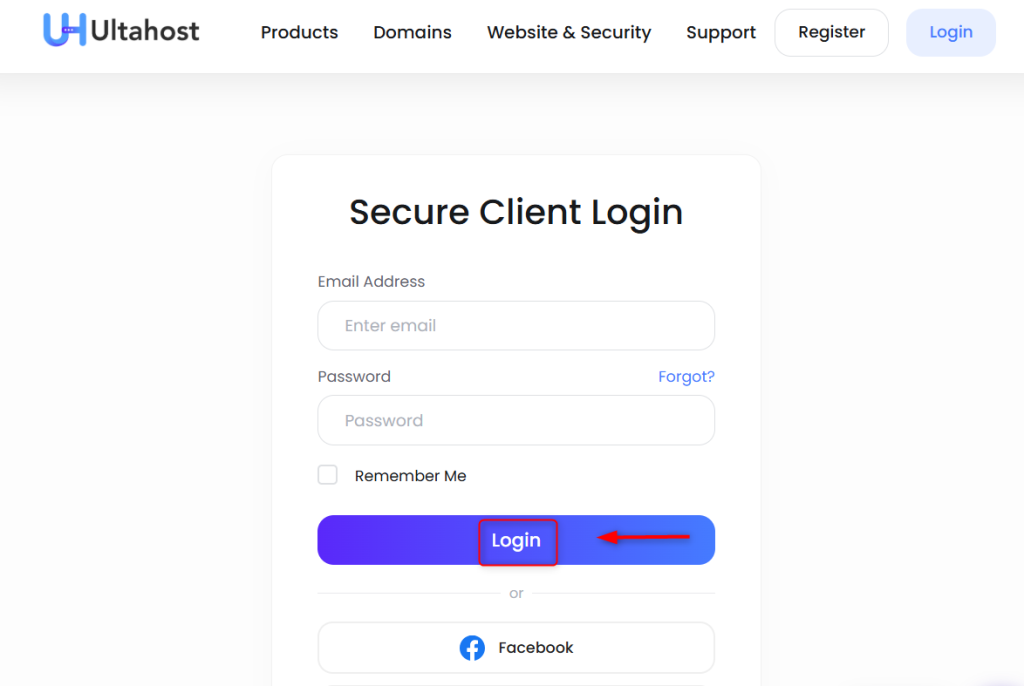
You can check the email service by accessing the Ultahost dashboard. This dashboard is where you can manage your hosting plan, domains, and billing:
Navigate to the Manage Services area once you are logged in. You will find all the active hosting plans that are associated with your account. Select the appropriate hosting plan (e.g., Email only Hosting) by clicking on it. You can view the details, specifications, and features included:
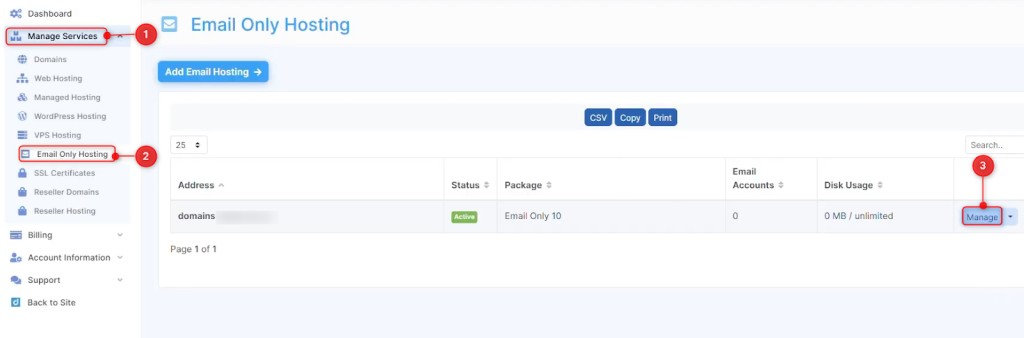
It is important to do this because different hosting plans have different email features. Shared hosting plans, for example, often come with basic email capabilities, while VPS and dedicated hosting plans require manual configuration. Clicking the Manage button will allow you to see what your official plan includes.
You should review your dashboard for technical details after selecting your hosting plan. Hosting plans usually list information such as the amount of disk space and bandwidth available, the number of websites that can be hosted, and how many email accounts are included:
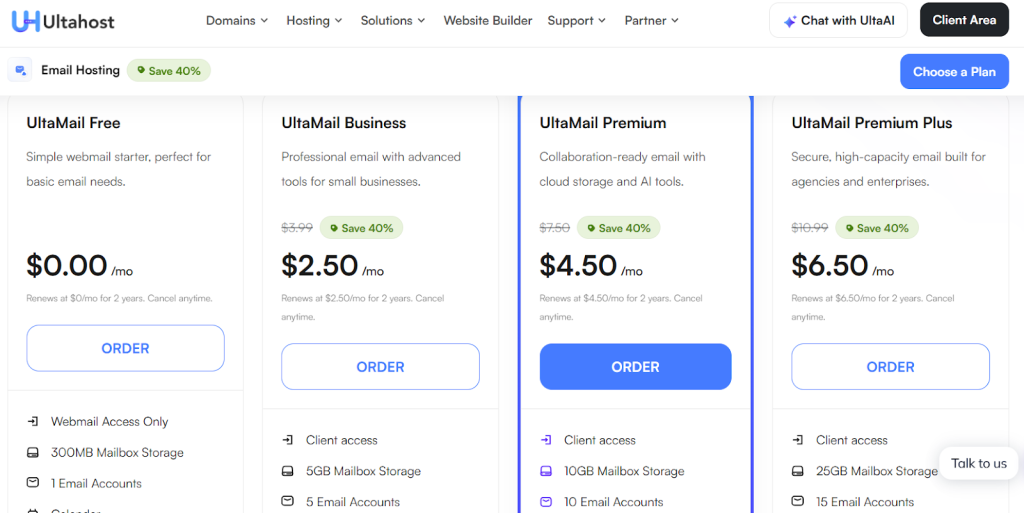
You should pay attention to the sections that refer to Email Accounts, Mailboxes, or Email hosting. Some plans limit mailbox storage or the number of email accounts, while others do not. Understanding these specifications will help you decide whether or not your email service comes with your hosting package.
It is important to take this step, as not all hosting packages include advanced email service. Basic plans may have limited functionality.
Ultahost’s shared hosting plans come with a control panel, such as cPanel. Accessing your control panel provides direct insight into email features available under your hosting package. Log in to the cPanel:
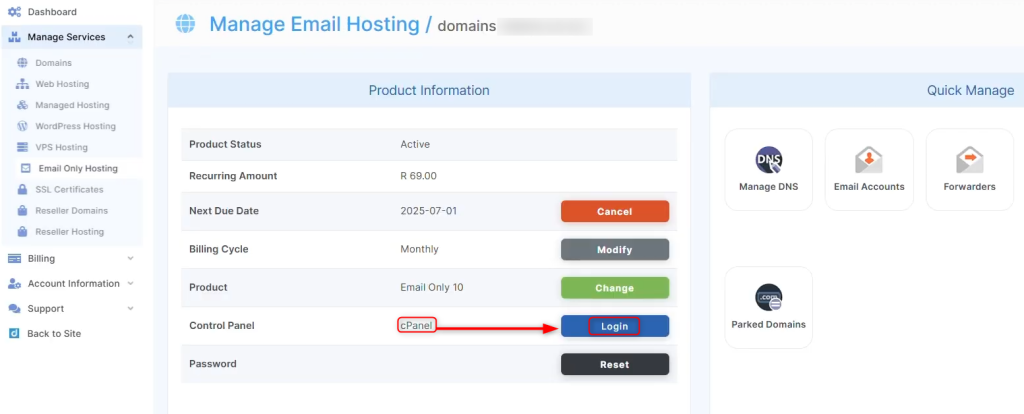
Look for “Email Accounts”. This section contains features such as forwarders, autoresponders, and spam filters:
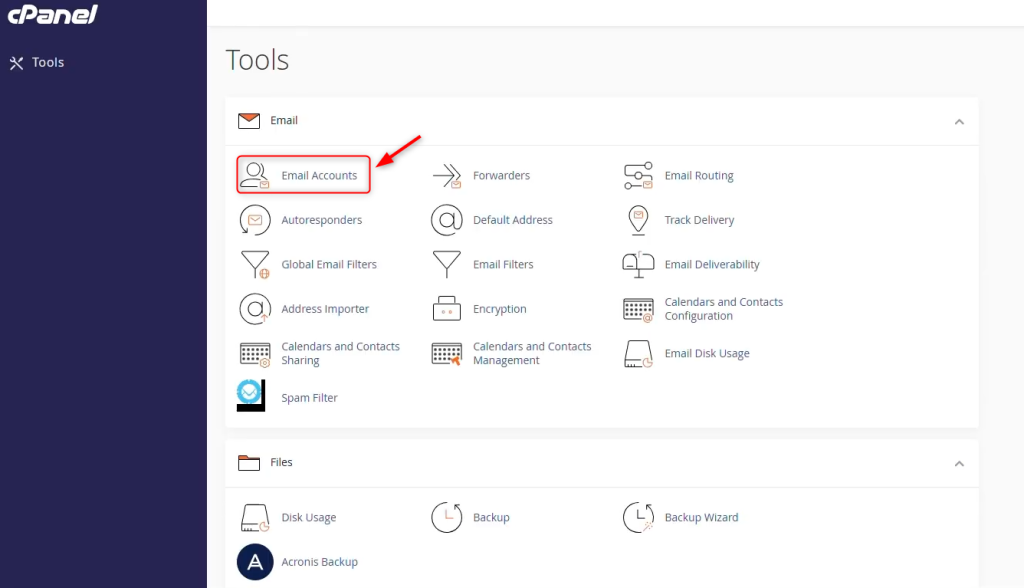
If your plan lets you create email accounts, then email hosting is included. If you don’t see an email section in your dashboard, your plan probably doesn’t support email functionality:
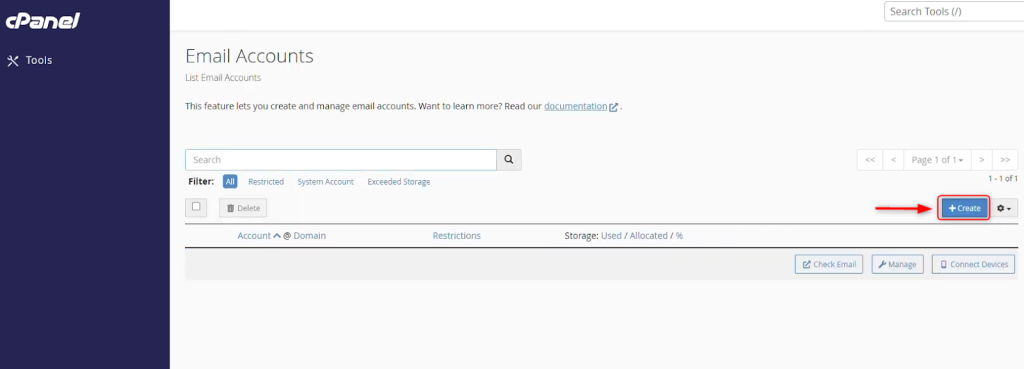
The control panel gives a better overview than the client area, as it displays active email management tools instead of just plan descriptions.
You can create a new account by entering the following information:
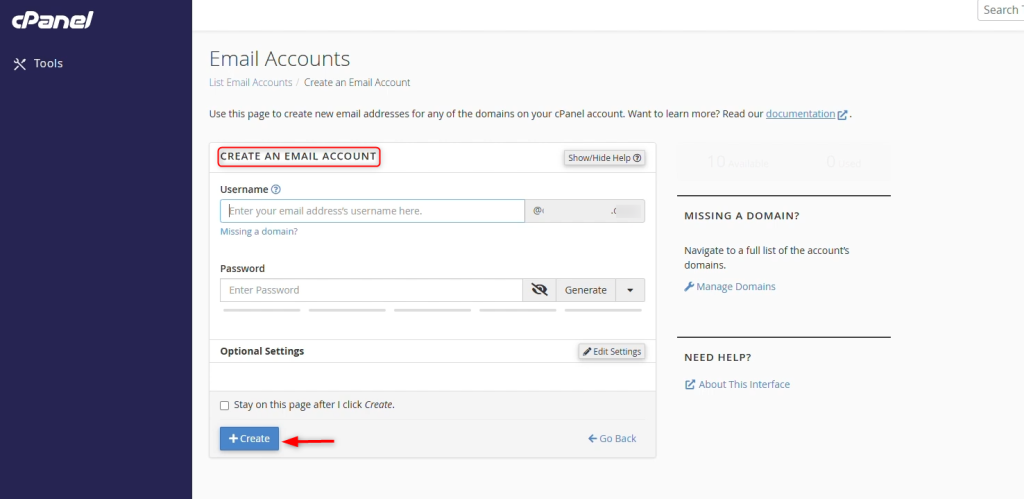
You should check the mailbox size and storage limits once you are in the email management area. There may be limitations on mailbox size even if your hosting package includes email accounts. Click the Check Email button to check your mailbox size.
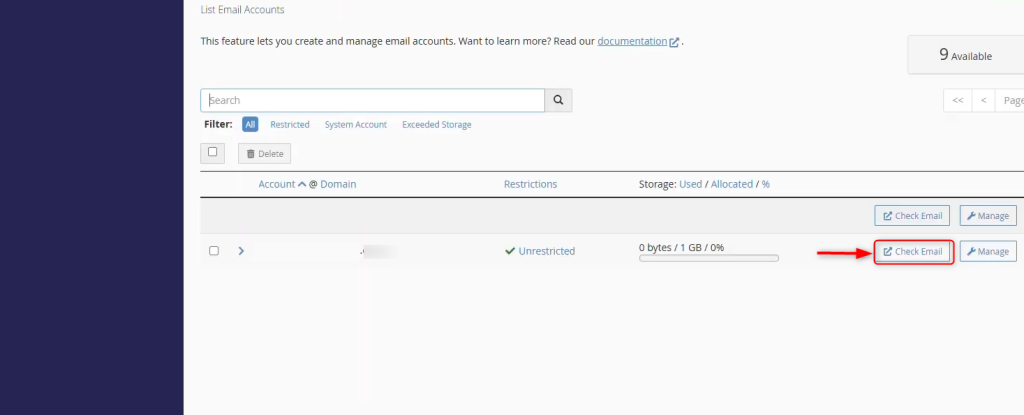
Other plans offer unlimited mailboxes but limit the number of accounts. Some plans offer unlimited accounts but limit the storage per mailbox. It is important to understand these limits because a mailbox that exceeds the limit can stop new emails from being received. You can avoid communication interruptions by checking your limit and planning upgrades in advance. Let’s click the Open button:
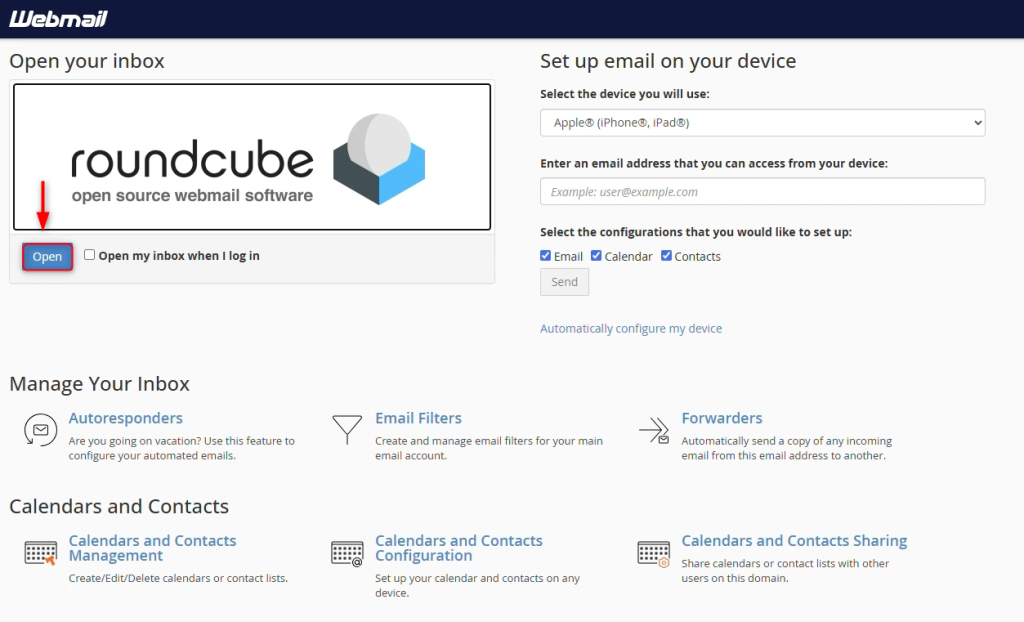
It navigates to the Webmail. If you rely on email for your business, having enough storage is a major priority.
You can access your email from the web (using any browser) with our email client. Webmail comes with nearly every hosting plan that offers email.
Look for webmail applications in your control panel. Accessing webmail indicates that your hosting is set up to allow email.
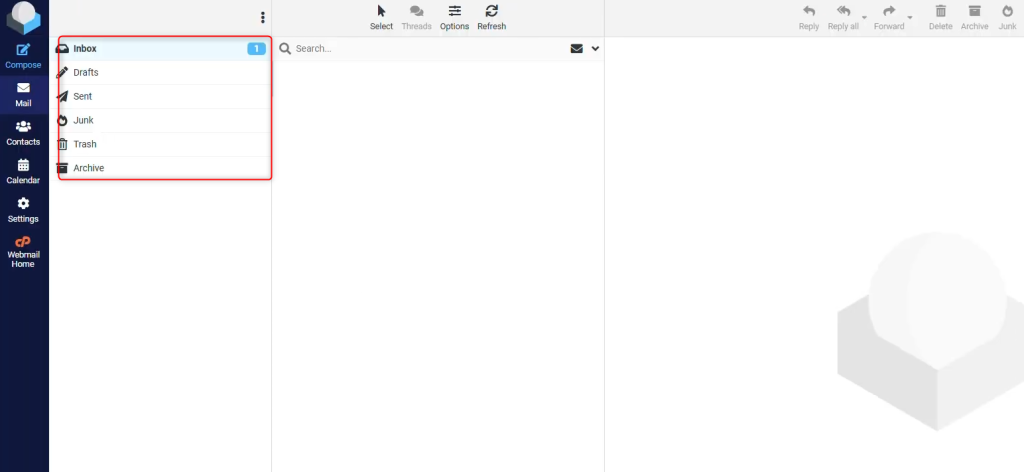
For this reason, webmail is particularly beneficial to users who require a convenient method of access without needing to set up external clients. By validating it is available, one may be able to manage communications in a more flexible way.
You need to configure professional email services correctly using protocols like IMAP, POP3, and SMTP. If email is part of your hosting plan, you should be able to use these protocols. IMAP synchronizes emails across multiple devices, keeping them updated on all of them. POP3 downloads emails to a single device, and SMTP sends outgoing messages.
Email Accounts displays all email accounts for the domain. Navigate to the account for which you wish to view settings. It will redirect you to a page with SSL/TLS or Non-SSL configurations. You can configure your email client by viewing all the information on this page. This includes username, password, and incoming and outgoing server details.
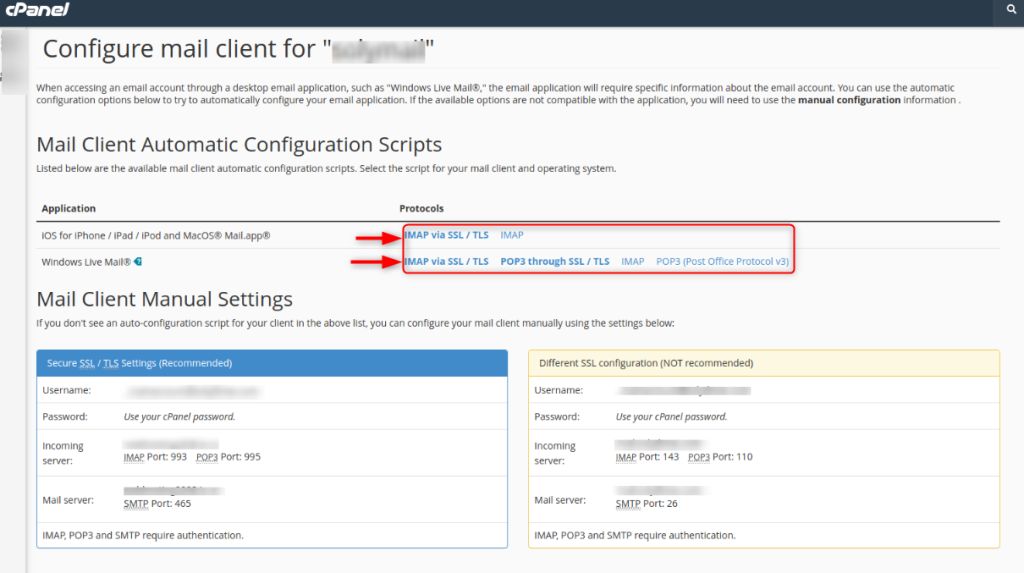
It is important to verify the protocol support if you use email clients like Apple Mail or Outlook. If the hosting documentation or control panels don’t list these protocols, you will need additional services. Verification is a way to ensure that your email is compatible with all platforms.
Compare the email services offered by Ultahost with your current service. Dedicated email hosting provides enhanced features such as higher storage limits, more advanced spam filters, increased security, deliverability, and scalability.
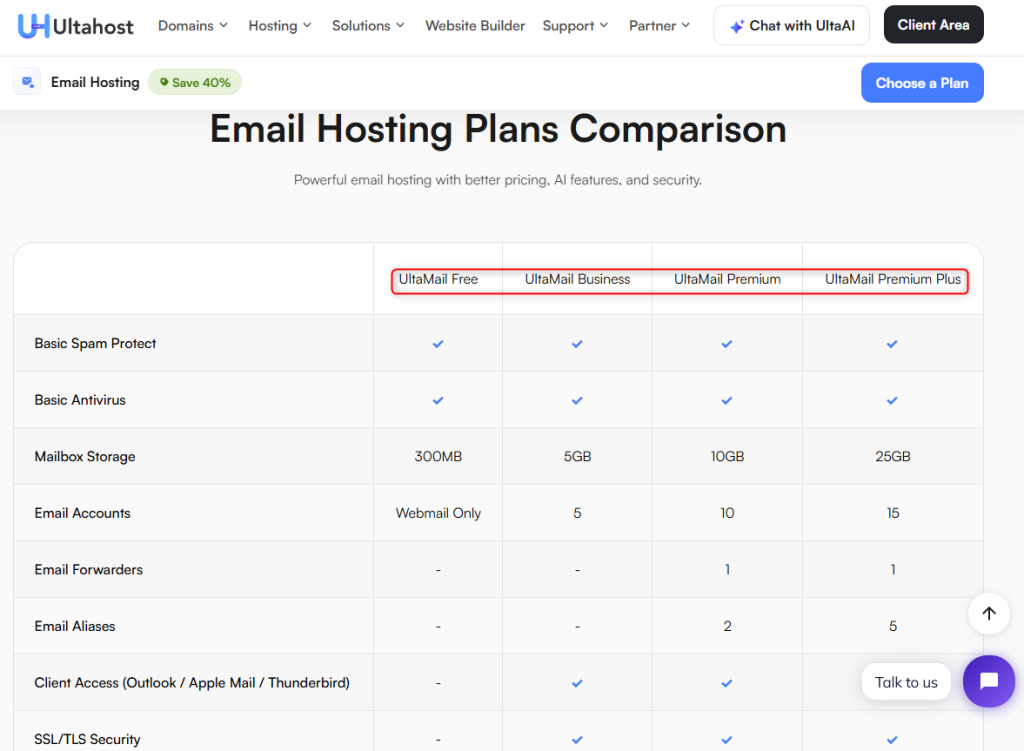
Upgrade to a dedicated solution if you only have basic email functionality in your hosting plan. Large businesses that send many emails will benefit from improved performance and reliability.
Compare your existing plan with your needs to decide whether you require an expansion or a new plan. If you are unable to find the information that you require, please check the Ultahost description or contact our support team.
When reviewing your Ultahost hosting package, focus on features that offer reliability, security, and scalability. Check how many email accounts you can create and the storage space for each one to ensure it meets your business or personal needs.
It is essential to have support for IMAP/POP3/SMTP protocols in order to be able access your email from multiple devices. Webmail is also a good option, as it allows you to manage messages directly from the browser.
Additionally, prioritize features such as spam filtering, virus protection, email forwarding, autoresponders, and the ability to create custom domain-based email addresses (e.g., [email protected]). Verify that your chosen plan allows you to easily upgrade it in order to add additional storage or accounts.
You should upgrade if emails bounce or your mailbox becomes overcrowded. Dedicated hosting is often beneficial for businesses that heavily depend on email marketing, communication within the team, customer service, or support. Improvements in security, uptime, and spam filtering are all important.
Your current hosting plan may be enough if your email needs are minimal and you have sufficient accounts and storage.
It is a common misconception that all hosting plans include unlimited email accounts. Another mistake is to ignore the mailbox storage limit until email delivery fails. Users often forget to configure MX Records and other DNS records that are necessary for email functionality. Check your hosting dashboard and control panel to ensure that you are not experiencing any of these issues.
Check which email services your hosting plan includes by reviewing your control panel or client dashboard. If your current hosting meets your email needs, you can continue using it. Ultahost may be able to provide the reliability and scalability that your business requires. Understanding your options can help you maximize performance, avoid unexpected issues, and maintain professional communication with confidence.
Not all hosting plans include the same email features. Shared hosting plans usually include email functionality. VPS and dedicated plans, however, may require manual configuration. Review your plan details in your client area.
You can find this information in your client dashboard or control panel. Hosting specifications usually list the number of email accounts included.
Upgrade your hosting plan when you reach the mailbox storage limit. Monitoring regularly helps to prevent service interruptions.
If your web host supports IMAP3, POP3, and SMTP protocols, you can configure a third-party client. These settings are usually available in your control panels.
You can access your webmail through your hosting control panel if your plan includes email. Look for the webmail or email section after logging into your dashboard.
Try Ultahost’s WordPress Hosting with AI Site Builder!
Upgrade your website with our LiteSpeed WordPress Hosting and enjoy 5× faster speed than other providers. Our WordPress hosting is designed to deliver top performance and speed.